
Introduction
Thank you for choosing the SoundPEATS Q8 Wireless Bluetooth In-Ear Headphones. These headphones are designed to provide a high-quality audio experience with the convenience of wireless connectivity. Featuring Bluetooth 4.0 and AptX audio coding technology, they offer clear stereo sound and a stable connection. The inline remote control and microphone allow for easy management of music playback and calls.

Image: SoundPEATS Q8 Wireless Bluetooth In-Ear Headphones.
Package Contents
Please ensure all items are present in your package:
- SoundPEATS Q8 Wireless Bluetooth In-Ear Headphones
- USB Charging Cable
- Ear Gels (Small, Medium, Large)
- Ear Stabilizers (Small, Medium, Large)
- Carrying Case
- User Manual

Image: Diagram illustrating the SoundPEATS Q8 headphones, various sizes of ear hooks and ear cushions, and the USB charging cable included in the package.
Product Overview
The SoundPEATS Q8 headphones feature an ergonomic design for a secure and comfortable fit. The inline remote control allows for easy access to various functions without needing to interact directly with your connected device.
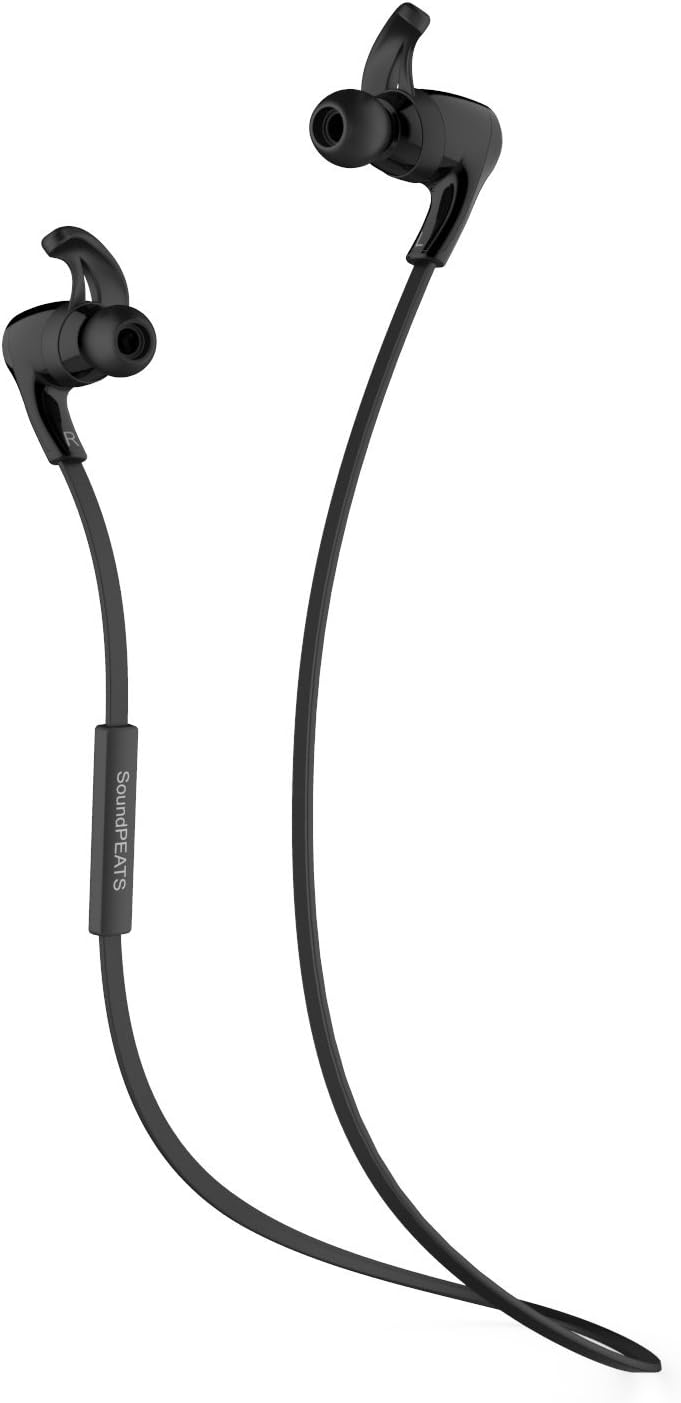
Image: A detailed view of the SoundPEATS Q8 headphones, showcasing the earbud design, ear hooks, and the inline control module with buttons.
Setup
1. Charging the Headphones
- Connect the micro-USB end of the charging cable to the charging port on the headphone's inline remote.
- Connect the USB-A end of the charging cable to a USB power adapter or a computer's USB port.
- The LED indicator light will turn red during charging and turn blue when fully charged.
- A full charge typically takes approximately 1-2 hours. The headphones offer up to 6 hours of listening/talk time and up to 200 hours of standby time.
2. Bluetooth Pairing
- Ensure the headphones are turned off.
- Press and hold the multi-function button (usually the center button on the inline remote) for approximately 5-7 seconds until the LED indicator light flashes red and blue alternately. This indicates the headphones are in pairing mode.
- On your Bluetooth-enabled device (smartphone, tablet, computer), go to the Bluetooth settings and enable Bluetooth.
- Search for available devices. Select "SoundPEATS Q8" from the list.
- Once successfully paired, the LED indicator light will flash blue slowly, and you may hear an audible confirmation.
- If prompted for a password, enter "0000".
3. Wearing the Headphones
For optimal sound quality and comfort, select the appropriate size of ear gels and ear stabilizers. The headphones come with an assortment of three different sized ear gels and three different sized ergonomic ear stabilizers to ensure an excellent fit.
- Choose ear gels that create a good seal in your ear canal.
- Select ear stabilizers that fit snugly into the concha of your ear to keep the headphones secure during activity.
- Place the headphones in your ears, ensuring the ear hooks are positioned over the top of your ears.

Image: A person wearing the SoundPEATS Q8 headphones, viewed from behind, illustrating the secure placement of the earbuds and the cable resting around the neck.

Image: A person wearing the SoundPEATS Q8 headphones, viewed from the side, demonstrating the in-ear fit and the ear hook design.
Operating Instructions
Power On/Off
- Power On: Press and hold the multi-function button for approximately 3 seconds until the blue LED indicator flashes.
- Power Off: Press and hold the multi-function button for approximately 3 seconds until the red LED indicator flashes briefly, then turns off.
Music Playback
- Play/Pause: Press the multi-function button once.
- Volume Up: Press the "+" button.
- Volume Down: Press the "-" button.
- Next Track: Long press the "+" button.
- Previous Track: Long press the "-" button.
Call Management
- Answer/End Call: Press the multi-function button once.
- Reject Call: Long press the multi-function button for approximately 2 seconds.
- Redial Last Number: Double press the multi-function button.
Maintenance
- Clean the headphones regularly with a soft, dry cloth.
- Avoid exposing the headphones to extreme temperatures, humidity, or corrosive substances.
- Store the headphones in the provided carrying case when not in use to protect them from damage.
- Keep the charging port free of dust and debris.
Troubleshooting
- Headphones not turning on: Ensure the headphones are fully charged.
- Cannot pair with device:
- Ensure the headphones are in pairing mode (red and blue LED flashing alternately).
- Make sure Bluetooth is enabled on your device.
- Move the headphones closer to your device and away from potential interference sources.
- Try restarting both the headphones and your device.
- No sound or low volume:
- Check the volume levels on both the headphones and your connected device.
- Ensure the headphones are properly paired and connected.
- Verify that the ear gels provide a good seal in your ear canal.
- Poor sound quality:
- Ensure the headphones are within the effective Bluetooth range (up to 10 meters) of your device.
- Avoid physical obstructions between the headphones and your device.
- Check for interference from other wireless devices.
Specifications
| Model | Q8 |
| Connectivity Technology | Bluetooth |
| Bluetooth Version | 4.0 |
| Chipset | CSR 8645 |
| Audio Technology | AptX |
| Battery Life (Music/Talk) | Up to 6 hours |
| Standby Time | Up to 200 hours |
| Wireless Range | Up to 10 meters (33 feet) |
| Control Type | Volume Control, Remote |
| Microphone | Included |
| Noise Control | Sound Isolation |
| Item Weight | 4.8 ounces |
Warranty and Support
For warranty information or technical support, please refer to the warranty card included in your package or visit the official SoundPEATS website. You may also contact SoundPEATS customer service directly for assistance with product issues or inquiries.