Introduction
This manual provides detailed instructions for the installation, setup, operation, and maintenance of your Samsung Digital Door Lock SHS-P718LBK/EN. This advanced door lock features fingerprint recognition, a push-pull handle mechanism, and multiple security functions to enhance the safety and convenience of your home or office.

Image: Front and side view of the Samsung Digital Door Lock SHS-P718LBK/EN. The front panel features a keypad, fingerprint scanner, and a sleek push-pull handle. The side view shows the slim profile of the lock.
Product Components
Before installation, please ensure all components are present and undamaged. The package includes the following:
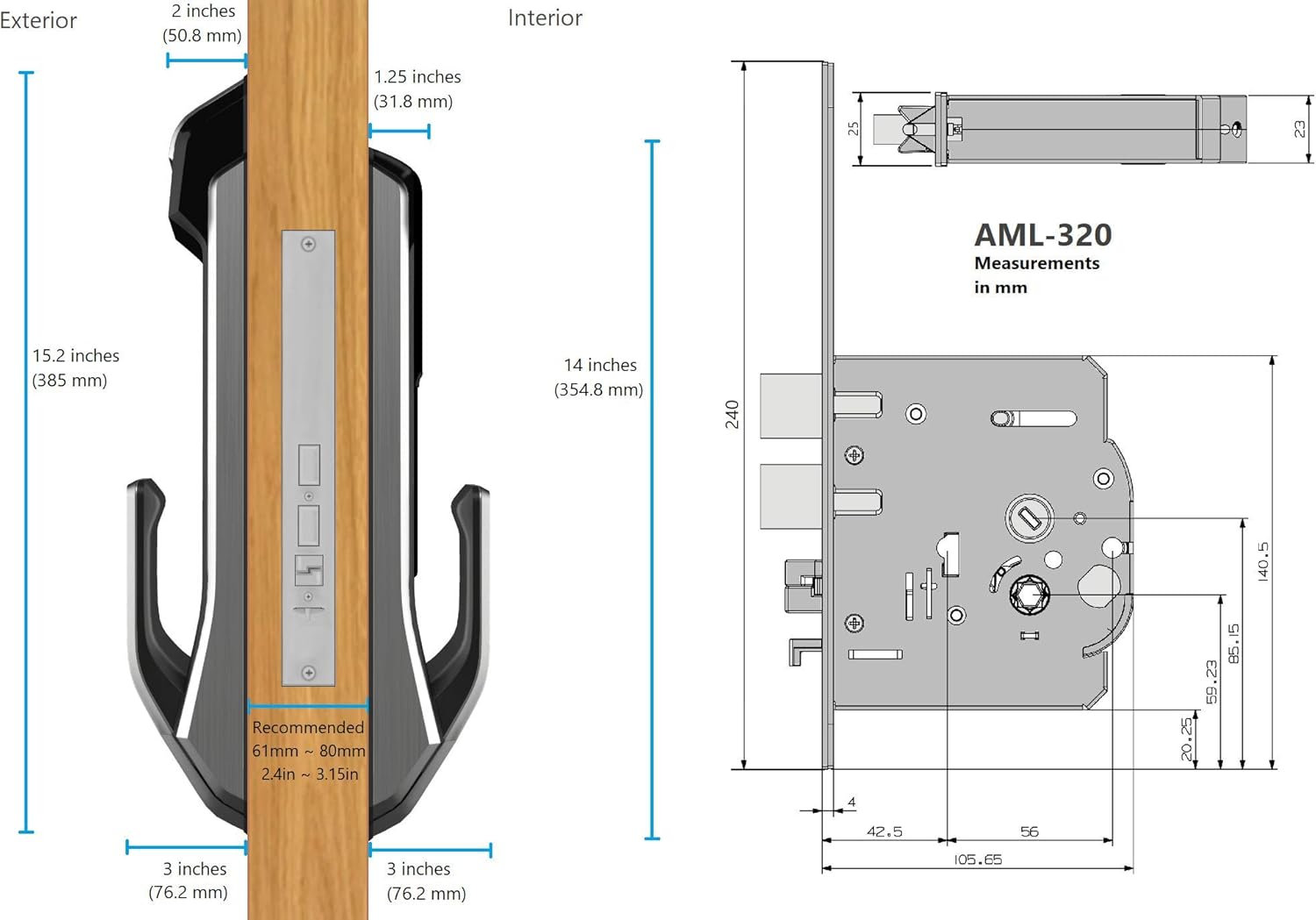
Image: An exploded diagram showing all components of the Samsung Digital Door Lock SHS-P718LBK/EN. This includes the outer body, inner body, mortise (SHS-AML320) and strike plate, user guide, key tags, emergency keys, AA batteries, handle shaft, handle shaft spring, and various fastening bolts for support panels and the inner/outer body.
- Outer Body
- Inner Body
- Mortise (SHS-AML320) and Strike Plate
- User Guide
- Key Tags (RF ID)
- Emergency Keys
- 'AA' Batteries (LR6) x 8
- Handle Shaft and Handle Shaft Spring
- Support Panel and various Fastening Bolts
Installation
The Samsung Digital Door Lock SHS-P718LBK/EN is designed for doors with a thickness between 38mm and 80mm. The mortise included is the AML320 model. Due to the precision required for mortise installation, professional installation is highly recommended.

Image: Two Samsung SHS-P718 digital door locks, one in a black finish and another in a gold finish, highlighting the premium design.
Door Preparation and Dimensions
Accurate measurements are crucial for proper installation. Refer to the diagram below for detailed dimensions of the lock and mortise.
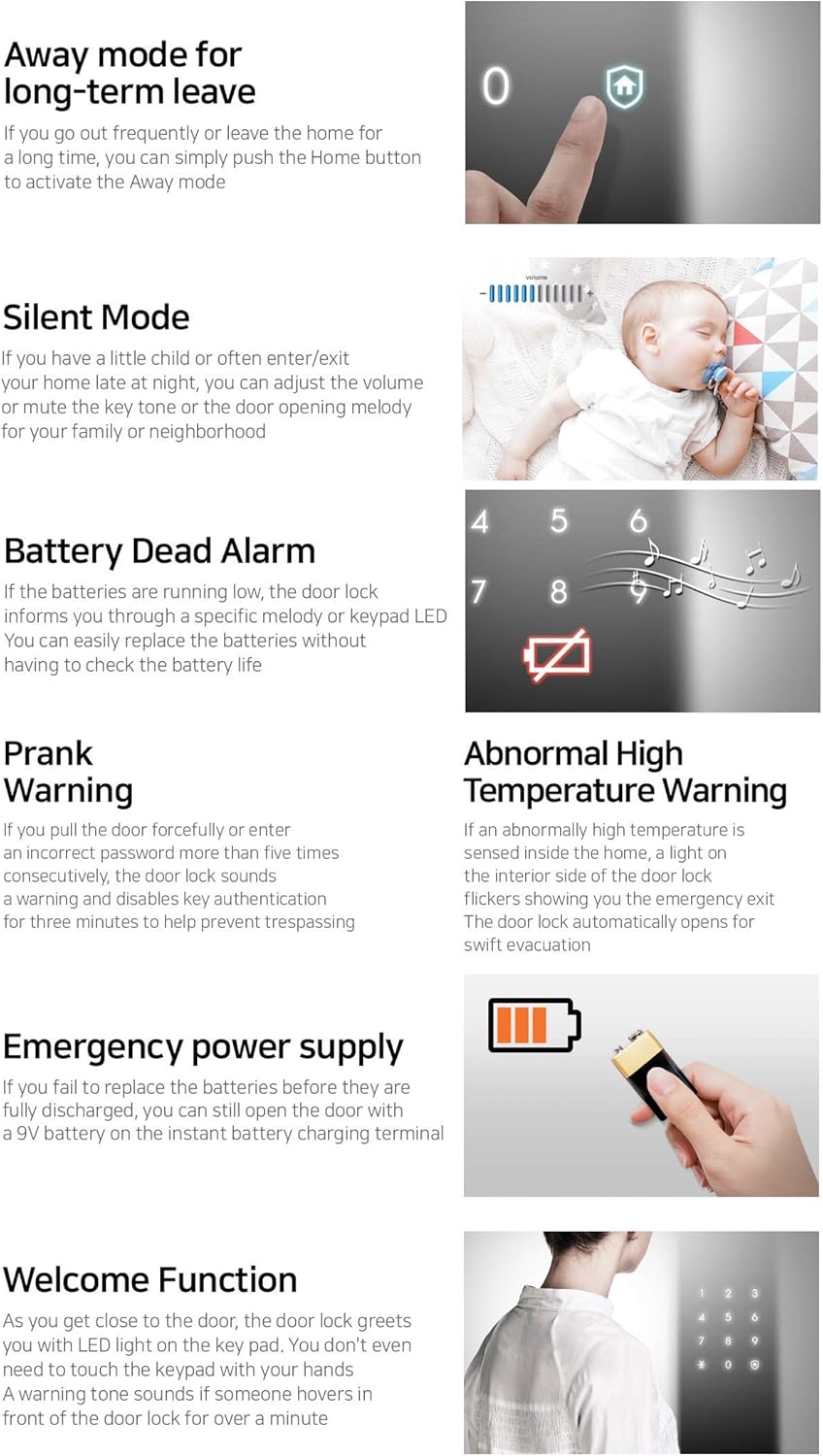
Image: A technical drawing illustrating the exterior and interior dimensions of the Samsung Digital Door Lock when installed on a door, along with detailed measurements of the AML-320 mortise in millimeters.
Setup and Programming
After installation, configure your lock with user access methods.
1. User Access Code Registration
The lock supports 4-12 digit number combinations, with a capacity for up to 10 unique user codes. Follow the instructions in the included User Guide to register your personal access codes.
2. RFID Key Tag/Card Registration
The lock is compatible with ISO 14443A type (13.56MHz) RFID key tags or cards, with a capacity for up to 20 entries. Refer to the User Guide for steps on how to register your RFID devices.
3. Fingerprint Registration
The lock can store up to 100 fingerprints. This state-of-the-art recognition system provides convenient and secure access. Detailed steps for fingerprint registration are in the User Guide.

Image: A hand placing a finger on the biometric scanner of the Samsung Digital Door Lock, illustrating the fingerprint access method. A text overlay states 'Finger Print: Your finger is the key!'
4. Double Authentication Mode
For enhanced security, activate the Double Authentication Mode. This requires both a password and a fingerprint scan for door access. Ensure you remember your password when this mode is active.
Operating Instructions
Push-Pull Handle Mechanism
The innovative push-pull handle allows for easy door operation. Push the handle from the outside to open, and pull from the inside. This design simplifies entry and exit, especially when your hands are full.

Image: The top portion shows the lock's user-friendly LED interface displaying 'UNLOCKED' and 'TRY AGAIN' messages. The bottom portion illustrates a hand operating the push-pull handle, demonstrating the ease of use for opening the door.
Keypad Operation
To unlock using an access code, touch the keypad to activate it, enter your code, and confirm. The keypad panel is automatically covered after pressing the door's center open lock button, enhancing security.
Welcome Feature
An integrated IR sensor detects motion within 70cm, automatically activating the keypad and greeting you with an LED light. If motion is detected for an extended period, a warning sound may activate.
Locking Notification Feature
The lock provides clear status updates on its touch panel, displaying messages such as 'Locked' and 'Unlocked' for immediate feedback.
Security and Convenience Functions
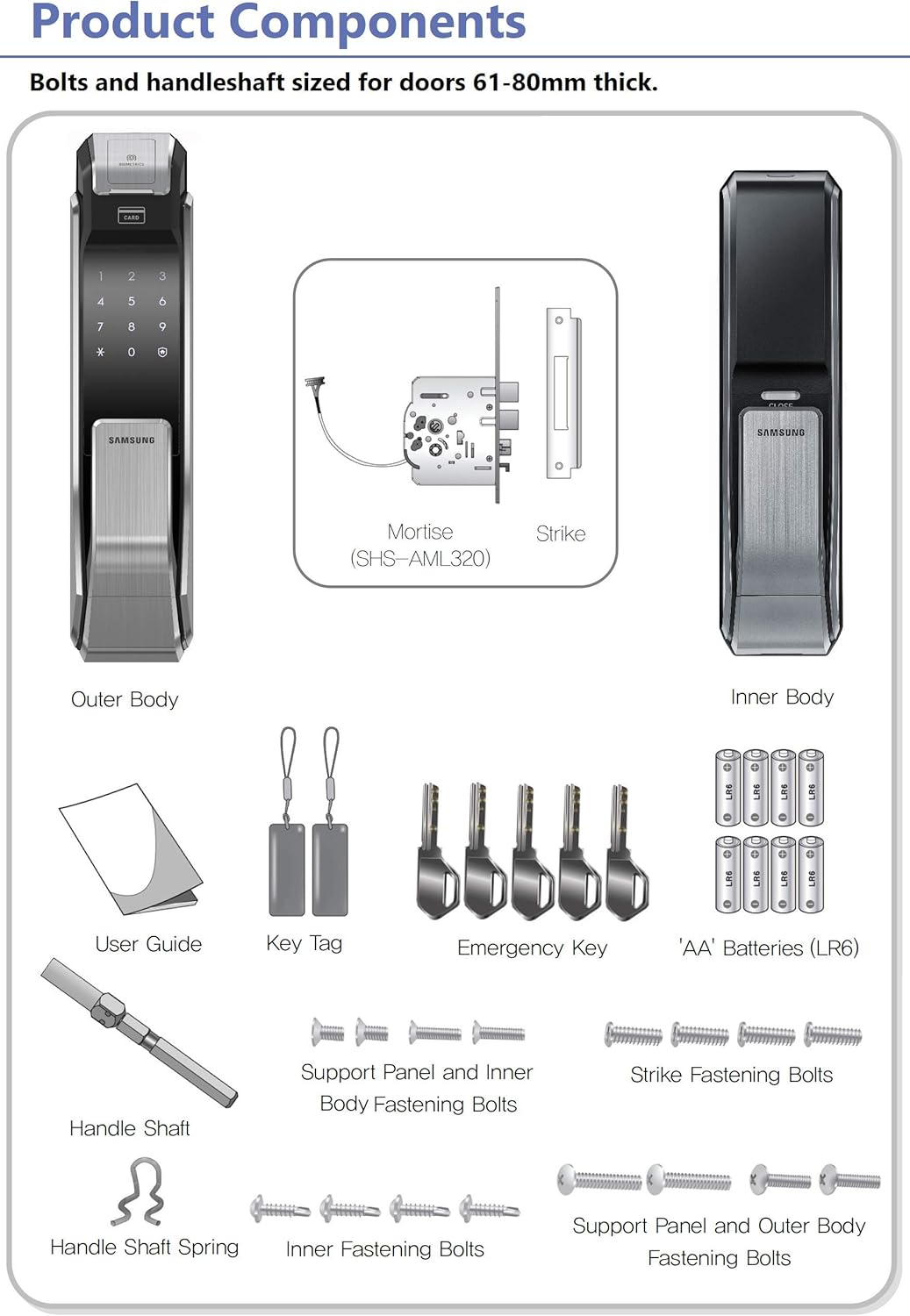
Image: A collage of illustrations depicting various features: 'Away mode' (finger pressing home button), 'Silent Mode' (baby sleeping, volume control), 'Battery Dead Alarm' (battery icon, musical notes), 'Prank Warning' (keypad with 'TRY AGAIN'), 'Abnormal High Temperature Warning' (flashing lock icon), 'Emergency power supply' (9V battery connection), and 'Welcome Function' (person approaching lock).
- Away Mode: Activate this mode by pressing the Home button when leaving for an extended period.
- Silent Mode: Adjust the volume or mute the key tone and door opening melody for quiet operation, useful for families with children or during late hours.
- Intruder Prevention: The lock features a robust dual structure and an intruder prevention function with a one-touch activation.
Safety Features and Warnings
- Battery Dead Alarm: The lock will notify you with a specific melody or keypad LED when batteries are running low, allowing for timely replacement.
- Prank Warning: If an incorrect password is entered five times consecutively, the lock sounds an alarm and disables key authentication for three minutes to deter unauthorized access.
- Abnormal High Temperature Warning: In case of abnormally high temperatures detected inside the home, an alarm sounds, and the lock automatically opens for swift evacuation.
- Emergency Power Supply: If batteries are completely discharged, you can still open the door by connecting a 9V battery to the emergency power terminal.
Maintenance
Battery Replacement
The lock requires 8 AA alkaline batteries (DC 6V). Replace all batteries when the low battery alarm sounds. Using non-alkaline batteries or mixing old and new batteries may affect performance and battery life.
Troubleshooting
If you encounter issues with your lock, refer to the following common solutions:
- Lock not responding: Check battery levels and replace if necessary. Ensure the emergency power supply terminal is clean.
- Fingerprint not recognized: Ensure your finger is clean and dry. Re-register your fingerprint if issues persist.
- Access code not working: Verify the code is entered correctly. Ensure Double Authentication Mode is not requiring a fingerprint as well.
- Short battery life: Ensure you are using high-quality AA alkaline batteries. Frequent use of certain features or extreme temperatures can affect battery life.
For more complex issues, consult the full User Guide or contact Samsung customer support.
Specifications
| Feature | Specification |
|---|---|
| Model Name | SHS-P718LBK/EN |
| User Access Code Capacity | 10 (4-12 digit combination) |
| RFID Capacity | 20 (ISO 14443A type, 13.56MHz) |
| Fingerprint Capacity | 100 |
| Door Thickness | 38-80mm |
| Mortise Type | AML320 |
| Power Source | DC 6V (8 x AA Alkaline Batteries) |
| Material | Metal |
| Dimensions (Product) | 27.56 x 3.15 x 0.01 inches (approximate) |
| Connectivity Protocol | Wi-Fi (for SmartThings integration, if applicable) |
| Control Method | Touch, Hand Control, SmartThings |
Warranty and Support
For warranty information, technical support, or service inquiries, please refer to the official Samsung website or contact your local Samsung customer service center. Keep your purchase receipt as proof of purchase.


