
1. Important Safety Instructions
When using your telephone equipment, basic safety precautions should always be followed to reduce the risk of fire, electric shock, and injury to persons, including the following:
- Read and understand all instructions.
- Follow all warnings and instructions marked on the product.
- Unplug this product from the wall outlet before cleaning. Do not use liquid or aerosol cleaners. Use a damp cloth for cleaning.
- Do not use this product near water, such as a bathtub, wash bowl, kitchen sink, laundry tub, swimming pool, or in a wet basement.
- Do not place this product on an unstable cart, stand, or table.
- This product should be operated only from the type of power source indicated on the marking label. If you are not sure of the type of power supply in your home, consult your dealer or local power company.
- Do not allow anything to rest on the power cord. Do not locate this product where the cord will be walked on.
- Never push objects of any kind into this product through the slots in the base or handset as they may touch dangerous voltage points or create a short circuit. Never spill liquid of any kind on the product.
- To reduce the risk of electric shock, do not disassemble this product. Take it to an authorized service facility when service or repair work is required. Opening or removing covers may expose you to dangerous voltages or other risks. Incorrect reassembly can cause electric shock when the product is subsequently used.
- Do not overload wall outlets and extension cords as this can result in a risk of fire or electric shock.
- Unplug this product from the wall outlet and refer servicing to an authorized service facility under the following conditions:
- When the power supply cord or plug is damaged or frayed.
- If liquid has been spilled onto the product.
- If the product has been exposed to rain or water.
- If the product does not operate normally by following the operating instructions.
- If the product has been dropped or the casing has been damaged.
- If the product exhibits a distinct change in performance.
- Avoid using a telephone (other than cordless type) during an electrical storm. There may be a remote risk of electric shock from lightning.
- Do not use the telephone to report a gas leak in the vicinity of the leak.
2. What's in the Box
Ensure all items are present in your package. If any items are missing or damaged, contact customer support.
- One (1) CS6629-3 Base Unit with Digital Answering System
- Three (3) Cordless Handsets (one for the base, two additional)
- Three (3) Handset Battery Compartment Covers
- Three (3) Rechargeable Ni-MH Battery Packs
- One (1) Telephone Line Cord
- One (1) Telephone Base Power Adapter
- Two (2) Charger Units for additional handsets
- Two (2) Charger Power Adapters for additional handsets
- One (1) Wall Mount Bracket
- This User Manual
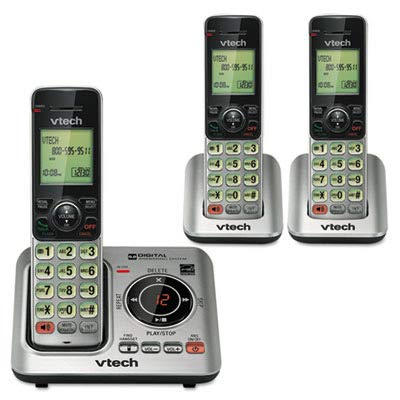
Image: Contents of the VTech CS6629-3 package, showing the base unit, three handsets, and various cords and adapters.
3. Setup
3.1 Base Unit Installation
- Connect the Telephone Line Cord: Plug one end of the telephone line cord into the TEL LINE jack on the back of the telephone base. Plug the other end into a telephone wall jack.
- Connect the Power Adapter: Plug the large end of the telephone base power adapter into a power outlet not controlled by a wall switch. Plug the small end into the POWER jack on the back of the telephone base.
- Position the Base: Place the telephone base on a flat surface, away from other electronic devices that may cause interference.

Image: Rear view of the VTech CS6629-3 base unit, illustrating the connection points for the telephone line cord and power adapter.
3.2 Handset Battery Installation and Charging
- Install Battery: Open the battery compartment cover on the back of each handset. Connect the battery pack plug into the jack inside the compartment, ensuring correct polarity. Place the battery pack inside the compartment.
- Close Cover: Slide the battery compartment cover back into place until it clicks.
- Charge Handsets: Place each handset face up in its respective charger (base unit or auxiliary charger). The CHARGE light on the handset will illuminate, indicating proper charging.
- Initial Charge: Allow the handsets to charge for at least 10 hours before first use. For optimal battery performance, keep the handset in the charger when not in use.

Image: A VTech CS6629-3 handset with its back cover removed, showing the battery compartment and how to connect the battery pack.

Image: A VTech CS6629-3 handset resting in its charging cradle, with the charge indicator light visible.
3.3 Wall Mounting (Optional)
The telephone base can be mounted on a wall using the included wall mount bracket.
- Attach Bracket: Align the wall mount bracket with the mounting holes on the back of the telephone base and slide it into place until it locks.
- Mount to Wall: Plug the telephone line cord and power adapter into the base. Route the cords through the bracket's channels. Mount the bracket to a standard wall plate or directly to the wall using two screws (not included) spaced 3-1/4 inches apart.
4. Operating Your Phone
4.1 Basic Call Functions
- Making a Call: Press TALK/FLASH or SPEAKER, then dial the number. Alternatively, dial the number first and then press TALK/FLASH or SPEAKER.
- Answering a Call: When the phone rings, press TALK/FLASH or SPEAKER.
- Ending a Call: Press OFF/CANCEL or place the handset back in the charger.
- Volume Control: During a call, press VOL▲ or VOL▼ to adjust the listening volume.
- Mute: During a call, press MUTE to temporarily silence the microphone. Press MUTE again to unmute.
4.2 Digital Answering System
The base unit includes a digital answering system to record incoming messages when you are away or unable to answer the phone.
- Turning On/Off: Press ANS ON/OFF on the telephone base to activate or deactivate the answering system.
- Playing Messages: Press PLAY/STOP on the telephone base to listen to messages. Use SKIP▲ to skip to the next message and REPEAT▼ to repeat the current message or go back to the previous one.
- Deleting Messages: During message playback, press DELETE on the telephone base to delete the current message.
- Recording an Announcement: Refer to the full manual for detailed instructions on recording a personalized outgoing announcement.
4.3 Intercom
You can use the handsets to communicate with each other via intercom.
- Initiate Intercom: With a handset, press INT.
- Select Handset: If you have multiple handsets, dial the number of the handset you wish to call (e.g., 2 for handset 2).
- Answer Intercom: The receiving handset will ring. Press TALK/FLASH or SPEAKER to answer.
- End Intercom: Press OFF/CANCEL or place the handset in the charger.
4.4 Phonebook
Store frequently called numbers in the phonebook for quick dialing.
- Adding an Entry:
- Press MENU/SELECT.
- Scroll to PHONEBOOK and press MENU/SELECT.
- Scroll to ADD NEW ENTRY and press MENU/SELECT.
- Enter the name using the keypad. Press # to cycle through capitalization.
- Press MENU/SELECT.
- Enter the phone number.
- Press MENU/SELECT to save.
- Dialing from Phonebook:
- Press DIR.
- Scroll to the desired entry.
- Press TALK/FLASH or SPEAKER to dial.
5. Maintenance
5.1 Cleaning Your Phone
Clean the telephone base and handset with a soft, damp cloth. Do not use cleaning sprays or liquid cleaners. Ensure the phone is unplugged from the wall outlet before cleaning.
5.2 Battery Care
- Use only the supplied rechargeable Ni-MH battery pack.
- Do not dispose of batteries in a fire. They may explode. Check with local codes for special disposal instructions.
- Do not open or mutilate the battery. Released electrolyte is corrosive and may cause burns or injury to the eyes or skin. It may be toxic if swallowed.
- Exercise care in handling batteries to not create a short circuit with conductive materials such as rings, bracelets, and keys. The battery or conductor may overheat and cause burns.
- Charge the battery provided with this product only in accordance with the instructions and limitations specified in this manual.
6. Troubleshooting
If you experience difficulty with your telephone, please try the suggestions below. For customer service, visit vtechphones.com or call 1 (800) 595-9511.
| Problem | Solution |
|---|---|
| No dial tone. |
|
| Handset does not charge. |
|
| Poor sound quality or static. |
|
| Answering system not recording messages. |
|
7. Specifications
| Feature | Detail |
|---|---|
| Model | CS6629-3 |
| Frequency Control | DECT 6.0 Digital technology |
| Transmit Frequency | 1921.536-1928.448 MHz |
| Channels | 5 |
| Nominal Effective Range | Maximum power allowed by FCC and IC. Actual operating range may vary depending on environmental conditions at the time of use. |
| Power Requirements |
|
| Battery | Ni-MH battery, 2.4V, 300mAh |
| Memory |
|
8. Warranty and Support
8.1 Limited Warranty
VTech Communications, Inc. warrants to the holder of a valid proof of purchase ("Consumer" or "you") that the product and all accessories provided in the sales package ("Product") are free from defects in material and workmanship, pursuant to the following terms and conditions, when installed and used normally and in accordance with the Product operating instructions.
This limited warranty extends only to the Consumer for Products purchased and used in the United States of America and Canada. The warranty period for the VTech CS6629-3 is typically one (1) year from the date of purchase. For full details on warranty coverage, exclusions, and how to obtain service, please refer to the official VTech website or the warranty card included with your product.
8.2 Customer Support
For technical support, product registration, or to download the full user manual, please visit:
Website: www.vtechphones.com
Telephone Support: 1 (800) 595-9511 (U.S. and Canada)
Hours of Operation: Refer to the VTech website for current support hours.


