
HACH DR1900-01H
Hach DR1900 Portable Spectrophotometer User Manual
Model: DR1900-01H
1. Product Overview
The Hach DR1900 Portable Spectrophotometer is a compact, lightweight, and rugged instrument designed for accurate water quality analysis in various field conditions. It features over 220 preprogrammed methods and a wide wavelength range of 340-800 nm, offering laboratory-grade results in a portable format.
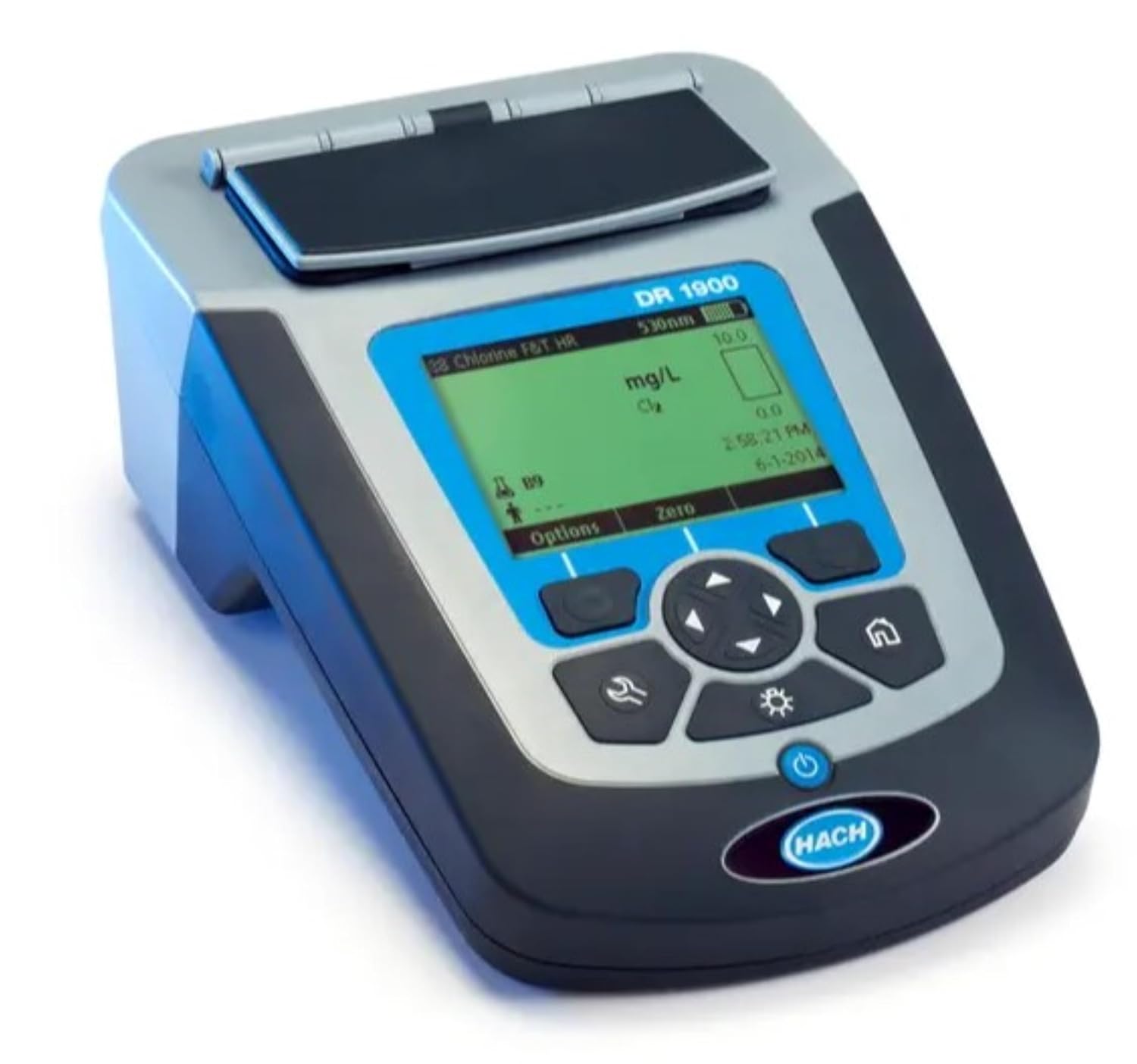
Figure 1: Front view of the Hach DR1900 Portable Spectrophotometer, showing its display and control buttons.
Key Features:
- Portability: Easy to hold and operate, making it an ideal tool for field technicians. It is designed to be one of the lightest and smallest spectrophotometers available.
- Accuracy: Performs tests with a wavelength range of 340 to 800 nm, providing results typically associated with laboratory instruments.
- Ruggedness: Built to withstand demanding field conditions, featuring a large, clear screen and a simple user interface for ease of use.
- Versatile Applications: Suitable for analysis of groundwater, influent for wastewater, municipal water, nutrient monitoring, primary treatment, QA/QC lab, secondary treatment, and surface water.
- Included Components: The package includes the portable spectrophotometer, a printed basic instrument manual, a dust cover, 1-inch square matched glass sample cells, 4 AA alkaline batteries, and a four-type adapter set.
2. Setup and Initial Operation
2.1 Unpacking and Inspection
Carefully unpack all components from the packaging. Verify that all items listed in the "Included Components" section are present and undamaged. If any items are missing or damaged, contact Hach customer support immediately.

Figure 2: The Hach DR1900 Spectrophotometer with its included accessories, such as sample cells and manual.
2.2 Battery Installation
- Locate the battery compartment on the back of the instrument.
- Open the battery compartment cover.
- Insert the four AA alkaline batteries, ensuring correct polarity as indicated inside the compartment.
- Close the battery compartment cover securely.
2.3 Powering On/Off
To power on the DR1900, press and hold the power button (usually marked with a circle and vertical line) until the display illuminates. To power off, press and hold the power button again until the display turns off.
3. Operating Instructions
3.1 Navigating the Interface
The DR1900 features a user-friendly interface with a clear screen and intuitive navigation buttons. Use the arrow keys to scroll through menus and options, and the 'OK' or 'Enter' button to select. The 'Back' or 'Escape' button allows you to return to the previous screen.
3.2 Performing a Measurement
- Select Method: From the main menu, navigate to "Preprogrammed Methods" and select the desired water quality parameter (e.g., Chlorine, Ammonia).
- Prepare Sample: Follow the specific instructions for the selected method to prepare your water sample and reagent. Ensure the sample cell is clean and free of fingerprints.
- Insert Blank: Insert a blank sample (distilled water or specified reagent) into the sample compartment. Close the lid.
- Zero Instrument: Press the 'Zero' button on the instrument. The display will show "0.00" or similar, indicating the instrument has been zeroed.
- Insert Prepared Sample: Remove the blank and insert your prepared sample into the sample compartment. Close the lid.
- Read Measurement: Press the 'Read' button. The instrument will perform the measurement and display the result.

Figure 3: A user holding the Hach DR1900 Spectrophotometer, demonstrating its portability for field use.

Figure 4: A user performing a water quality test with the Hach DR1900 Spectrophotometer in an outdoor environment, highlighting its rugged design.

Figure 5: A user utilizing the Hach DR1900 Spectrophotometer for water quality analysis in an industrial or laboratory setting.
4. Maintenance
4.1 Cleaning the Instrument
Regularly clean the exterior of the DR1900 with a soft, damp cloth. Do not use abrasive cleaners or solvents. For the sample compartment, use a lint-free cloth to gently wipe away any spills or dust. Ensure the sample cells are always clean and free of scratches or fingerprints for accurate readings.
4.2 Storage
When not in use, store the DR1900 in a cool, dry place, away from direct sunlight and extreme temperatures. Use the provided dust cover to protect the instrument from dust and debris.
4.3 Battery Replacement
Replace batteries when the low battery indicator appears on the display. Always replace all four AA batteries simultaneously with new, high-quality alkaline batteries.
5. Troubleshooting
| Problem | Possible Cause | Solution |
|---|---|---|
| Instrument does not power on. | Dead or incorrectly installed batteries. | Check battery polarity; replace with new AA alkaline batteries. |
| Inaccurate or inconsistent readings. | Dirty sample cells, incorrect sample preparation, instrument not zeroed correctly. | Clean sample cells thoroughly; re-read method instructions for sample preparation; re-zero the instrument. |
| Display shows an error message. | Specific error condition (e.g., light path blocked, out of range). | Refer to the detailed instrument manual for specific error code explanations and remedies. Ensure sample compartment lid is closed. |
For issues not covered here, please consult the comprehensive user manual provided with the instrument or contact Hach technical support.
6. Technical Specifications
| Feature | Detail |
|---|---|
| Model Number | DR1900-01H |
| Wavelength Range | 340-800 nm |
| Preprogrammed Methods | Over 220 |
| Power Source | 4 AA Alkaline Batteries |
| Dimensions (Package) | 16.3 x 15 x 14.02 inches |
| Weight (Item) | 3.31 Pounds |
| Manufacturer | HACH |
7. Warranty and Support
For detailed warranty information, please refer to the warranty card included with your Hach DR1900 Portable Spectrophotometer or visit the official Hach website. Warranty terms typically cover manufacturing defects for a specified period from the date of purchase.
For technical support, service, or to order replacement parts, please contact Hach customer service. Contact information can usually be found in the full user manual or on the Hach website. When contacting support, please have your instrument's model number (DR1900-01H) and serial number ready.
You can visit the official HACH Store for more information: HACH Store on Amazon.
Related documentsDR1900-01H


Ask a question about this manual
Ask about setup, troubleshooting, compatibility, parts, safety, or missing instructions. Manuals+ will review the question and use this page’s manual context to help answer it.