
Makita 4329K
Contents
Makita 4329K 3.9 Amp Variable-Speed Top-Handle Jig Saw Instruction Manual
Model: 4329K | Brand: Makita
Introduction
This manual provides essential information for the safe and effective operation, maintenance, and troubleshooting of your Makita 4329K 3.9 Amp Variable-Speed Top-Handle Jig Saw. Please read this manual thoroughly before using the tool to ensure proper handling and to maximize its performance and longevity.
Safety Information
Always wear appropriate personal protective equipment, including eye protection, hearing protection, and gloves, when operating the jig saw. Ensure your work area is clean, well-lit, and free of obstructions. Keep bystanders and children away from the operating area. Disconnect the tool from the power source before making any adjustments, changing blades, or performing maintenance. This product contains chemicals known to the State of California to cause cancer and birth defects or other reproductive harm.
- Always ensure the blade is securely fastened before operation.
- Do not force the tool; let the blade do the work.
- Keep hands and fingers away from the cutting path.
- Ensure proper ventilation when cutting materials that produce dust.
- Store the tool in a dry, secure location when not in use.
Product Overview and Features
The Makita 4329K Jig Saw is designed for precision cutting in various materials. Its robust construction and ergonomic design ensure comfort and control during use.

The Makita 4329K Jig Saw and its durable teal carrying case. The jig saw features a top-handle design for comfortable grip and control.

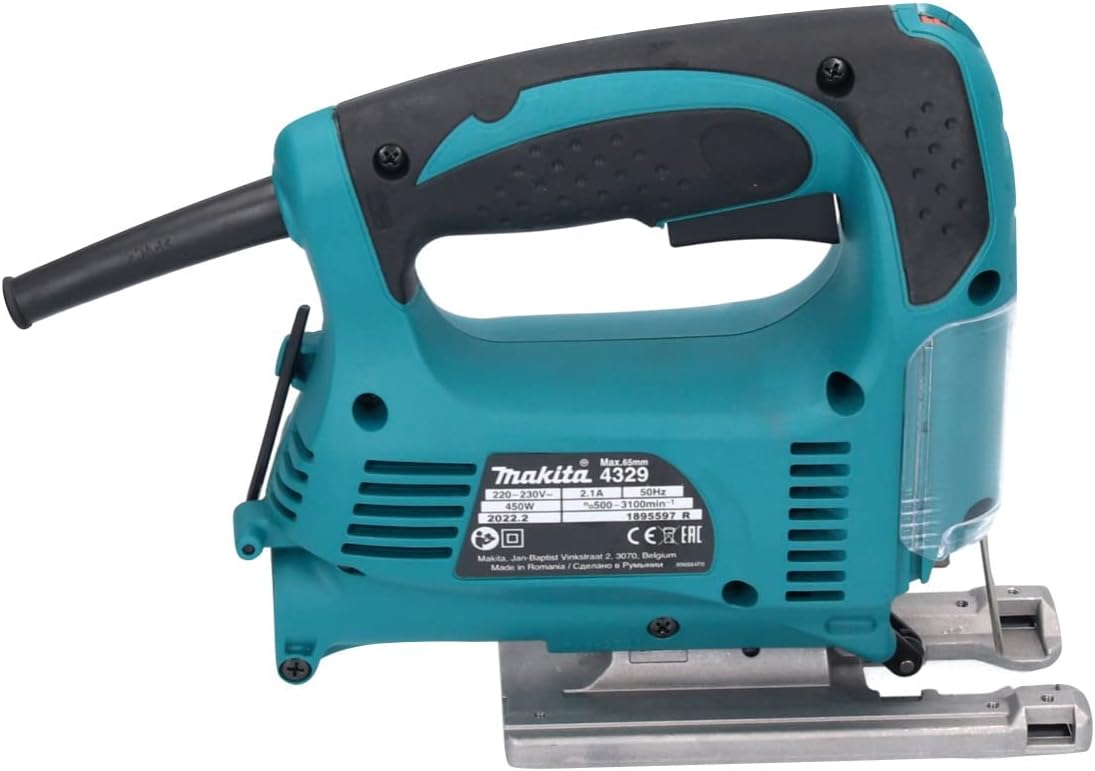
Side view of the jig saw, highlighting its ergonomic rubberized grip and clear blade guard.
Bottom view of the jig saw, showing the metal base plate and the blade mechanism. This view is crucial for adjusting the foot for angled cuts.
Key Features:
- 3 Orbital Settings plus Straight Cutting: Allows for versatile cutting in various materials, from wood to metal.
- Variable Speed Control Dial (500-3,100 SPM): Enables precise speed matching to the application for optimal cutting performance.
- 3.9 Amp Motor: Provides ample power for demanding tasks.
- Low Vibration, Low Noise Design: Enhances user comfort and reduces fatigue during extended use.
- Sliding Dust Cover: Keeps chips from flying and aids in dust collection when connected to a vacuum. The clear design allows visibility of the cutting line.
- Bevel Cuts: Capable of bevel cuts up to 45 degrees left or right, with positive stops at 90 degrees.
- Stroke Length: 11/16 inches.
- T-Shank Blade Acceptance: Designed to accept T-shank blades only for secure and quick changes.
- Ergonomic Rubberized Grip: Provides increased comfort and control.
Setup
- Unpacking: Carefully remove the jig saw and all accessories from the carrying case. Inspect for any damage that may have occurred during shipping.
- Blade Installation:
- Ensure the tool is unplugged from the power source.
- Locate the blade clamp mechanism.
- Insert the T-shank blade into the blade clamp until it clicks securely into place. Ensure the teeth are facing forward.
- Verify the blade is firmly seated by gently pulling on it.
- Power Connection: Connect the jig saw's power cord to a suitable 120-volt power outlet.
Operating Instructions
1. Powering On/Off and Lock-On Button
- To turn on the jig saw, press the trigger switch.
- To turn off, release the trigger switch.
- For continuous operation, press the trigger switch and then press the lock-on button. This will keep the tool running without holding the trigger.
- To release the lock-on, press the trigger switch again.
2. Adjusting Orbital Action
The jig saw features a lever to adjust the orbital action, which controls the blade's forward motion in addition to its up-and-down stroke. Different settings are suitable for different materials and desired cut quality.
| Position | Cutting Action | Applications |
|---|---|---|
| 0 | Straight line cutting action | For fine cuts in steel, stainless steel, and plastic. |
| I | Small orbit cutting action | For mild steel, aluminum, and for cutting wood and plywood. |
| II | Medium orbit cutting action | For fast cutting in wood and plywood. |
| III | Large orbit cutting action | For very fast cutting in wood and rough cuts. |
3. Variable Speed Control
The variable speed control dial is located on the top of the tool. Rotate the dial to select the desired speed (500-3,100 SPM) based on the material being cut. Lower speeds are suitable for metal and plastics, while higher speeds are ideal for wood.
4. Bevel Cutting
To make angled cuts (bevel cuts), the base plate of the jig saw can be tilted up to 45 degrees left or right.
- Unplug the tool.
- Using the included hex wrench, loosen the bolt located on the underside of the base plate.
- Tilt the base plate to the desired angle. Markings on the base plate indicate common angles (e.g., 0°, 15°, 30°, 45°).
- Tighten the bolt securely with the hex wrench to lock the base plate in position.
5. Dust Extraction
For cleaner operation, connect a vacuum cleaner to the dust extraction port located at the rear of the tool. This feature helps to keep the cutting line clear and reduces airborne dust.
Maintenance
- Cleaning: Regularly clean the tool, especially the blade area and dust port, to prevent buildup of sawdust and debris. Use a soft cloth, and avoid harsh chemicals.
- Blade Inspection: Inspect blades before each use for sharpness and damage. Replace dull or damaged blades immediately.
- Cord Inspection: Check the power cord for any cuts, fraying, or damage. Do not use the tool if the cord is damaged.
- Carbon Brushes: The carbon brushes may need periodic replacement. Refer to the detailed instructions in the full product manual for replacement procedures, or consult a qualified service technician.
- Storage: Store the jig saw in its original carrying case in a dry, secure place, away from direct sunlight and moisture.
Troubleshooting
| Problem | Possible Cause | Solution |
|---|---|---|
| Tool does not start | No power supply; Damaged cord/plug; Faulty switch. | Check power outlet and connections; Inspect cord/plug for damage; Contact service center. |
| Blade not cutting efficiently | Dull or wrong blade type; Incorrect orbital setting; Overheating. | Replace blade or use appropriate blade for material; Adjust orbital setting; Allow tool to cool down. |
| Excessive vibration/noise | Loose blade; Damaged blade; Worn internal components. | Securely fasten blade; Replace blade; Contact service center. |
Specifications
| Feature | Detail |
|---|---|
| Model Number | 4329K |
| Amperage | 3.9 Amps |
| Strokes Per Minute (SPM) | 500 - 3,100 |
| Stroke Length | 11/16" |
| Orbital Settings | 3 Orbital + Straight Cutting |
| Bevel Capacity | 0° - 45° Left or Right |
| Blade Type | T-Shank |
| Power Source | Corded Electric (120 Volts, 450 Watts) |
| Item Weight | 7.48 pounds |
| Product Dimensions | 3 x 8 x 7 inches |
Warranty and Support
Your Makita 4329K Jig Saw comes with a limited warranty. For specific details regarding warranty coverage, duration, and terms, please refer to the warranty card included with your product or visit the official Makita website. For technical support, service, or to purchase replacement parts, please contact Makita Customer Service through their official website or authorized service centers.
Makita Customer Service:
- Visit the Makita Store on Amazon for product information and support.
- Refer to the full product manual for detailed contact information.
Ask a question about this manual
Ask about setup, troubleshooting, compatibility, parts, safety, or missing instructions. Manuals+ will review the question and use this page’s manual context to help answer it.