
1. Introduction
This manual provides detailed instructions for the safe and proper installation and use of your Mounting Dream MD2163-K Fixed TV Wall Mount. Please read all instructions carefully before beginning installation. If you have any questions, contact customer service.
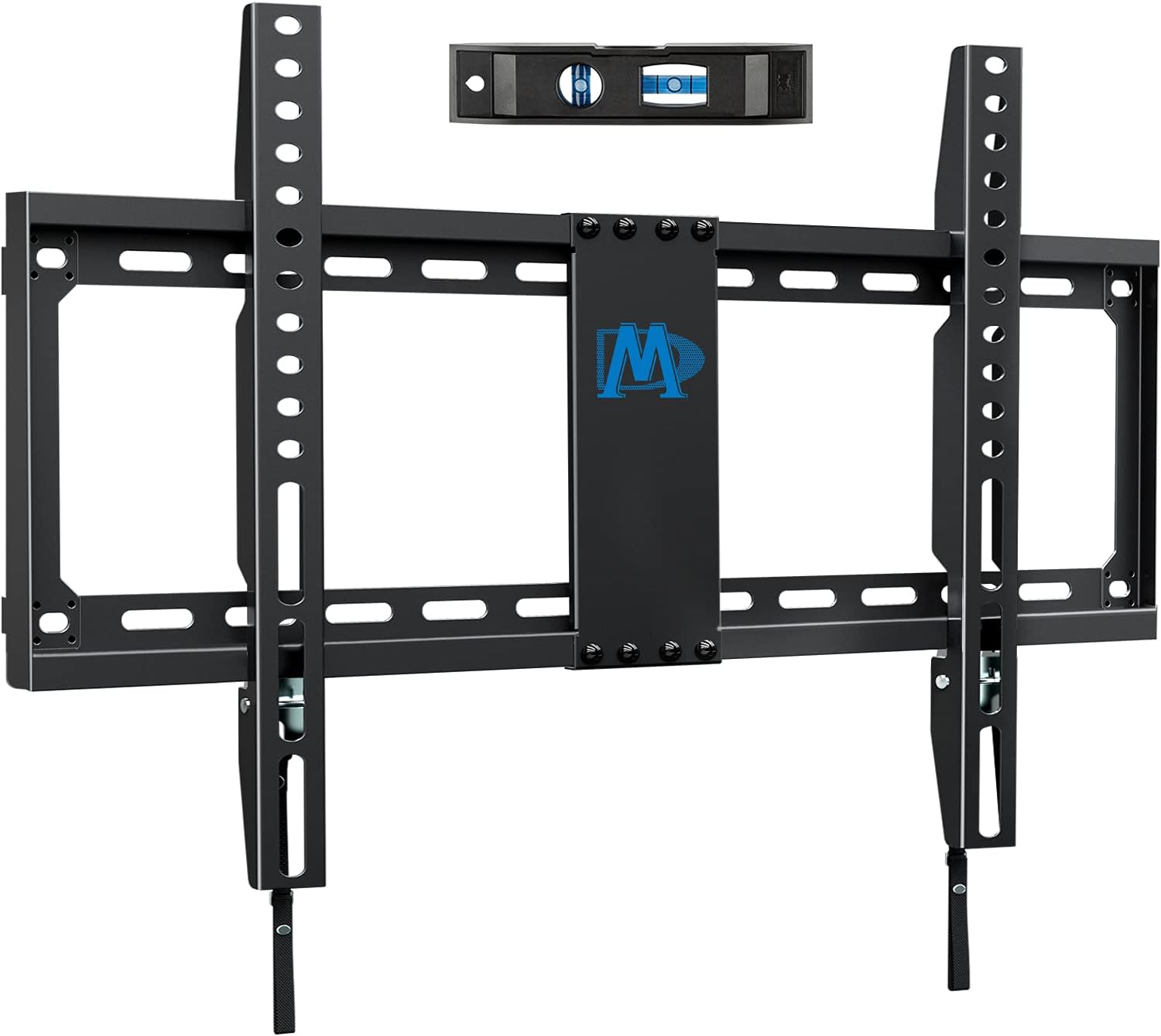
Figure 1: Mounting Dream MD2163-K Fixed TV Wall Mount components.
2. Safety Information
WARNING: Failure to read and follow all instructions can result in personal injury, property damage, or voiding of your warranty. Do not install on drywall alone. Always mount into wood studs, concrete, or brick walls.
- Ensure the mounting surface can safely support the combined weight of the mount and the TV.
- Do not exceed the maximum weight capacity of 132 lbs (60 kg).
- This mount is designed for TVs between 42-84 inches.
- Use a stud finder to locate wood studs accurately.
- Always drill pilot holes before inserting lag bolts.
- Two people are recommended for safe installation.
3. Package Contents
Verify all parts are present and undamaged before installation. If any parts are missing or defective, contact Mounting Dream customer service.
The package includes:
- Wall Plate Assembly
- TV Brackets (2x)
- Hardware Kit (various screws, washers, spacers, concrete anchors)
- Bubble Level
- Installation Template
A user-submitted video shows the unboxing and contents of the Mounting Dream MD2163-K mount:
Video: Unboxing and initial inspection of the MD2163-K mount components.
4. Compatibility Check
Before installation, ensure your TV and wall are compatible with the MD2163-K mount.
4.1 TV Size and Weight
This mount is suitable for most 42-84 inch flat screen TVs and supports a maximum weight of 132 lbs (60 kg).

Figure 2: The MD2163-K mount supports TVs up to 132 lbs.
4.2 VESA Pattern
Check the VESA (Video Electronics Standards Association) pattern on the back of your TV. The MD2163-K supports VESA patterns from 200x100mm up to 600x400mm.
4.3 Wall Type and Stud Spacing
This mount is designed for installation on 16", 18", or 24" wood studs, as well as concrete and brick walls. DO NOT install on drywall alone.

Figure 3: Wall type compatibility for the MD2163-K mount.

Figure 4: Comprehensive compatibility check for your TV and wall.
5. Setup and Installation
Follow these steps carefully for a secure installation.
5.1 Attach Brackets to TV
Align the TV brackets with the VESA holes on the back of your TV. Select the appropriate screws, washers, and spacers from the hardware kit. Secure the brackets to the TV using a screwdriver. Do not use electric tools for this step to avoid overtightening and damaging the TV.
An official video demonstrates attaching the brackets to the TV:
Video: Step-by-step guide on attaching the TV brackets to the television.
5.2 Assemble Wall Plate
The wall plate may come in two parts. Connect them using the provided screws and a screwdriver. Ensure the connection is secure.
5.3 Find Studs and Mark Mounting Holes
Use a stud finder to locate the center of your wood studs. Mark the desired height for your TV. Use the provided installation template to mark the pilot hole locations on the wall. Ensure the marks are level using the included bubble level.
5.4 Drill Pilot Holes
Drill pilot holes at the marked locations. For wood studs, use a 7/32" (5.5mm) drill bit. For concrete/brick walls, use a 3/8" (10mm) masonry drill bit and insert concrete anchors.
5.5 Attach Wall Plate to Wall
Align the wall plate with the drilled pilot holes. Insert the lag bolts and tighten them securely with a wrench. Ensure the wall plate is firmly attached and level.
5.6 Hang and Secure TV to Wall Plate
With assistance, carefully lift the TV and hook the TV brackets onto the top edge of the wall plate. Gently lower the TV until the brackets engage with the wall plate. Pull the quick-release straps downwards to lock the TV in place. Ensure the TV is securely fastened.

Figure 5: Two-person installation is recommended for hanging the TV.
An official video provides a visual guide for the entire installation process:
Video: Detailed installation steps for the MD2163-K fixed TV wall mount.
6. Operating
The MD2163-K is a fixed mount, providing a low-profile installation. It features a quick lock/release mechanism for easy TV removal when needed.
6.1 Low Profile Design
The mount positions your TV approximately 1.1 inches from the wall, offering a sleek, space-saving appearance.

Figure 6: The low-profile design of the MD2163-K mount.
6.2 Quick Lock and Release
To release the TV from the wall plate, pull down on the two straps located at the bottom of the TV brackets. This disengages the locking mechanism, allowing you to lift the TV off the wall plate. To re-engage, simply hang the TV and ensure the straps are released, allowing the brackets to lock automatically.

Figure 7: Quick lock and release mechanism for easy TV removal.
7. Maintenance
Regular maintenance ensures the longevity and safety of your TV mount.
- Periodically check all screws and bolts to ensure they are tight and secure.
- Inspect the mount for any signs of wear, corrosion, or damage.
- Clean the mount with a soft, dry cloth. Avoid abrasive cleaners.
8. Troubleshooting
If you encounter any issues during or after installation, refer to the following common problems and solutions:
- TV is not level: Ensure the wall plate was installed level. Some mounts allow for minor post-installation leveling adjustments.
- TV feels unstable: Recheck all mounting bolts on both the wall and the TV brackets. Ensure they are tightened to the recommended specifications. Verify the wall type and stud spacing are appropriate.
- Missing parts: Refer to the package contents list. Contact customer service for replacement parts.
9. Specifications
| Feature | Specification |
|---|---|
| Model Number | MD2163-K |
| TV Size Compatibility | 42-84 inches |
| Max Weight Capacity | 132 lbs (60 kg) |
| VESA Compatibility | 200x100mm to 600x400mm |
| Profile from Wall | 1.1 inches |
| Wall Type Compatibility | 16"/18"/24" Wood Studs, Concrete, Brick |
| Material | Alloy Steel |
| Movement Type | Fixed |
10. Warranty and Support
Mounting Dream offers a 10-year warranty on this TV mount. For any questions, technical assistance, or warranty claims, please contact our US-based customer service experts, available 7 days a week.
Visit the Mounting Dream Store for more information and support resources.

