
1. Introduction
This manual provides essential information for the installation, operation, and maintenance of your FSP Group Mini ITX/Flex ATX 300W Power Supply, model FSP300-60LG-5K. This unit is designed to provide stable and efficient power for compact PC systems, featuring 80 Plus Bronze certification for energy efficiency and reliable performance at altitudes up to 5000 meters.
2. Safety Information
WARNING: Risk of electric shock. Do not open the power supply unit. There are no user-serviceable parts inside.
- Ensure the power supply is disconnected from the AC outlet before installation or maintenance.
- Install the power supply in a well-ventilated area to prevent overheating.
- Use only the provided power cord or a certified equivalent.
- Do not expose the unit to moisture or extreme temperatures.
- This product is designed for use with compatible computer components. Refer to your system's documentation for compatibility.
3. Package Contents
Verify that all items are present in the package:
- FSP300-60LG-5K Flex ATX 300W Power Supply Unit
- AC Power Cord
- Documentation (this manual)

Image: Contents of the FSP300-60LG-5K package, including the power supply unit, AC power cord, and brown cardboard box.
4. Product Overview
The FSP300-60LG-5K is a compact Flex ATX power supply featuring a 40mm ball-bearing fan for cooling and a comprehensive set of connectors for various system components.

Image: Top-down view of the FSP300-60LG-5K power supply unit, showing its compact form factor and product label.
4.1 Connectors
The power supply includes the following connectors:
- Main 24-Pin ATX Connector: For motherboard power.
- P4-Pin Connector: For CPU power.
- Serial-ATA (SATA) Connectors (x3): For SATA hard drives, SSDs, and optical drives.
- Molex 4-Pin Connectors (x2): For older peripherals or case fans.

Image: The FSP300-60LG-5K power supply unit with its various power cables, including 24-pin ATX, P4, SATA, and Molex connectors, spread out for clear viewing.
4.2 Cooling System
The unit features a single 40mm ball-bearing fan designed to provide efficient cooling while maintaining low noise levels. Proper airflow within the PC chassis is crucial for optimal performance and longevity.

Image: A close-up view of the FSP300-60LG-5K power supply, highlighting the 40mm cooling fan and the bundled power cables exiting the unit.
5. Setup and Installation
Follow these steps to install the FSP300-60LG-5K power supply into your system:
- Prepare Your System: Ensure your computer is powered off and unplugged from the wall outlet. Open your computer case to access the power supply bay.
- Mount the Power Supply: Carefully slide the FSP300-60LG-5K into the Flex ATX power supply bay of your chassis. Secure it with the appropriate screws.
- Connect Motherboard Power: Connect the 24-Pin ATX connector to the corresponding port on your motherboard. Ensure it clicks into place.
- Connect CPU Power: Connect the P4-Pin connector to the CPU power port on your motherboard.
- Connect Peripherals: Connect the SATA power connectors to your hard drives, SSDs, or optical drives. Use the Molex connectors for any other compatible peripherals or case fans.
- Manage Cables: Route cables neatly to improve airflow and aesthetics within your case.
- Close Case and Connect AC Power: Close your computer case. Connect the AC power cord to the power supply's inlet and then to a grounded wall outlet.
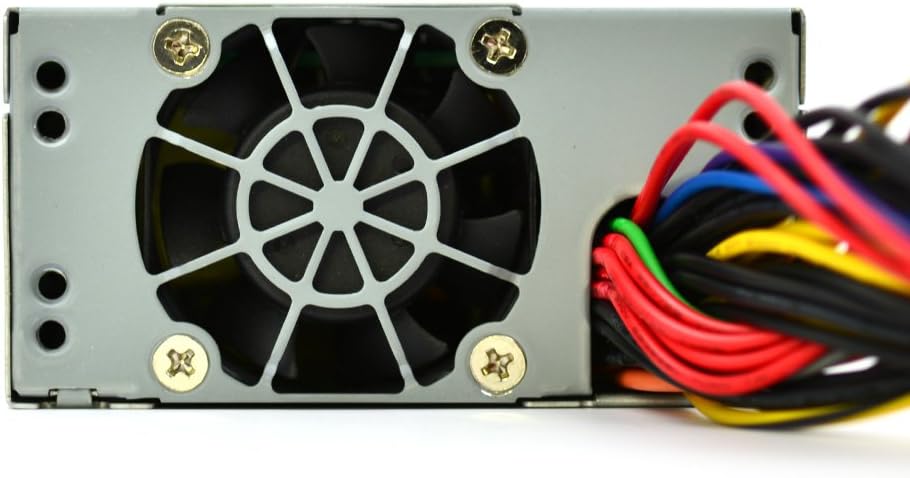
Image: A detailed view of the FSP300-60LG-5K power supply's rear panel, showing the AC power input socket and the hexagonal ventilation grille.
6. Operating Instructions
After successful installation, you can power on your system. The FSP300-60LG-5K will automatically provide power to your components. The 40mm fan will operate to cool the unit. No specific user interaction is required for the power supply's operation beyond system power control.
7. Maintenance
Regular maintenance helps ensure the longevity and optimal performance of your power supply:
- Dust Removal: Periodically clean dust from the power supply's fan and ventilation grilles using compressed air. Ensure the system is powered off and unplugged before cleaning.
- Ventilation: Ensure that the computer case has adequate airflow and that the power supply's intake and exhaust vents are not obstructed.
- Cable Management: Keep internal cables tidy to prevent interference with airflow.
8. Troubleshooting
If you encounter issues with your power supply, refer to the following common troubleshooting steps:
- No Power:
- Check if the AC power cord is securely connected to both the power supply and the wall outlet.
- Verify that the wall outlet is functional.
- Ensure all internal power connectors (24-Pin ATX, P4-Pin, SATA, Molex) are firmly seated.
- System Instability/Random Shutdowns:
- This could indicate insufficient power or overheating. Ensure the power supply is adequately ventilated.
- Verify that your system's power requirements do not exceed the 300W capacity of the power supply.
- Excessive Fan Noise:
- A certain level of fan noise is normal, especially under load.
- If the noise is unusually loud or grinding, check for dust accumulation in the fan. If the issue persists, contact support.
If these steps do not resolve the issue, contact FSP Group technical support.
9. Specifications
| Feature | Description |
|---|---|
| Brand | FSP |
| Model Number | FSP300-60LG-5K |
| Form Factor | Flex ATX |
| Output Wattage | 300 Watts |
| Efficiency | 80 Plus Bronze |
| AC Input | 90-264V |
| Cooling Method | Air (40mm ball-bearing fan) |
| Dimensions (LxWxH) | 5.9 x 3.2 x 1.6 inches |
| Weight | 2.2 pounds |
| Main Connectors | 24-Pin ATX, P4-Pin |
| Peripheral Connectors | 3x Serial-ATA, 2x Molex 4-Pin |
| Protections | OVP (Over Voltage Protection), Line input fuse protection |
| Certifications | CE, FCC, cUL, CCC, TUV, CB, RoHS, Lead-Free, Green Product (G.P) |
| MTBF | 100,000 hours at full load at 25℃ |
| Altitude Rating | 5km (5000 meters) |
10. Warranty and Support
For warranty information and technical support, please refer to the official FSP Group website or contact your local FSP Group distributor. Keep your purchase receipt for warranty claims.


