
AQUA CONTROL C4100
Aqua Control C4100 Garden Irrigation Programmer User Manual
Model: C4100 | Brand: AQUA CONTROL
Product Overview
The Aqua Control C4100 is a digital irrigation programmer designed to automate garden watering. It features an intuitive LCD screen and allows for precise control over watering frequency and duration. Constructed with high-quality materials, it ensures durability and efficient water flow. The removable front panel simplifies programming and maintenance.

Image: Front view of the Aqua Control C4100 irrigation programmer, showing the LCD screen and control buttons.
Key Features
- Digital Programming: Allows up to 8 watering starts per day with customizable frequency and duration.
- LCD Screen: Provides clear and easy-to-read programming information.
- High-Quality Construction: Made with durable materials for extended product life.
- Efficient Flow: Features a large internal flow passage for optimal water delivery.
- Removable Front Panel: Simplifies battery replacement and programming access.
- Battery Operated: Requires one 9-volt alkaline battery (not included).
- Safety Feature: Automatic valve closure when battery is low to prevent water waste.
Package Contents
Verify that all components are present in the package:
- 1 x Aqua Control C4100 Digital Irrigation Programmer
- User Manual (this document)
Note: A 9-volt alkaline battery is required for operation and is not included.
Setup
1. Battery Installation
- Gently slide the front panel of the programmer downwards and pull it away from the main unit.
- Locate the battery compartment.
- Insert one new 9-volt alkaline battery, ensuring correct polarity.
- Reattach the front panel by aligning it and sliding it upwards until it clicks into place.

Image: The Aqua Control C4100 with its front panel detached, illustrating the removable design for battery access.
2. Connecting to a Faucet
- Ensure the faucet is turned off.
- Screw the programmer onto a standard 3/4" or 1" outdoor faucet. Hand-tighten only to prevent damage.
- Connect your garden hose or irrigation system to the outlet at the bottom of the programmer.
- Slowly turn on the faucet. The programmer is designed to operate between 1 and 7 bars of pressure.
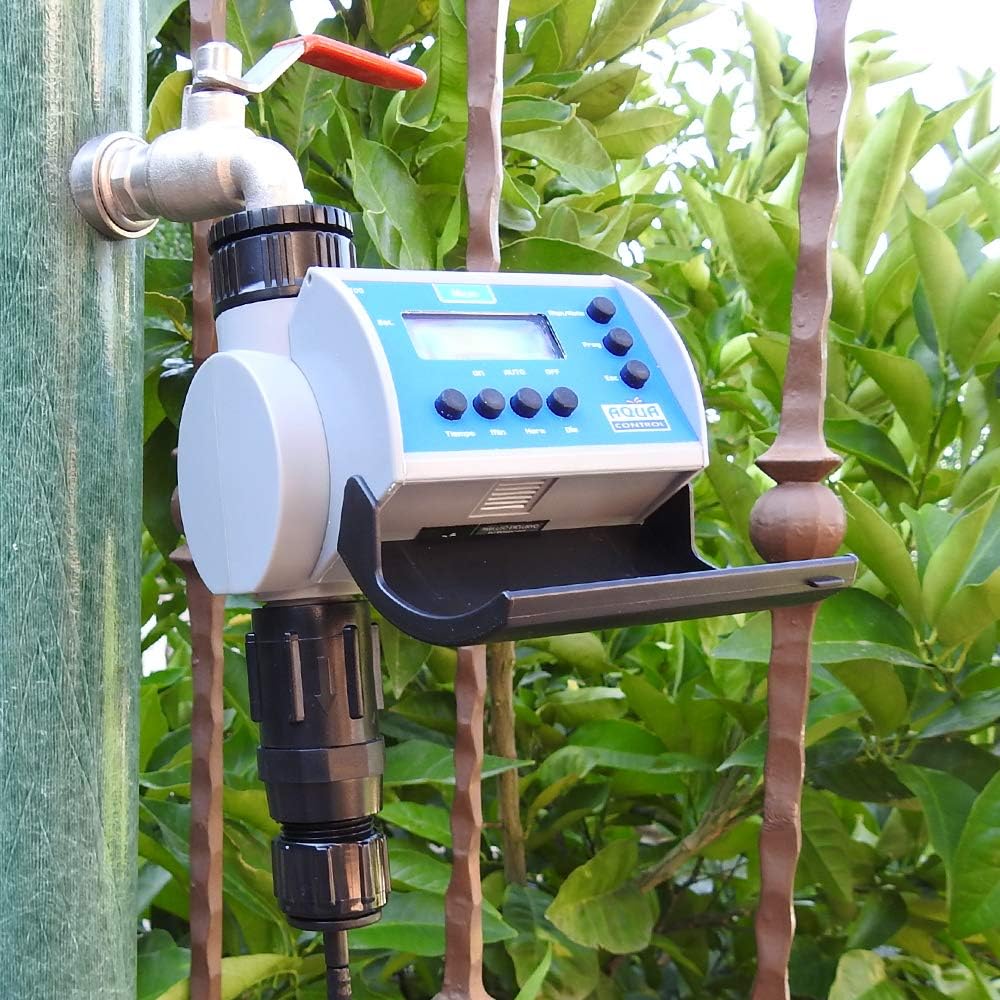
Image: The Aqua Control C4100 irrigation programmer securely attached to an outdoor garden faucet, ready for use.
Operating Instructions
Understanding the Display and Buttons
The LCD screen displays current time, programming status, and battery level. The buttons allow for navigation and setting adjustments:
- Man/Auto: Toggles between Manual and Automatic modes.
- Prog: Enters programming mode.
- Esc: Exits current menu or cancels an action.
- Tiempo (Time): Adjusts time settings.
- Min (Minute): Adjusts minutes.
- Hora (Hour): Adjusts hours.
- Dia (Day): Adjusts day of the week or watering days.
- ON/AUTO/OFF: Selects the operating mode.
Setting the Current Time
- Press the Prog button.
- Use the Hora and Min buttons to set the current hour and minute.
- Use the Dia button to set the current day of the week.
- Press Prog again to save and exit.
Programming Watering Schedules
The C4100 allows for up to 8 independent watering programs per day.
- Press the Prog button repeatedly until "P1" (Program 1) appears on the screen.
- Use Hora and Min to set the desired start time for Program 1.
- Press Prog. The display will show the duration setting. Use Tiempo, Hora, and Min to set the watering duration (e.g., 15 minutes).
- Press Prog. The display will show the frequency setting. Use Dia to select watering days (e.g., every day, specific days of the week).
- Repeat steps 2-4 for additional programs (P2 to P8) as needed.
- After setting all desired programs, press Esc to exit programming mode.
Manual Operation
To manually turn the water on or off:
- Press the Man/Auto button to switch to Manual mode.
- Use the ON/AUTO/OFF button to select ON for continuous watering or OFF to stop watering.
- To return to automatic programming, press Man/Auto again and select AUTO.
Maintenance
- Battery Replacement: Replace the 9-volt battery annually or when the low battery indicator appears on the LCD screen. A low battery will automatically close the valve to prevent continuous water flow.
- Filter Cleaning: The programmer includes a metallic filter at the inlet. Periodically remove the programmer from the faucet and clean the filter to prevent debris buildup and ensure optimal water flow.
- Winter Storage: During freezing temperatures, disconnect the programmer from the faucet and store it indoors in a dry, frost-free location. Water left inside the unit can freeze and cause damage.
- General Cleaning: Wipe the exterior of the programmer with a damp cloth. Do not use abrasive cleaners or submerge the unit in water.

Image: Close-up view of the Aqua Control C4100's battery compartment, showing where the 9V battery is inserted.
Troubleshooting
| Problem | Possible Cause | Solution |
|---|---|---|
| No water flow / Valve not opening. | Low battery; Faucet turned off; Water pressure too low; Filter clogged. | Replace battery; Turn on faucet; Ensure water pressure is between 1-7 bar; Clean inlet filter. |
| Watering schedule not starting. | Programmer in OFF or Manual mode; Incorrect program settings; Battery low. | Set to AUTO mode; Verify program start times and days; Replace battery. |
| Water continuously flowing. | Programmer stuck in ON mode; Internal valve issue; Debris in valve. | Switch to OFF or AUTO mode; Disconnect and reconnect; Check for debris in valve (if accessible). If issue persists, contact support. |
| LCD screen is blank or dim. | Dead or low battery. | Replace the 9-volt battery. |
Specifications
| Feature | Detail |
|---|---|
| Model | C4100 |
| Power Source | 1 x 9V Alkaline Battery (not included) |
| Operating Pressure | 1 - 7 bar (15 - 100 PSI) |
| Flow Rate | Approximately 15 L/min |
| Watering Programs | Up to 8 starts per day |
| Display Type | LCD |
| Inlet Thread | 3/4" and 1" (with adapter) |
| Material | Plastic, Metal |
| Dimensions (L x W x H) | 20 x 10 x 15 cm (7.87 x 3.94 x 5.91 inches) |
| Weight | 380 grams (0.84 lbs) |
Warranty and Support
The Aqua Control C4100 Garden Irrigation Programmer comes with a 2-year warranty from the date of purchase, covering manufacturing defects.
This warranty does not cover damage caused by:
- Improper installation or use.
- Exposure to freezing temperatures.
- Unauthorized repairs or modifications.
- Accidental damage or misuse.
For technical support, warranty claims, or replacement parts, please contact your retailer or the manufacturer directly. Please have your proof of purchase and product model number (C4100) ready when contacting support.
Related documentsC4100

Ask a question about this manual
Ask about setup, troubleshooting, compatibility, parts, safety, or missing instructions. Manuals+ will review the question and use this page’s manual context to help answer it.