Introduction
This manual provides essential information for the safe and effective use of your ADVPRO i916 Alien UFO LED Sign. Please read these instructions carefully before installation and operation to ensure proper functionality and longevity of the product. The ADVPRO i916 LED Sign utilizes advanced 3-Dimension, surface, and line engraving technologies to create a distinct visual effect and is suitable for various indoor display environments.

Image: The ADVPRO i916 Alien UFO LED Sign, featuring three alien figures illuminated against a dark background.
Setup
Unpacking
Carefully remove the LED sign from its packaging. Inspect the sign and all included components for any signs of damage. Retain the original packaging for future storage or transport of the unit.
Mounting
The ADVPRO i916 LED sign is designed for wall mounting. The aluminum light box features a modern round shape with integrated mounting points for easy installation.

Image: Close-up of the aluminum light box end, showing the two screw holes for secure wall mounting. Mounting hardware is not included.
Ensure the chosen mounting surface is structurally sound and suitable to support the sign's weight (approximately 15.8 ounces). Use appropriate hardware (not included) for your specific wall type to ensure a secure installation.
Power Connection
Connect the provided 5 ft (1.5m) power cord to the sign and then to a suitable electrical outlet. The power cord includes an inline ON/OFF switch for convenient operation.

Image: The white power cord features an inline ON/OFF switch and a standard two-prong US plug. Other plug types are provided based on regional electrical standards.
Verify that the voltage of your electrical outlet matches the sign's power requirements (110V for US/CA, 240V for UK/AU/NZ/EU) before plugging in the device.
Operating Instructions
Powering On/Off
To operate the sign, locate the ON/OFF switch on the power cord. Press the switch to toggle the LED sign between the on and off states.
Color Selection (if applicable)
The default LED color is as shown in the primary product image. If you have purchased a sign with a specific color or color-changing capability, please refer to any additional instructions provided at the time of purchase for details on color adjustment. Available colors typically include blue, red, green, yellow, purple, orange, or white.
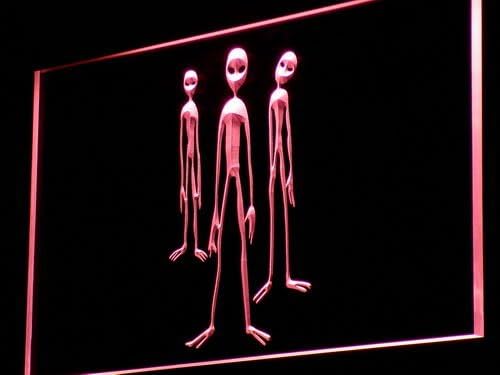
Image: The ADVPRO i916 Alien UFO LED Sign displaying a red illumination.

Image: The ADVPRO i916 Alien UFO LED Sign displaying a green illumination.
Maintenance
Cleaning
To clean the acrylic surface of the sign, gently wipe with a soft, dry, lint-free cloth. For stubborn marks, a slightly damp cloth with mild soap can be used, followed by a dry wipe. Avoid abrasive cleaners or solvents, as these can damage the acrylic material.
Storage
If storing the sign for an extended period, use the original packaging to protect it from dust and physical damage. Store the unit in a cool, dry place away from direct sunlight and extreme temperatures.
Troubleshooting
Sign Does Not Light Up
- Check Power Connection: Ensure the power cord is securely plugged into both the sign and the electrical outlet.
- Verify Power Outlet: Test the electrical outlet with another functional device to confirm it is supplying power.
- Check ON/OFF Switch: Make sure the inline ON/OFF switch on the power cord is in the "ON" position.
Dim or Flickering Light
- Power Supply: Ensure the power supply is stable and meets the sign's voltage requirements. Unstable power can cause flickering.
- Environmental Factors: Extreme temperatures can sometimes affect LED performance. Ensure the sign is used within recommended operating temperatures.
If issues persist after performing these checks, please contact customer support for further assistance.
Specifications
| Feature | Detail |
|---|---|
| Model | i916 |
| Brand | AdvPro |
| Light Source | LED (Neon-style effect) |
| Overall Dimensions | 12" W x 8.5" H (300mm x 210mm) |
| Product Dimensions (approx.) | 12 x 1 x 8.5 inches |
| Item Weight | 15.8 ounces |
| Material | Clear Acrylic, Aluminum Light Box |
| Mounting Type | Wall Mount |
| Power Cord Length | 5 ft (1.5m) with ON/OFF switch |
| Input Voltage | 110V (US/CA) / 240V (UK/AU/NZ/EU) |
| LED Lifespan | > 100,000 hours |
Warranty Information
The ADVPRO i916 LED Sign comes with a 1-Year Limited Warranty. This warranty covers defects in materials and workmanship under normal use and service conditions.
To ensure warranty validity, verify the presence of the ADVPRO laser sticker on your product. This sticker signifies quality control and is required for all warranty claims.

Image: The ADVPRO laser sticker, indicating product authenticity and warranty coverage.
The warranty does not cover damage caused by misuse, accidents, unauthorized modifications, improper installation, or any use not in accordance with the instructions provided in this manual.
Customer Support
For technical assistance, warranty claims, or any questions regarding your ADVPRO i916 Alien UFO LED Sign, please contact ADVPRO customer service. Refer to your purchase documentation for specific contact details or visit the official ADVPRO website.
Online Resources: Visit the AdvPro Store on Amazon