
1. Introduction and Overview
The THINKWARE X700 Dash Cam is a high-definition dashboard camera designed to record your daily commutes and provide crucial evidence in case of incidents. It captures crystal-clear Full HD 1080P footage at 30 frames per second with a wide 142.7° viewing angle, utilizing a Sony STARVIS image sensor for enhanced clarity. The device features a 2.7-inch LCD touchscreen for instant video playback, menu navigation, and settings configuration. Advanced Driver Assistance System (ADAS) features, such as Forward Collision, Lane Departure, and Front Vehicle Departure warnings, enhance driver safety (requires optional GPS antenna). Super Night Vision technology improves image quality in low-light conditions, ensuring clear recordings even in challenging lighting environments.
2. What's in the Box
Upon unboxing your THINKWARE X700 Dash Cam, please verify that all the following components are included:
- X700 Dash Cam Unit
- 3M Windshield Mount with extra tape
- 12V Power Cable
- Adhesive Cable Clips
- THINKWARE 16GB microSD card with SD adapter (User Manual stored inside microSD card)
- Quick Start Guide/Warranty Information

Figure 1: Included components of the THINKWARE X700 Dash Cam package.
3. Setup
3.1. Mounting the Dash Cam
Select a suitable location on your vehicle's windshield, typically behind the rearview mirror, to ensure an unobstructed view of the road. Clean the windshield surface thoroughly before applying the 3M Windshield Mount. Securely attach the dash cam to the mount.

Figure 2: THINKWARE X700 Dash Cam installed on the vehicle's windshield.
3.2. Connecting Power
Connect the provided 12V Power Cable to the dash cam and route the cable along the windshield trim and dashboard to the vehicle's 12V power outlet. Use the Adhesive Cable Clips to secure the cable neatly and prevent interference with driving. For optional parking surveillance modes, hardwiring to the vehicle's fuse box or an OBD II power source may be required (accessories sold separately).
3.3. Inserting MicroSD Card
Insert the 16GB microSD card (included) into the designated slot on the dash cam. The device will automatically format the card upon first use or when required. Ensure the card is properly inserted for recording functionality.
3.4. Optional GPS Antenna Connection
If you have purchased the optional GPS antenna, connect it to the designated port on the dash cam. The GPS antenna enables ADAS features and records speed and location data for your footage.

Figure 3: THINKWARE X700 Dash Cam from an exterior perspective.
4. Operating
4.1. 2.7-inch LCD Touchscreen
The intuitive 2.7-inch LCD touchscreen allows for direct interaction with the dash cam. You can instantly play back recorded videos, navigate through menus, and configure various settings without needing a separate device.

Figure 4: Touchscreen interface for video playback and settings.
4.2. Recording Modes
The X700 supports various recording modes to suit different driving and parking scenarios:
- Continuous Recording: Records footage in one-minute segments, overwriting the oldest files when the microSD card is full.
- Event (Impact) Recording: Automatically records and saves footage when an impact is detected by the built-in G-Sensor, preventing these files from being overwritten.
- Optional Parking Mode: When hardwired, this mode offers:
- Motion Detection Recording: Records when motion is detected around the vehicle.
- Time Lapse Recording: Records at 2 frames per second, extending recording time significantly.
- Energy Saving Mode: Reduces power consumption for extended parking surveillance.
4.3. Advanced Driver Assistance System (ADAS)
With the optional GPS antenna, the X700 provides real-time audio and visual alerts for:
- Forward Collision Warning System (FCWS): Alerts when approaching the vehicle ahead at a high closing rate.
- Lane Departure Warning System (LDWS): Warns if the vehicle drifts out of its lane.
- Front Vehicle Departure Warning (FVDW): Notifies when the vehicle ahead starts to move from a complete stop.

Figure 5: Visual representation of ADAS alerts.
4.4. Super Night Vision
The THINKWARE X700 features Super Night Vision technology, which utilizes the Sony STARVIS image sensor to reduce noise and enhance image quality in low-light conditions. This ensures that recordings made during nighttime driving or parking surveillance are crisp and clear, capturing important details.
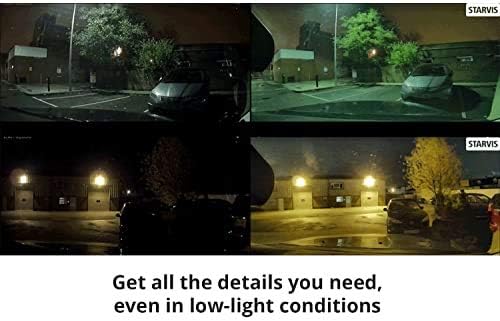
Figure 6: Super Night Vision enhances clarity in low-light environments.
4.5. GPS Functionality
When the optional GPS antenna is connected, the X700 records the vehicle's driving speed, location, and routes. This data can be viewed through the PC Viewer software, providing a comprehensive overview of your journeys and aiding in accident analysis.
4.6. Supported Languages
The THINKWARE X700 supports multiple languages for its interface and voice alerts, including English, English UK, Spanish, Portuguese, French, French (Canada), German, Italian, Russian, Simplified Chinese, Chinese (Hong Kong), Chinese (Taiwan), Thai, Japanese, and Korean.
4.7. Product Overview Video
Video 1: An official product overview of the THINKWARE X700 Dash Cam, highlighting its key features and functionalities.
5. Maintenance
5.1. MicroSD Card Management
The X700 utilizes loop recording, automatically overwriting the oldest continuous recording files when the microSD card is full. Event (impact) recordings are saved in a separate folder and are protected from overwriting. Regularly back up important footage to a computer. It is recommended to periodically format the microSD card using the dash cam's menu to maintain optimal performance and prevent data corruption.
5.2. Automatic Temperature Sensitive Shutdown
The dash cam is equipped with a self-protection shutdown function. If the internal temperature rises and exceeds a certain level due to strong sunlight or extreme heat, the device will automatically power off to protect the product and its stored videos. This feature ensures the longevity and reliability of the dash cam.
6. Troubleshooting
If you encounter any issues with your THINKWARE X700 Dash Cam, please refer to the following common troubleshooting steps:
- No Power: Ensure the 12V Power Cable is securely connected to both the dash cam and the vehicle's power outlet. Check the vehicle's fuse box if necessary.
- Recording Issues: Verify that the microSD card is properly inserted and formatted. If issues persist, try using a different compatible microSD card.
- False ADAS Alerts: Adjust the sensitivity settings for ADAS features through the touchscreen menu. Ensure the GPS antenna is properly connected and receiving a signal.
- Screen Malfunction: Attempt a soft reset of the device. If the problem continues, consult the full user manual on the microSD card or contact customer support.
- Overheating: Ensure the dash cam is not exposed to direct sunlight for extended periods when parked. The automatic shutdown feature is designed to protect the device.
7. Specifications
| Feature | Value |
|---|---|
| Product Dimensions | 4.1 x 1.1 x 2.1 inches |
| Item Weight | 4 ounces |
| Item Model Number | TW-X700 |
| Video Capture Resolution | 1080p |
| Field Of View | 142.7 Degrees |
| Connectivity Technology | Auxiliary |
| Mounting Type | Windshield Mount |
| Special Features | 2.7" LCD Touchscreen, ADAS Driver Alerts (Optional GPS Antenna required), Smart Parking, Super Night Vision (Parking Surveillance mode only) |
8. Warranty and Support
For detailed warranty information, please refer to the Quick Start Guide/Warranty document included in your product packaging or the full User Manual stored on the provided microSD card. For technical support or further assistance, please visit the official THINKWARE website or contact their customer service department.


