
Roxcore ROX600
Roxcore ROX600 In-Ear Headphones User Manual
Model: ROX600
Introduction
Thank you for choosing the Roxcore ROX600 In-Ear Headphones with Microphone. These headphones are designed to provide clear audio and convenient communication. Please read this manual carefully before using the product to ensure proper operation and longevity.
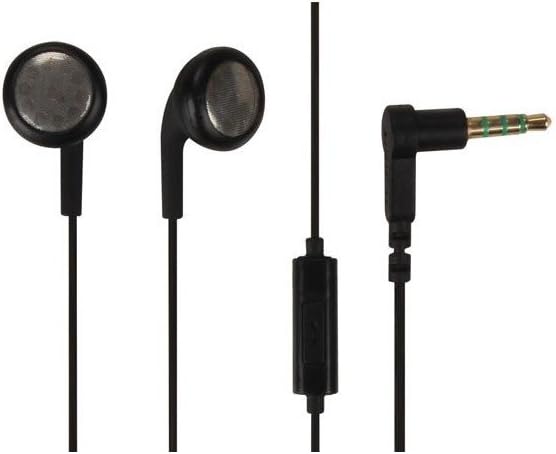
Figure 1: Overview of the Roxcore ROX600 In-Ear Headphones. The image displays the two black in-ear earbuds, the tangle-free cable, an in-line control with a microphone, and the L-shaped 3.5mm audio jack.
Safety Information
- Avoid prolonged listening at high volume levels to prevent hearing damage.
- Do not use headphones while driving, cycling, or in situations where inability to hear ambient sounds could be dangerous.
- Keep out of reach of children.
- Do not expose to extreme temperatures, humidity, or liquids.
- Do not attempt to disassemble or modify the headphones. This will void the warranty.
Package Contents
- Roxcore ROX600 In-Ear Headphones with Microphone
- User Manual (this document)
Setup
The Roxcore ROX600 headphones are designed for simple plug-and-play operation.
- Identify the Audio Jack: Locate the 3.5mm audio jack on your audio device (smartphone, tablet, laptop, MP3 player, etc.).
- Connect the Headphones: Insert the 3.5mm plug of the Roxcore ROX600 headphones firmly into the audio jack of your device. Ensure it is fully seated to prevent sound issues.
- Position Earbuds: Gently insert the left (L) and right (R) earbuds into your respective ears. Adjust for a comfortable and secure fit.
Operating Instructions
Audio Playback
- Once connected, audio from your device will be routed through the headphones.
- Adjust the volume directly on your connected device. The ROX600 headphones do not feature in-line volume controls.
Using the Microphone and In-line Control
The Roxcore ROX600 features an in-line microphone and a single multi-function button for call and music control.
| Action | Function |
|---|---|
| Press once | Play/Pause music; Answer/End call |
| Press twice | Skip to next track |
| Press three times | Skip to previous track |
| Press and hold | Activate voice assistant (e.g., Siri, Google Assistant) |
Note: Microphone and button functionality may vary slightly depending on your connected device and operating system.
Maintenance and Care
- Cleaning: Use a soft, dry cloth to wipe the earbuds and cable. Do not use harsh chemicals or abrasive cleaners.
- Storage: When not in use, store the headphones in a clean, dry place, preferably in a small pouch or case to prevent tangling and damage.
- Cable Care: Avoid pulling the cable forcefully or wrapping it too tightly, as this can damage the internal wires. The tangle-free design helps prevent knots.
- Moisture: Keep the headphones away from water and excessive moisture. If they get wet, dry them thoroughly before use.
Troubleshooting
| Problem | Possible Cause | Solution |
|---|---|---|
| No sound or distorted sound |
|
|
| Microphone not working |
|
|
| In-line button not responding |
|
|
If the problem persists after trying these solutions, please contact customer support.
Specifications
| Feature | Detail |
|---|---|
| Model Name | ROX600 |
| Brand | Roxcore (Manufactured by Velleman) |
| Connectivity Technology | Wired |
| Form Factor | In-ear |
| Headphone Jack | 3.5 mm jack |
| Driver Diameter | 15 mm |
| Frequency Range | 20 Hz - 20,000 Hz |
| Impedance | 32 ohm |
| Cable Length | 1.20 m |
| Cable Feature | Tangle-free |
| Material Type | Plastic |
| Color | Black |
| Item Weight | 40.8 grams |
| Compatible Devices | Most devices with audio input options |
| Country of Origin | China |
Warranty and Support
For warranty information and technical support, please refer to the documentation provided at the point of purchase or visit the official Velleman website. Keep your proof of purchase for warranty claims.
Manufacturer: Velleman
Model: ROX600
ASIN: B00Q8L6JUU
Related documentsROX600

Ask a question about this manual
Ask about setup, troubleshooting, compatibility, parts, safety, or missing instructions. Manuals+ will review the question and use this page’s manual context to help answer it.