
MEAN WELL RSP-750-24
MEAN WELL RSP-750-24 AC-DC Switching Enclosed Power Supply
Instruction Manual
1. Introduction
This manual provides essential information for the safe and efficient operation of your MEAN WELL RSP-750-24 AC-DC Switching Enclosed Power Supply. Please read this manual thoroughly before installation and use, and retain it for future reference.
The RSP-750-24 is a high-performance 750-watt single output enclosed power supply featuring Power Factor Correction (PFC), designed for various industrial and scientific applications. It offers universal AC input, high efficiency, and comprehensive protection mechanisms.
2. Safety Information
WARNING: Risk of electric shock. Do not open the casing. Refer all servicing to qualified personnel.
- Ensure proper grounding before connecting the power supply.
- Do not operate the unit in wet or damp conditions.
- Verify input voltage compatibility before connection.
- Ensure adequate ventilation to prevent overheating.
- Disconnect power before performing any installation, maintenance, or troubleshooting.
3. Product Overview
The RSP-750-24 is designed for robust performance and reliability. Key features include:
- 750 Watt Single Output
- 24 Volts, 31.3 Amps Output
- Universal AC Input / Full Range AC Input (90 to 264 VAC)
- Built-in Active PFC Function (PF > 0.97)
- High Efficiency up to 90.5%
- Protections: Short Circuit, Overload, Over Voltage, Over Temperature, Fan Alarm
- Forced air cooling by built-in DC fan with speed control
- Output voltage and current can be trimmed by external control signal
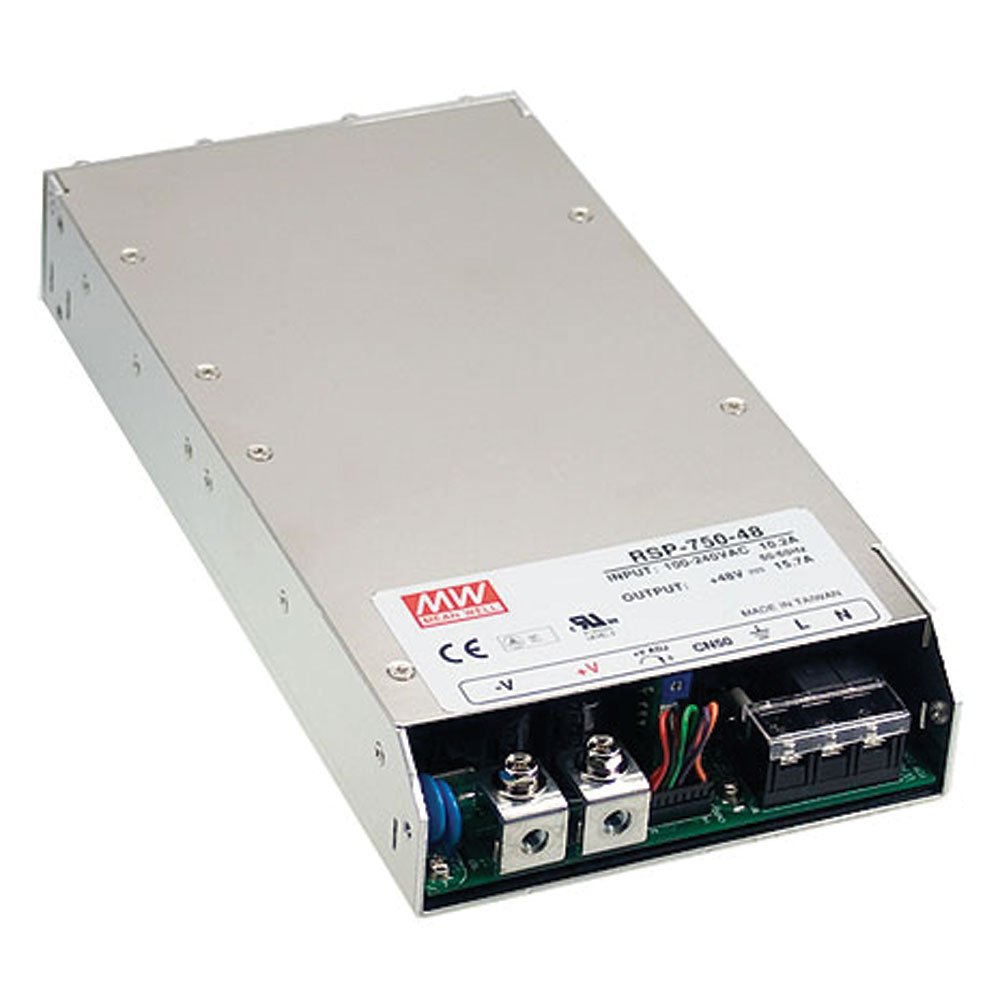
Figure 3.1: Front view of the MEAN WELL RSP-750 series power supply, highlighting the input (L, N, GND) and output (+V, -V) screw terminals. Note: The image label shows RSP-750-48, but the product is RSP-750-24, which shares the same physical form factor.
4. Setup
- Mounting: Securely mount the power supply in a well-ventilated area using appropriate fasteners. Ensure sufficient clearance for airflow around the unit.
- Input Connection: Connect the AC input (Line, Neutral, Ground) to the designated screw terminals. Ensure correct polarity and a secure connection. Refer to the terminal block labels on the unit.
- Output Connection: Connect your load to the DC output terminals (+V and -V). Observe correct polarity. Ensure the load current does not exceed the power supply's maximum output current (31.3A).
- Auxiliary Power (Optional): If utilizing the built-in 12V/0.1A auxiliary power, connect your auxiliary device to the corresponding terminals.
- Control Signal (Optional): If external control of output voltage/current is desired, connect the 2-5.5Vdc control signal to the designated terminals as per the detailed wiring diagram (not included in this general manual, refer to product datasheet for specifics).
5. Operating Instructions
Once properly installed and connected, the RSP-750-24 operates automatically. The built-in fan will adjust its speed based on the internal temperature to maintain optimal operating conditions.
- Power On: Apply AC power to the input terminals. The unit will power on and provide the regulated 24V DC output.
- Load Management: Ensure the connected load does not exceed the power supply's rated output power (751.2W) or current (31.3A). Overloading will trigger protection mechanisms.
- Monitoring: Periodically check the power supply for any unusual noises, smells, or excessive heat.
6. Maintenance
The RSP-750-24 is designed for minimal maintenance. However, regular checks can prolong its lifespan and ensure reliable operation.
- Cleaning: Periodically clean the exterior of the power supply and fan vents to prevent dust accumulation, which can impede airflow and lead to overheating. Use a soft, dry cloth. Do not use liquid cleaners.
- Connections: Annually inspect all input and output connections to ensure they remain tight and free from corrosion.
- Ventilation: Ensure that the area around the power supply remains clear and unobstructed to allow for proper air circulation.
7. Troubleshooting
| Problem | Possible Cause | Solution |
|---|---|---|
| No Output Voltage | No AC input power; Input fuse blown; Overload protection activated; Over-temperature protection activated. | Check AC input connection and power source; Replace fuse (if accessible and cause identified); Reduce load; Ensure adequate ventilation and allow unit to cool. |
| Output Voltage Fluctuates | Unstable AC input; Loose connections; Load instability. | Verify stable AC input; Check all wiring connections; Inspect load for issues. |
| Fan Not Operating | Unit not under sufficient load/temperature to activate fan; Fan malfunction. | This is normal if the unit is cool; If unit is hot and fan is still off, contact support. |
If the problem persists after attempting these solutions, please contact qualified service personnel or MEAN WELL customer support.
8. Specifications
| Parameter | Value |
|---|---|
| Model | RSP-750-24 |
| Input Voltage Range | 90 to 264 VAC |
| Input Frequency | 47 to 63 Hz |
| Output Voltage | 24 VDC |
| Output Current | 31.3 A |
| Maximum Output Power | 751.2 W |
| Efficiency | 90.5% |
| Operating Temperature | -30°C to 70°C |
| Dimensions (L x W x H) | 9.8 x 5 x 1.6 inches (249 x 127 x 40.6 mm) |
| Weight | Approx. 0.01 Ounces |
| Agency Approvals | cULus, TUV, CB, CE |
9. Warranty and Support
For warranty information and technical support, please refer to the official MEAN WELL website or contact your authorized distributor. Keep your purchase receipt for warranty claims.
For further assistance, please contact MEAN WELL customer service with your product model number (RSP-750-24) and serial number (if applicable).
Related documentsRSP-750-24


Ask a question about this manual
Ask about setup, troubleshooting, compatibility, parts, safety, or missing instructions. Manuals+ will review the question and use this page’s manual context to help answer it.