
Introduction
Thank you for choosing the West Bend 1.5 lb Automatic Bread & Dough Maker. This manual provides essential information for the safe and efficient operation of your appliance. Please read all instructions carefully before first use and retain this manual for future reference.
Important Safeguards
When using electrical appliances, basic safety precautions should always be followed, including the following:
- Read all instructions.
- Do not touch hot surfaces. Use handles or knobs.
- To protect against electric shock, do not immerse cord, plugs, or appliance in water or other liquid.
- Close supervision is necessary when any appliance is used by or near children.
- Unplug from outlet when not in use and before cleaning. Allow to cool before putting on or taking off parts.
- Do not operate any appliance with a damaged cord or plug or after the appliance malfunctions or has been damaged in any manner.
- The use of accessory attachments not recommended by the appliance manufacturer may cause injuries.
- Do not use outdoors.
- Do not let cord hang over edge of table or counter, or touch hot surfaces.
- Do not place on or near a hot gas or electric burner, or in a heated oven.
- Extreme caution must be used when moving an appliance containing hot oil or other hot liquids.
- To disconnect, turn any control to "off", then remove plug from wall outlet.
- Do not use appliance for other than intended use.
Product Overview and Parts
Familiarize yourself with the components of your West Bend Bread & Dough Maker.
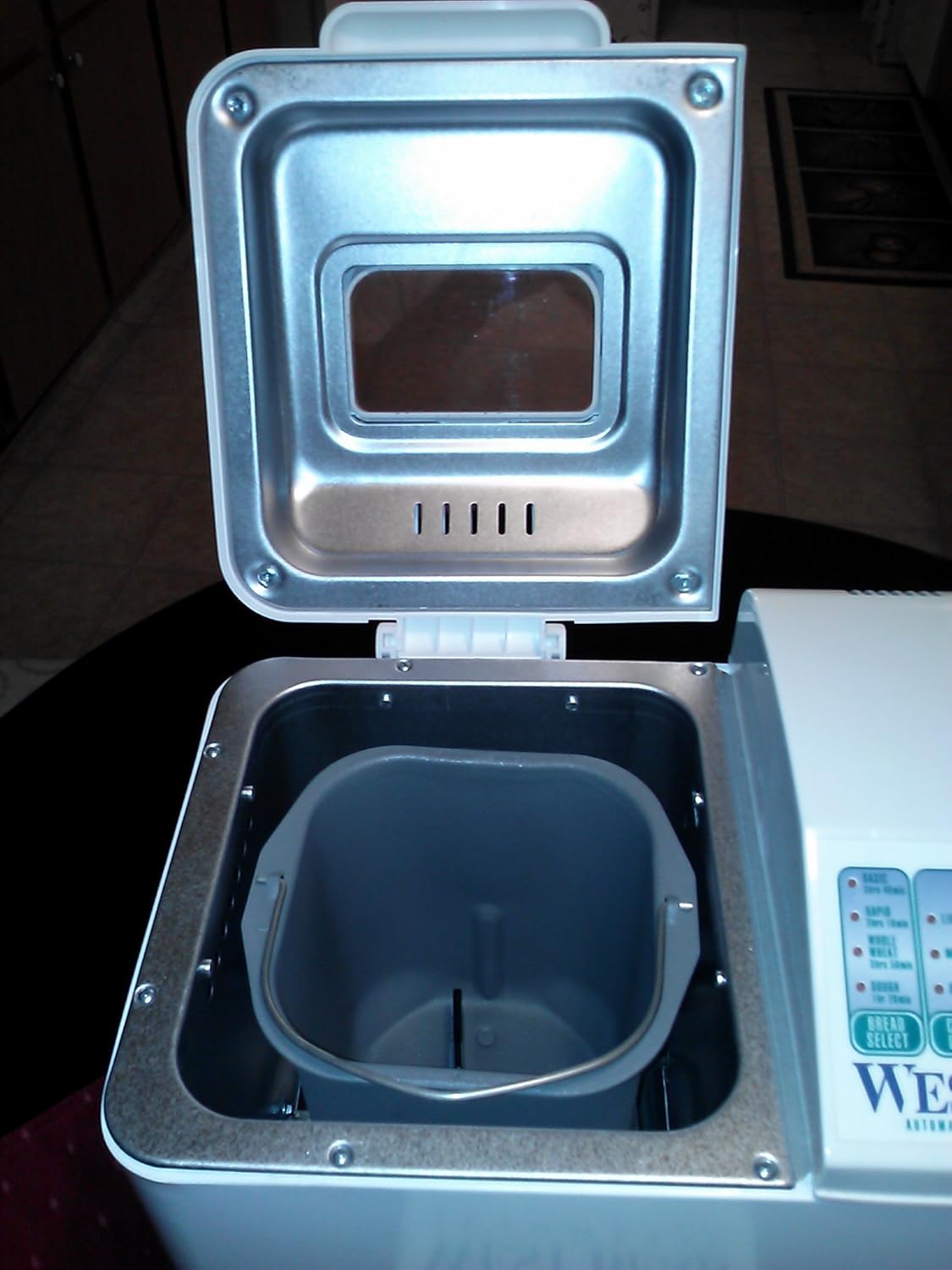
Figure 1: Top-down view of the West Bend bread maker with the lid open, showing the empty interior cavity where the bread pan is inserted. The bread pan has been removed in this image.

Figure 2: Top-down view of the West Bend bread maker with the lid open, showing the bread pan correctly inserted. The kneading paddle is visible at the bottom of the pan.

Figure 3: Exterior view of the West Bend 1.5 lb Automatic Bread & Dough Maker. The control panel is visible on the right side of the appliance.
Key Components:
- Lid: Hinged lid with a viewing window.
- Baking Chamber: The insulated interior where the bread pan sits.
- Bread Pan: Removable non-stick pan for baking.
- Kneading Paddle: Detachable paddle located inside the bread pan for mixing and kneading ingredients.
- Control Panel: Located on the front/top, featuring buttons for program selection, crust color, loaf size, and start/stop.
- Heating Element: Located at the bottom of the baking chamber (not visible externally).
Setup and First Use
- Unpacking: Carefully remove the bread maker and all accessories from the packaging.
- Cleaning: Wash the bread pan and kneading paddle with warm, soapy water. Rinse thoroughly and dry completely. Wipe the exterior of the bread maker with a damp cloth. Do not immerse the main unit in water.
- Placement: Place the bread maker on a stable, heat-resistant, and dry surface, away from direct sunlight and heat sources. Ensure adequate ventilation around the appliance.
- First Bake Cycle (Empty): Before baking your first loaf, it is recommended to run an empty bake cycle to burn off any manufacturing residues. Insert the empty bread pan with the kneading paddle attached into the baking chamber. Close the lid. Plug the appliance into a grounded electrical outlet. Select the "Bake" program (if available, or a short cycle like "Rapid Bake") and let it run for about 10 minutes. Unplug and allow to cool completely before proceeding.
Operating Instructions
General Baking Steps:
- Insert Kneading Paddle: Ensure the kneading paddle is securely attached to the shaft inside the bread pan.
- Add Ingredients: Add liquid ingredients first, followed by dry ingredients. Make a small indentation in the dry ingredients for the yeast, ensuring it does not come into direct contact with liquids or salt initially. Refer to your recipe for precise measurements and order.
- Place Bread Pan: Insert the bread pan into the baking chamber, pressing down firmly until it clicks into place. Close the lid.
- Plug In: Connect the power cord to a grounded electrical outlet. The display will illuminate.
- Select Program: Use the "MENU" button to select the desired program (e.g., Basic, Whole Wheat, Dough, French).
- Select Loaf Size and Crust Color: Use the "LOAF SIZE" and "CRUST" buttons to adjust settings according to your recipe and preference.
- Start Cycle: Press the "START/STOP" button to begin the baking cycle. The machine will start kneading.
- Monitoring: During the kneading cycle, you may open the lid briefly to check the dough consistency. Add a small amount of flour or liquid if necessary.
- End of Cycle: Once the cycle is complete, the machine will beep. Press and hold the "START/STOP" button to stop the program. Unplug the appliance.
- Remove Bread: Using oven mitts, carefully remove the hot bread pan from the machine. Invert the pan onto a wire rack to release the bread. If the kneading paddle remains in the bread, carefully remove it with a non-metallic utensil.
- Cooling: Allow the bread to cool on a wire rack for at least 30 minutes before slicing.
Using the Delay Timer:
The delay timer allows you to program the bread maker to finish baking at a later time, up to 13 hours in advance. This feature is ideal for fresh bread in the morning.
- Add all ingredients to the bread pan as usual.
- Select your desired program, loaf size, and crust color.
- Use the "TIME" buttons (usually + and -) to set the desired delay time. The display will show the total time until the bread is ready, including the baking cycle.
- Press "START/STOP". The timer will begin counting down, and the machine will start baking when the delay time has elapsed.
- Caution: Do not use the delay timer with recipes containing highly perishable ingredients like milk, eggs, or fresh fruit, as they may spoil before baking begins.
Care and Maintenance
Proper cleaning and maintenance will ensure the longevity and optimal performance of your bread maker.
- Always unplug the appliance and allow it to cool completely before cleaning.
- Bread Pan and Kneading Paddle: Wash these parts with warm, soapy water using a soft sponge. Do not use abrasive cleaners or metal scouring pads, as this can damage the non-stick coating. Rinse thoroughly and dry completely. These parts are generally not dishwasher safe.
- Exterior: Wipe the exterior of the bread maker with a soft, damp cloth. Do not use harsh chemicals or abrasive cleaners.
- Interior: Wipe the interior baking chamber with a damp cloth to remove any crumbs or spills. Ensure no water enters the heating element area.
- Storage: Store the bread maker in a clean, dry place with the lid closed.
- Product Care Instructions: Wipe with Dry Cloth (as per product specifications). This applies to the main unit's exterior.
Troubleshooting Guide
If you encounter issues with your bread maker, refer to the following common problems and solutions:
| Problem | Possible Cause | Solution |
|---|---|---|
| Bread does not rise | Expired yeast, incorrect water temperature, too much salt, not enough sugar. | Check yeast expiration date. Use lukewarm water (105-115°F / 40-46°C). Ensure ingredients are measured accurately. |
| Dough is too sticky or too dry | Incorrect liquid to flour ratio. | Adjust liquid or flour by a tablespoon at a time during the first kneading cycle until dough forms a soft ball. |
| Bread collapses during baking | Too much liquid, too much yeast, high altitude. | Reduce liquid slightly. Reduce yeast by 1/4 teaspoon. For high altitude, refer to specific high-altitude baking adjustments. |
| Kneading paddle stuck in bread | Common occurrence. | Allow bread to cool slightly, then carefully remove the paddle with a non-metallic utensil. |
| Machine not starting | Not plugged in, lid not closed, program not selected. | Ensure power cord is securely plugged in. Close the lid completely. Select a program and press START/STOP. |
Product Specifications
- Model Number: 41073
- Capacity: 1.5 Pounds
- Voltage: 120 Volts
- Item Weight: 15.2 pounds
- Package Dimensions: 16.5 x 14.7 x 11.8 inches
- Color: White
- Product Care Instructions: Wipe with Dry Cloth
Warranty and Support
This product is covered by a manufacturer's warranty. Please refer to the original packaging or the full instruction booklet (page 47 as indicated on the manual cover) for detailed warranty information, terms, and conditions. For technical support or service inquiries, please contact West Bend customer service.
Keep your purchase receipt as proof of purchase for warranty claims.

Figure 4: Cover of the physical "West Bend Automatic Bread & Dough Maker Recipes and Instructions" manual, which contains detailed warranty information.


