1. Introduction
This manual provides essential information for the installation, operation, and maintenance of your Dell PERC H730P Storage Controller. The Dell PowerEdge RAID Controller (PERC) H730P is a high-performance RAID adapter designed to enhance storage capabilities and data protection in Dell PowerEdge servers. It supports various RAID levels and offers advanced features for managing your server's storage infrastructure.
2. Product Overview
The Dell PERC H730P is an integrated RAID controller featuring 2GB of NV Cache, designed for robust data management. It supports SAS 12Gb/s and SATA 6Gb/s interfaces, providing high-speed data transfer for connected drives. This low-profile plug-in card utilizes a PCI Express 3.0 x8 interface for efficient communication with the host system.
Key Features:
- Integrated RAID Controller with 2GB NV Cache.
- Supports SAS 12Gb/s and SATA 6Gb/s interfaces.
- PCI Express 3.0 x8 host interface.
- Supports RAID levels: 0, 1, 5, 6, 10, 50, 60.
- Features 8 internal SAS ports.
- Compatible with Linux and PC operating systems.
- Includes 2 GB Flash Backed Cache for data protection.
Component Identification:
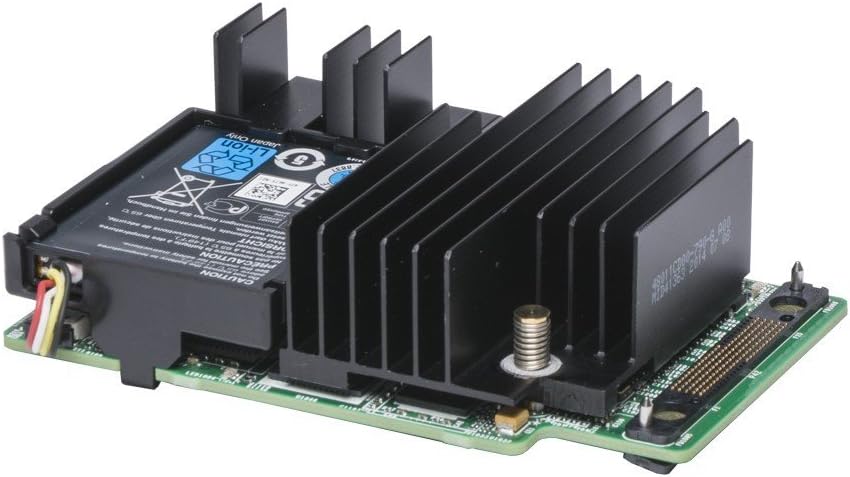
This image displays the Dell PERC H730P RAID controller, a low-profile expansion card. It features a prominent black heatsink covering the main processor, and a battery backup unit (BBU) attached, indicating its ability to protect data in case of power loss. The card has a green PCB with various electronic components and a connector for integration into a server system.
3. Setup and Installation
Safety Precautions: Always ensure the server is powered off and disconnected from the power source before performing any installation or maintenance. Wear an anti-static wrist strap to prevent electrostatic discharge (ESD) damage to components.
Installation Steps:
- Prepare the Server: Power down the server and disconnect all power cables. Open the server chassis according to the server's documentation.
- Locate an Available PCIe Slot: Identify an available PCI Express 3.0 x8 slot on the server's motherboard. The PERC H730P is a low-profile card.
- Install the Controller: Carefully align the PERC H730P card with the chosen PCIe slot and press down firmly until it is securely seated. Secure the card with any retaining clips or screws provided by the server chassis.
- Connect SAS/SATA Cables: Connect the appropriate SAS/SATA data cables from the PERC H730P's internal ports to your server's hard drives or backplane. Ensure all connections are secure.
- Close the Server: Once the card and cables are securely installed, close the server chassis and reconnect power cables.
- Power On and Configure: Power on the server. During boot-up, access the PERC BIOS configuration utility (typically by pressing a specific key like Ctrl+R or F2, as indicated on screen) to create and configure RAID arrays. Refer to your server's documentation for specific BIOS access instructions.
4. Operating Instructions
After physical installation, the primary operation involves configuring and managing RAID arrays.
RAID Configuration:
- Accessing the PERC BIOS: During server boot, a prompt will appear to enter the PERC BIOS Configuration Utility. Follow the on-screen instructions (e.g., press Ctrl+R).
- Creating Virtual Disks: Within the utility, you can create virtual disks by selecting physical drives and choosing a RAID level (0, 1, 5, 6, 10, 50, 60). Each RAID level offers different performance and data redundancy characteristics.
- Operating System Installation: Once virtual disks are configured, you can proceed with installing your operating system (e.g., Linux) onto these virtual disks. Ensure appropriate drivers are loaded during OS installation if required.
For detailed instructions on specific RAID configurations and advanced settings, refer to the Dell PowerEdge Server documentation relevant to your server model.
5. Maintenance
Regular maintenance ensures optimal performance and data integrity for your storage system.
- Firmware Updates: Periodically check the Dell support website for updated firmware for the PERC H730P controller. Keeping firmware current can improve performance, stability, and compatibility.
- Driver Updates: Ensure that the operating system drivers for the PERC H730P are up-to-date.
- Monitor RAID Status: Use Dell's OpenManage Server Administrator or other monitoring tools to regularly check the health and status of your RAID arrays and physical drives. Address any warnings or errors promptly.
- Battery Backup Unit (BBU): The PERC H730P includes a BBU. Monitor its health and replace it if it indicates failure, as it is crucial for protecting data in cache during power outages.
6. Troubleshooting
If you encounter issues with your PERC H730P controller, consider the following troubleshooting steps:
- No Detection:
- Verify the card is securely seated in the PCIe slot.
- Ensure all power and data cables are correctly connected.
- Check server BIOS settings to ensure PCIe slots are enabled.
- Drive Errors/RAID Degradation:
- Check the status of individual drives in the PERC BIOS or monitoring software.
- Replace failed drives promptly.
- Ensure proper drive cooling to prevent overheating.
- Performance Issues:
- Verify that the latest firmware and drivers are installed.
- Check for any background RAID operations (e.g., rebuilds, consistency checks) that might impact performance.
- Ensure sufficient server resources (CPU, RAM) are available.
- Operating System Not Booting:
- Confirm that the virtual disk containing the operating system is set as the primary boot device in the server BIOS.
- Ensure the operating system has the correct drivers for the PERC H730P.
If issues persist, consult the Dell support website or contact Dell technical support for further assistance.
7. Specifications
| Feature | Specification |
|---|---|
| Brand | Dell |
| Model Number | 405-AAEK |
| Series | 7H4CN |
| Hardware Interface | PCI Express 3.0 x8, SAS, SATA |
| Data Transfer Rate | SAS 12Gb/s, SATA 6Gb/s |
| RAID Levels Supported | 0, 1, 5, 6, 10, 50, 60 |
| Cache Memory | 2GB NV Cache (Flash Backed) |
| Internal Ports | 8 SAS Ports |
| Operating System Compatibility | Linux, PC |
| Form Factor | Low Profile Plug-in Card |
| Compatible Devices | Dell PowerEdge R640/R740 (and other compatible Dell servers) |
| Item Weight | 6.2 ounces |
| Product Dimensions (LxWxH) | 6.7 x 9.5 x 2 inches |
| UPC | 884116181361 |
8. Warranty and Support
For information regarding the warranty of your Dell PERC H730P Storage Controller, please refer to the documentation provided with your Dell server or visit the official Dell support website. Dell offers comprehensive technical support and resources for its products.
Dell Support Website: www.dell.com/support


