1. Introduction
This manual provides comprehensive instructions for the safe and efficient operation, maintenance, and troubleshooting of the UNICO SQ2800P Scanning Spectrophotometer. The SQ2800P is a single-beam spectrophotometer designed for precise measurements across a wavelength range of 190-1100 nm, featuring a 4 nm bandpass and a built-in printer for convenience. It includes integrated software for various applications such as Transmittance/Absorbance/Concentration (T/A/Conc), Standard Curve analysis, Kinetics, Multi-wavelength scanning, and DNA/Protein analysis.
Please read this manual thoroughly before operating the instrument to ensure proper usage and to maximize its performance and longevity.
2. Safety Information
Adhering to safety guidelines is crucial for preventing injury and damage to the instrument.
- Always connect the instrument to a grounded power outlet. Ensure the voltage setting (110V/220V) matches your local power supply before connecting. The unit is preset at 110V.
- Do not operate the spectrophotometer in environments with excessive dust, humidity, or corrosive gases.
- Avoid spilling liquids onto the instrument. In case of spillage, immediately disconnect power and clean thoroughly.
- Do not attempt to open the instrument casing or perform unauthorized repairs. Refer all servicing to qualified personnel.
- Handle cuvettes with care. Use only the provided optical glass and quartz cuvettes.
- Ensure proper ventilation around the instrument to prevent overheating.
3. Product Overview
The UNICO SQ2800P is a sophisticated scanning spectrophotometer designed for a wide range of analytical applications. Key features include:
- Built-in Printer: For immediate hard copies of results.
- Single Beam Optics: Provides reliable and accurate measurements.
- Wide Wavelength Range: 190-1100 nm, suitable for UV/Vis applications.
- 4 nm Bandpass: Ensures good spectral resolution.
- LCD Screen: Clear display for navigation and data viewing.
- Programmable Functions: User-friendly interface for various measurement modes.
- 4-Position Cell Holder: Accommodates multiple samples for efficiency.
- Connectivity: USB port and parallel port for external connections.
- Integrated Software: T/A/Conc, Standard Curve, Kinetics, Multi-wavelength scanning, DNA/Protein.
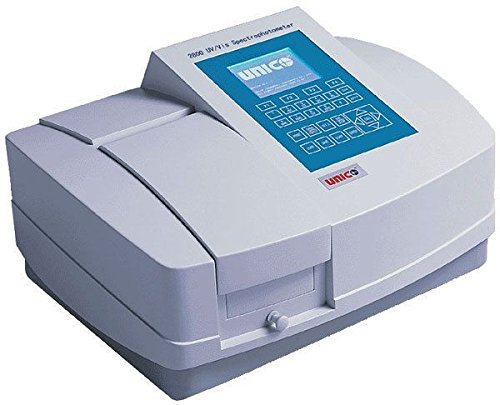
Figure 3.1: The UNICO SQ2800P Scanning Spectrophotometer. This image shows the front view of the spectrophotometer, highlighting its integrated LCD screen, control panel, built-in printer slot, and the sample compartment with a 4-position cell holder. The UNICO logo is visible on the front panel.
4. Setup
4.1 Unpacking and Inspection
- Carefully remove the spectrophotometer and all accessories from the packaging.
- Verify that all components are present:
- UNICO SQ2800P Spectrophotometer unit
- Power cord
- USB cable
- Parallel port cable
- (4) Optical glass cuvettes
- (2) Quartz cuvettes
- Dust cover
- User manual (this document)
- Inspect the instrument for any signs of damage incurred during shipping. Report any damage to your supplier immediately.
4.2 Placement
- Place the spectrophotometer on a stable, level surface, away from direct sunlight, strong magnetic fields, and sources of vibration.
- Ensure adequate space around the instrument for ventilation and access to ports.
4.3 Power Connection
- Before connecting, confirm the voltage switch on the back of the unit is set to your local power supply (110V or 220V). The unit is preset at 110V.
- Connect the power cord to the instrument's power inlet and then to a grounded electrical outlet.
4.4 Initial Power On
- Press the power switch located on the rear of the instrument.
- The LCD screen will illuminate, and the instrument will perform a self-test. Allow the instrument to warm up for at least 15-30 minutes for optimal stability and accuracy.
5. Operating Instructions
5.1 Basic Operation
- Sample Preparation: Prepare your samples and blank solution (solvent) in appropriate cuvettes. Ensure cuvettes are clean and free of scratches or fingerprints.
- Cuvette Insertion: Open the sample compartment lid. Insert the blank cuvette into the designated position (usually the first position in the 4-position cell holder). Ensure the clear sides of the cuvette face the light path.
- Wavelength Selection: Use the keypad to enter the desired wavelength for your measurement.
- Blanking: With the blank cuvette in place, press the "Blank" or "Zero" button to set the instrument to zero absorbance/100% transmittance.
- Sample Measurement: Replace the blank cuvette with your sample cuvette. The instrument will display the absorbance or transmittance value.
5.2 Integrated Software Functions
The SQ2800P includes several built-in software modes accessible via the main menu.
- T/A/Conc (Transmittance/Absorbance/Concentration):
This mode allows direct measurement of transmittance, absorbance, or calculation of concentration based on a known factor or standard.
- Standard Curve:
Used to create a calibration curve from a series of known concentration standards. Once the curve is established, unknown sample concentrations can be determined automatically.
- Kinetics:
Measures the change in absorbance or transmittance over time, useful for enzyme kinetics or reaction rate studies. Users can set measurement intervals and total duration.
- Multi-wavelength Scanning:
Performs a spectral scan across a user-defined wavelength range (e.g., 190-1100 nm) to identify absorbance peaks and valleys. This is crucial for qualitative analysis and determining optimal measurement wavelengths.
- DNA/Protein:
Dedicated mode for calculating DNA and protein concentrations using specific absorbance ratios (e.g., A260/A280 for nucleic acids). This mode simplifies common biochemical measurements.
Refer to the on-screen prompts and the detailed software section in the full user manual for specific steps within each mode.
6. Maintenance
6.1 Cleaning
- Exterior: Wipe the exterior surfaces with a soft, damp cloth. Do not use abrasive cleaners or solvents.
- Cuvette Compartment: Use a soft brush or lint-free cloth to remove any dust or spills from the sample compartment. Ensure no debris obstructs the light path.
- Cuvettes: Clean cuvettes thoroughly with appropriate cleaning solutions (e.g., dilute acid, detergent) and rinse with distilled water. Dry them completely before use.
6.2 Calibration
The SQ2800P performs an internal self-calibration upon startup. For advanced calibration or performance verification, consult the full user manual or contact UNICO technical support. Regular checks with certified reference materials are recommended to ensure accuracy.
6.3 Storage
When not in use, cover the spectrophotometer with the provided dust cover to protect it from dust and environmental contaminants. Store in a dry, temperature-controlled environment.
7. Troubleshooting
| Problem | Possible Cause | Solution |
|---|---|---|
| Instrument does not power on. | Power cord not connected; power switch off; no power from outlet; incorrect voltage setting. | Check power cord connection; ensure power switch is on; verify outlet power; confirm voltage switch is correct (110V/220V). |
| Unstable readings or high noise. | Instrument not warmed up; dirty cuvette; air bubbles in sample; sample compartment lid open; external vibrations. | Allow adequate warm-up time (15-30 min); clean cuvette; remove air bubbles; close sample compartment lid; ensure stable environment. |
| Error message on LCD. | Internal system error; lamp issue; calibration failure. | Note the error code and consult the full user manual's error code section. If persistent, contact technical support. |
| Printer not printing. | No paper; paper jammed; printer settings incorrect. | Check and load paper; clear any paper jams; verify printer settings in the menu. |
For issues not listed here or if troubleshooting steps do not resolve the problem, please contact UNICO technical support.
8. Specifications
| Parameter | Value |
|---|---|
| Model Number | SQ2800P |
| Optical System | Single Beam |
| Wavelength Range | 190-1100 nm |
| Bandpass | 4 nm |
| Detector | Silicon Photodiode |
| Light Source | Deuterium Lamp (UV), Tungsten Halogen Lamp (Vis) |
| Display | LCD Screen |
| Cell Holder | 4-position |
| Connectivity | USB Port, Parallel Port |
| Built-in Software | T/A/Conc, Standard Curve, Kinetics, Multi-wavelength scanning, DNA/Protein |
| Power Supply | 110/220V, 50/60Hz (Switchable, preset at 110V) |
| Certifications | CE Certified |
| Package Dimensions | 10 x 10 x 10 inches |
| Weight | 1 Pound (shipping weight) |
9. Warranty and Support
For detailed warranty information, please refer to the warranty card included with your product or visit the official UNICO website.
For technical support, service, or to order replacement parts, please contact UNICO customer service. Have your model number (SQ2800P) and serial number ready when contacting support.
Manufacturer: Unico
Model: SQ2800P


