1. Important Safety Information
Read all instructions carefully before installing or using this heater. Failure to follow these instructions may result in electric shock, fire, property damage, or personal injury.
- Electrical Connection: This heater requires a 240-volt, dedicated circuit. All wiring must be performed by a qualified electrician and comply with local and national electrical codes.
- Mounting: Mount the heater securely to a ceiling joist or other structural support. Ensure adequate clearance from walls, ceilings, and combustible materials as specified in the installation section.
- Flammable Materials: Do not store or use gasoline, paint, or other flammable liquids or vapors in the vicinity of this heater.
- Overheating Protection: The heater is equipped with a thermal cut-off switch that will automatically shut off the unit if it overheats. If this occurs, turn off the heater, allow it to cool, and then investigate the cause of overheating before restarting.
- Children and Pets: Keep children and pets away from the heater. Do not allow them to operate or play near the unit.
- Maintenance: Disconnect power before performing any maintenance or cleaning.
2. Product Overview
The ProFusion Heat Ceiling-Mounted Garage Heater (Model HA24-50M / EH-4604) is designed to provide supplemental heat for garages, workshops, and similar indoor spaces. It features a durable construction, adjustable heat settings, and an integrated thermostat for temperature control.
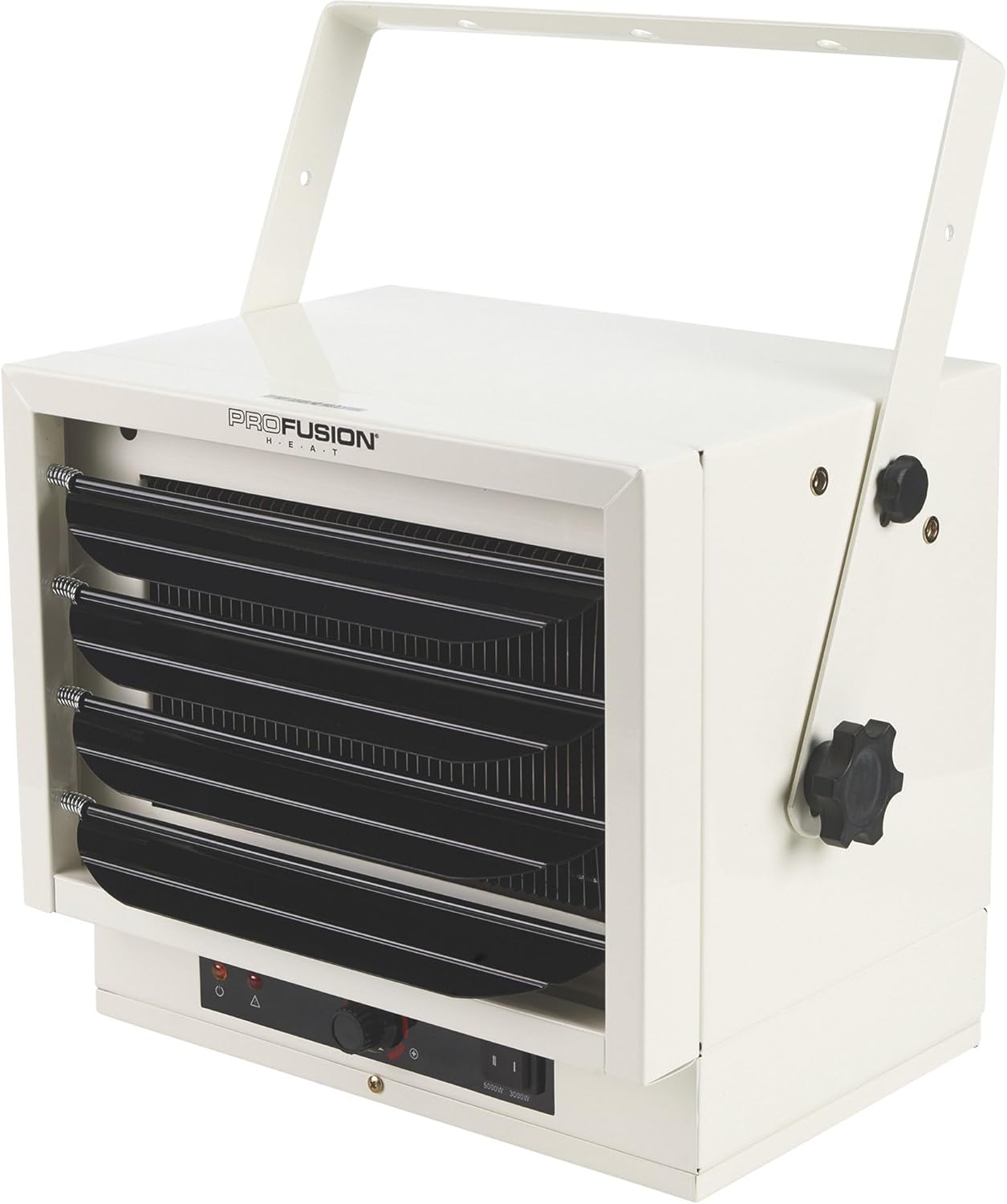
Image 2.1: Front angled view of the ProFusion Heat Ceiling-Mounted Garage Heater, showing the main unit and mounting bracket.
Key Features:
- Heat Output: Up to 17,065 BTUs (5000 Watts)
- Voltage: 240 Volts
- Mounting: Ceiling Mount
- Heat Settings: 3000W and 5000W
- Controls: Adjustable Thermostat, Power Switch
- Safety: Tip-Over Protection (though ceiling mounted, this feature is integrated), Overheat Protection

Image 2.2: Side view of the heater, highlighting the control knobs for thermostat adjustment and power settings.
3. Setup and Installation
3.1 Pre-Installation Checklist
- Verify that the power supply available is 240 volts.
- Ensure the installation location has adequate structural support for the heater's weight (approximately 25 pounds).
- Maintain minimum clearances:
- Front: 36 inches (91 cm)
- Sides: 12 inches (30 cm)
- Rear: 12 inches (30 cm)
- Ceiling: 6 inches (15 cm)
- Confirm that the area is free from flammable materials, dust, and excessive moisture.
3.2 Mounting Instructions
- Identify a suitable ceiling joist or sturdy structural beam capable of supporting the heater.
- Position the mounting bracket against the ceiling and mark the drilling locations.
- Drill pilot holes as necessary.
- Securely attach the mounting bracket to the ceiling using appropriate hardware (not included).
- Lift the heater and align its side mounting holes with the holes on the bracket.
- Insert the provided bolts and secure the heater to the bracket, allowing for angle adjustment.
- Adjust the heater's angle to direct airflow as desired and tighten the adjustment knobs.

Image 3.1: The garage heater shown mounted to a ceiling, demonstrating typical installation.
3.3 Electrical Connection
WARNING: All electrical wiring must be performed by a licensed electrician in accordance with all national and local electrical codes.
- Ensure the main power supply to the circuit is turned OFF at the breaker panel before beginning any wiring.
- Connect the heater to a dedicated 240-volt, 30-amp circuit.
- Use appropriate gauge wiring for 240V applications (e.g., 10-gauge wire for a 30-amp circuit).
- Follow the wiring diagram provided inside the heater's electrical compartment cover.
- Ensure all connections are tight and secure.
- Replace the electrical compartment cover before restoring power.
4. Operating Instructions
4.1 Powering On/Off
- After installation and electrical connection are complete, turn on the circuit breaker supplying power to the heater.
- Locate the main power switch on the heater's control panel. Set it to the 'ON' position.
- To turn off the heater, set the main power switch to the 'OFF' position. For extended periods of non-use, it is recommended to turn off the circuit breaker.
4.2 Setting Heat Output
The heater offers two heat output settings:
- 3000 Watts: Provides approximately 10,236 BTUs of heat.
- 5000 Watts: Provides approximately 17,065 BTUs of heat.
Select the desired heat output using the switch on the control panel. The 5000W setting will provide faster heating for larger spaces or colder conditions.
4.3 Thermostat Control
The integrated thermostat controls the ambient temperature. To set the desired temperature:
- Turn the thermostat knob clockwise to the maximum setting. The heater will begin to operate.
- Once the room reaches a comfortable temperature, slowly turn the thermostat knob counter-clockwise until the heater turns off.
- The heater will now cycle on and off automatically to maintain the set temperature.
5. Maintenance
Regular maintenance ensures optimal performance and longevity of your heater. Always disconnect power at the circuit breaker before performing any maintenance.
5.1 Cleaning
- Exterior: Wipe the exterior surfaces with a soft, damp cloth. Do not use abrasive cleaners or solvents.
- Air Intake/Outlet: Periodically inspect the air intake (rear grille) and air outlet (front louvers) for dust and debris accumulation. Use a vacuum cleaner with a brush attachment to gently remove any buildup.
- Internal Components: Do not attempt to clean internal components unless you are a qualified service technician. Dust accumulation on heating elements can reduce efficiency and pose a fire hazard.

Image 5.1: Rear view of the heater, showing the air intake grille and fan assembly.
5.2 Storage
If storing the heater for an extended period, ensure it is clean and dry. Store it in a cool, dry location, protected from dust and moisture.
6. Troubleshooting
Before contacting customer support, review the following common issues and solutions:
| Problem | Possible Cause | Solution |
|---|---|---|
| Heater does not turn on. | No power supply, tripped circuit breaker, thermostat set too low. | Check circuit breaker. Ensure heater is plugged in (if applicable) or wired correctly. Increase thermostat setting. |
| Heater turns off unexpectedly. | Overheat protection activated, thermostat reached set temperature. | Allow heater to cool. Check for obstructions around air intake/outlet. Ensure proper clearances. If overheating persists, contact support. This is normal operation if the thermostat reached the set temperature. |
| Insufficient heat output. | Low heat setting selected, room size too large, poor insulation. | Select the 5000W heat setting. Consider the heater's capacity relative to the room size and insulation. |
| Unusual noise. | Loose components, fan obstruction. | Disconnect power. Inspect for any loose parts or debris in the fan area. If noise persists, contact support. |
If you experience issues not listed here or if the problem persists after attempting the solutions, please contact customer support.
7. Specifications
Technical specifications for the ProFusion Heat Ceiling-Mounted Garage Heater:
| Feature | Detail |
|---|---|
| Brand | ProFusion Heat |
| Model Number | HA24-50M (EH-4604) |
| Heat Output | 17,065 British Thermal Units (BTU) / 5000 Watts |
| Voltage | 240 Volts |
| Amperage | 20 Amps |
| Product Dimensions (D x W x H) | 10.62" x 14" x 12.62" |
| Item Weight | 25 pounds |
| Mounting Type | Ceiling Mount |
| Special Features | Tip-Over Protection, Overheat Protection |
| Indoor/Outdoor Usage | Indoor (Garages, Workshops) |

Image 7.1: Dimensional diagram of the heater, indicating height, width, and depth.
8. Warranty and Support
This ProFusion Heat product is covered by a limited manufacturer's warranty. Please refer to the warranty card included with your purchase for specific terms and conditions, including warranty duration and coverage details.
For technical assistance, troubleshooting beyond this manual, or warranty claims, please contact ProFusion Heat customer support. Contact information can typically be found on the product packaging or the manufacturer's official website.
Please have your model number (HA24-50M or EH-4604) and purchase date available when contacting support.