
Introduction
The Starfrit Nutrition Kitchen Scale is designed to assist in precise food measurement and nutritional tracking. This digital scale features a durable glass platform, a comprehensive food database, and the ability to calculate up to 7 essential nutritional values. It is suitable for monitoring daily food intake with accuracy and ease.
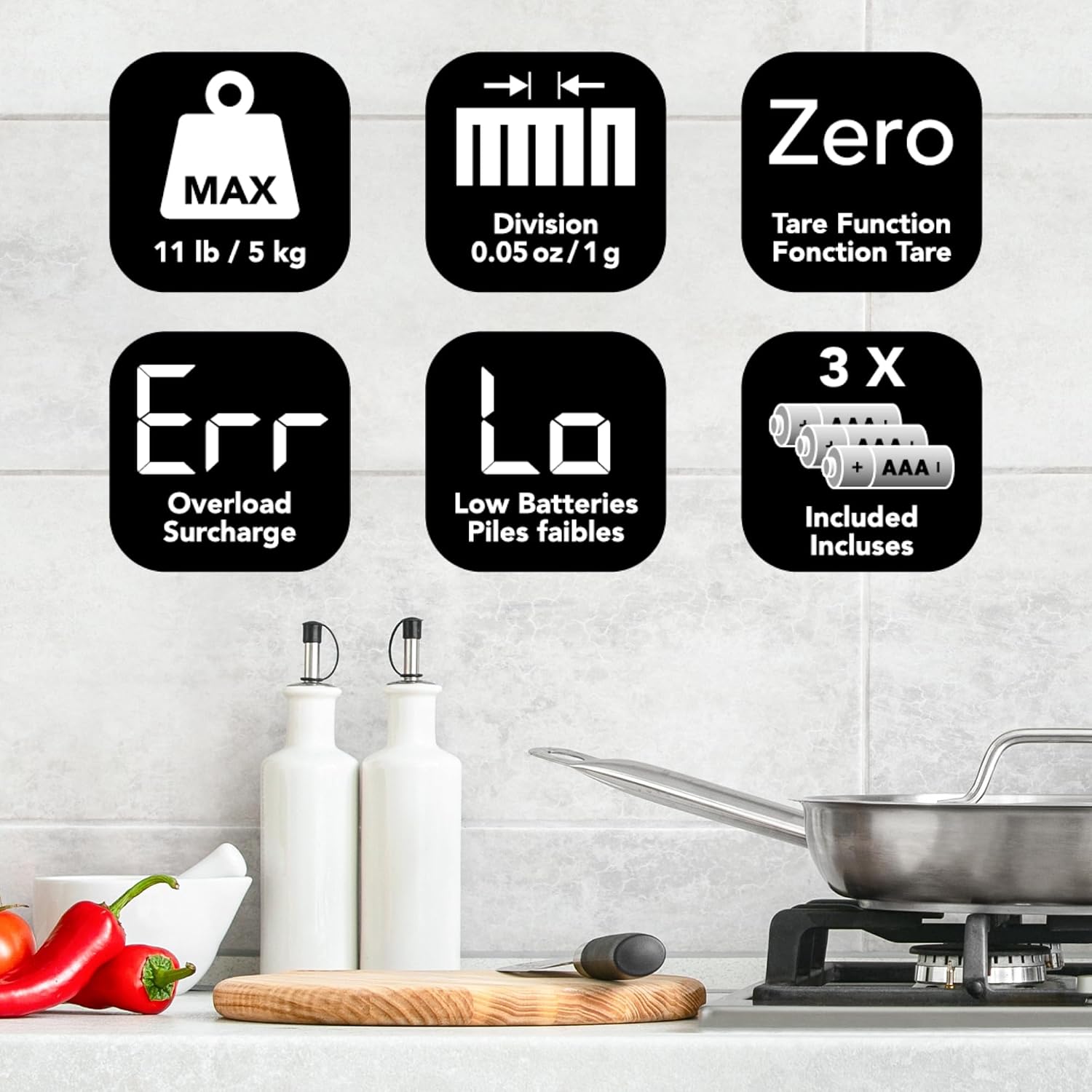
Image: Top-down view of the Starfrit Nutrition Kitchen Scale, showcasing its sleek design and digital display.

Image: The ultra-slim Starfrit Nutrition Kitchen Scale stored neatly in a kitchen drawer, demonstrating its compact design.
Safety Information
- Always place the scale on a firm, flat, and stable surface to ensure accurate readings.
- Do not immerse the scale in water or other liquids. Clean with a damp cloth.
- Avoid dropping the scale or subjecting it to strong impacts, as this may damage the internal components or glass platform.
- Keep out of reach of children.
- Do not use abrasive cleaners or sharp objects on the scale surface.
Setup
1. Battery Installation
The scale requires 3 AAA batteries, which are included. To install or replace batteries:
- Locate the battery compartment on the underside of the scale.
- Open the battery compartment cover.
- Insert the 3 AAA batteries, ensuring the correct polarity (+/-) as indicated inside the compartment.
- Close the battery compartment cover securely.
2. Initial Placement
Place the scale on a hard, level surface. Uneven surfaces can affect accuracy.
Operating Instructions
1. Turning On/Off
- To turn on: Press the Power button (usually marked with a power symbol). The display will show '0' or '0.0' when ready.
- To turn off: Press and hold the Power button for a few seconds, or the scale will automatically shut off after a period of inactivity to conserve battery life.
2. Weighing Food Items
The scale has a maximum capacity of 11 lb / 5 kg with an accuracy of 0.05 oz / 1 g.
- Ensure the scale is on and displays '0'.
- Place the item directly onto the glass platform. The weight will be displayed on the LCD screen.
- To change units (imperial/metric): Press the Unit button (often labeled 'g/oz' or similar) to toggle between grams (g) and ounces (oz), or pounds (lb) and kilograms (kg).

Image: The scale displaying the weight of brown sugar in a bowl, highlighting the bright blue LCD for clear results.
3. Tare Function
The Tare function allows you to weigh ingredients in a container by subtracting the container's weight.
- Place an empty bowl or container on the scale. The display will show its weight.
- Press the ZERO or TARE button. The display will reset to '0'.
- Add your food item into the container. The display will now show only the weight of the food.

Image: A visual guide demonstrating the three steps of using the tare function: placing a bowl, zeroing the scale, and adding food.
4. Nutritional Value Calculation
This scale can calculate 7 nutritional values: calories, fiber, sodium, protein, fat, carbohydrates, and cholesterol, using its database of 999 programmed foods.
- Weigh your food item using the steps above.
- Enter the corresponding food code from the included food list (refer to the separate food code manual if provided).
- The scale will display the nutritional values for the weighed portion.

Image: A diagram illustrating the 7 nutritional values (Calories, Carbs, Cholesterol, Fat, Fibre, Protein, Salt) that the scale can track.
5. Memory Function
The memory function allows you to track and accumulate daily intake for up to 99 items.
- After calculating the nutritional values for an item, use the Memory (M+) button to add it to the daily total.
- To review accumulated totals, use the Memory Recall (MR) button.
6. Integrated Timer
The scale includes a built-in kitchen timer for added convenience.
- Refer to the specific timer instructions in the full manual for setting and operating the timer function.
7. Room Temperature Indicator
The scale displays the ambient room temperature on its screen.
Maintenance and Care
Cleaning the Glass Platform
The scale features a durable and easy-to-clean glass platform.
- Wipe the surface with a soft, damp cloth immediately after use.
- For stubborn stains, use a mild detergent on the damp cloth, then wipe clean with a fresh damp cloth and dry thoroughly.
- Do not use abrasive cleaners, scouring pads, or chemical solvents, as these can damage the glass or electronic components.

Image: A hand wiping the glass platform of the scale, demonstrating its ease of cleaning.
Storage
Store the scale in a cool, dry place away from direct sunlight and extreme temperatures.
Troubleshooting
| Problem | Possible Cause | Solution |
|---|---|---|
| Display shows "Lo" | Low battery indicator. | Replace the 3 AAA batteries. |
| Display shows "Err" or "O-Ld" | Overload indicator. The weight on the scale exceeds its maximum capacity (11 lb / 5 kg). | Remove some weight from the scale immediately to prevent damage. |
| Inaccurate readings | Scale is on an uneven surface, or batteries are low. | Ensure the scale is on a flat, stable surface. Replace batteries if necessary. |
| Scale does not turn on | Batteries are incorrectly installed or depleted. | Check battery polarity and ensure they are fresh. |

Image: Icons illustrating key scale functions and alerts: Max capacity (11lb/5kg), Division (0.05oz/1g), Zero/Tare function, Overload (Err), Low Batteries (Lo), and Included Batteries (3x AAA).
Specifications
- Model Number: 093759-004-COUN
- Capacity: 11 lb / 5 kg
- Accuracy: 0.05 oz / 1 g
- Nutritional Values Tracked: Calories, Fiber, Sodium, Protein, Fat, Carbohydrates, Cholesterol
- Programmed Foods Database: 999 items
- Memory Function: Tracks up to 99 items
- Display Type: LCD
- Material: Glass platform
- Power Supply: 3 x AAA batteries (included)
- Product Dimensions: 18.5 x 4 x 25.6 cm (7.3 x 1.6 x 10.1 inches)
- Item Weight: 449 g (0.99 lb)
- Manufacturer: Starfrit
- Country of Origin: China

Image: Diagram showing the dimensions of the Starfrit Nutrition Kitchen Scale: 8.7 inches (22 cm) wide, 6 inches (15.3 cm) deep, and 0.7 inches (1.9 cm) thick, with an 11 lb / 5 kg capacity.
Warranty and Support
Warranty Information
This Starfrit Nutrition Kitchen Scale comes with a 1-year warranty from the date of purchase. Please retain your original purchase receipt as proof of purchase for any warranty claims.
Customer Support
For technical assistance, troubleshooting not covered in this manual, or warranty inquiries, please contact Starfrit customer service. Contact information can typically be found on the Starfrit official website or on the product packaging.

