
1. Introduction
1.1 Product Overview
The Epson PowerLite 535W is a WXGA 3LCD short-throw projector designed for various environments, including business, education, and home cinema. It features 3400 lumens of color brightness and 3400 lumens of white brightness, providing clear images even in well-lit rooms. Its short-throw capability allows for large image projection from a minimal distance, reducing shadows and glare.

Image: Front view of the Epson PowerLite 535W projector, showcasing its lens and branding.
1.2 What's in the Box
Verify that all components are present in the packaging:
- PowerLite 535W projector
- Power cord
- Computer cable (VGA)
- Projector remote control
- Batteries for remote control
- User manual CD
- Projector software CD
- Quick Setup Sheet
- Password protection sticker
- Lens cover
2. Setup
2.1 Physical Placement
Position the projector on a stable, flat surface or mount it securely. Due to its short-throw design, the projector can be placed close to the screen or wall, projecting a large image (up to 116 inches diagonal) from approximately 4 feet away. Ensure adequate ventilation around the projector to prevent overheating.
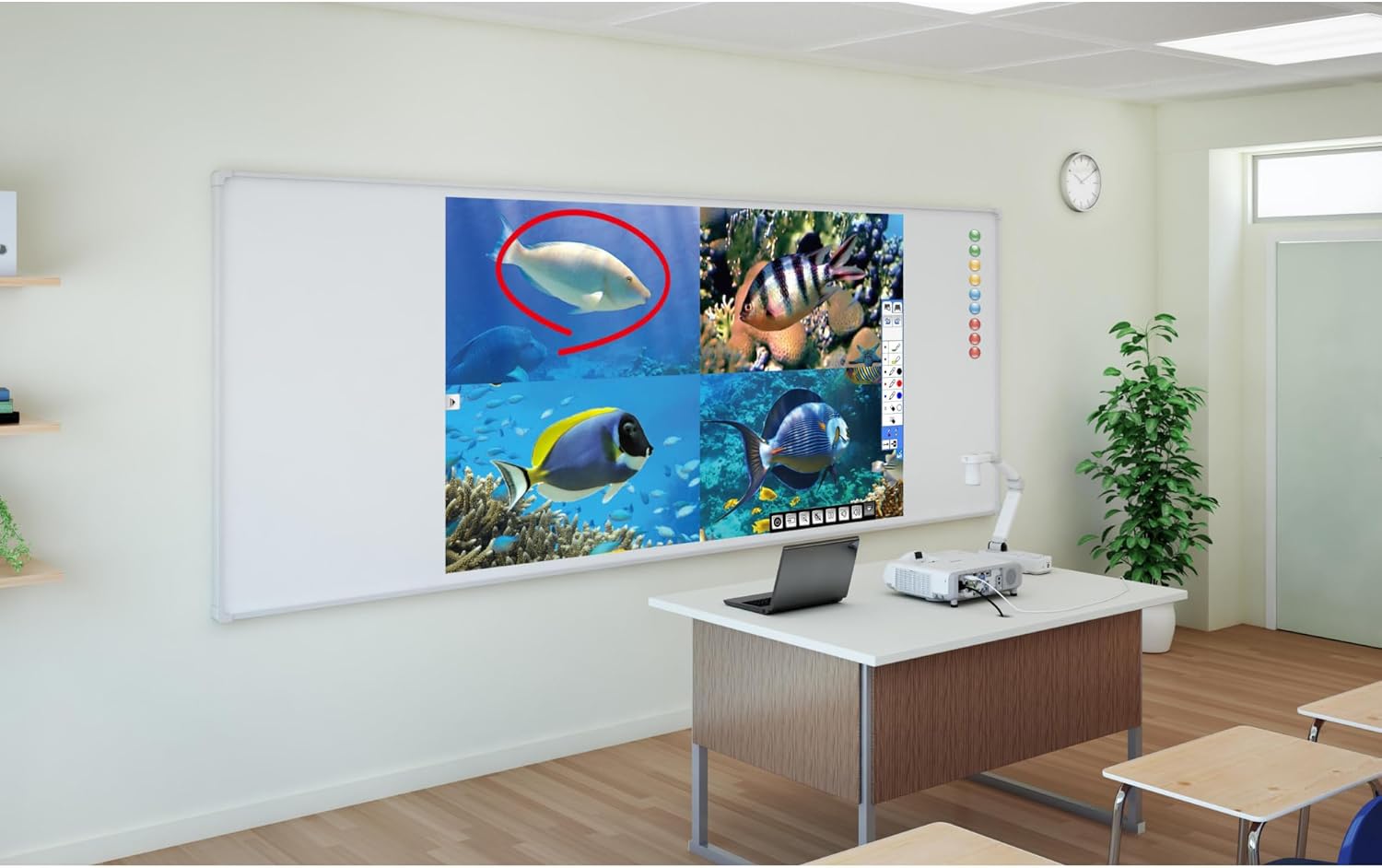
Image: The Epson PowerLite 535W projector positioned on a desk in a classroom, projecting an image onto a whiteboard.
2.2 Connecting Devices
The PowerLite 535W offers multiple connectivity options. Connect your video source (computer, DVD player, etc.) to the appropriate input port on the projector.
- HDMI: For high-definition digital video and audio.
- Computer1 (VGA): For analog computer video input.
- Video (RCA): For standard definition composite video.
- S-Video: For enhanced standard definition video.
- Audio 1 (Stereo Mini): For analog audio input.
- USB-B: For USB display and control.
- LAN (RJ-45): For network connectivity and control.

Image: Rear view of the Epson PowerLite 535W projector, displaying various input and output ports including HDMI, VGA, USB, and audio connections.
2.3 Powering On
Connect the power cord to the projector and a power outlet. Press the power button on the projector or the remote control to turn on the unit. The projector will initiate its startup sequence.
3. Operating Instructions
3.1 Basic Controls
The projector can be operated using the control panel on the top of the unit or the included remote control.

Image: Top view of the Epson PowerLite 535W projector, highlighting the control panel with buttons for power, menu navigation, source selection, and image adjustments.
- Power Button: Turns the projector on or off.
- Source Search: Cycles through available input sources.
- Menu Button: Accesses the projector's on-screen menu.
- Arrow Buttons: Navigate through menu options and adjust settings.
- Enter Button: Confirms selections.
- Esc Button: Exits menus or returns to the previous screen.
- A/V Mute: Temporarily mutes audio and blanks the screen.
3.2 Image Adjustment
Adjust the projected image for optimal clarity and size:
- Focus Ring: Rotate the focus ring on the lens to sharpen the image.
- Zoom Lever: Adjust the zoom lever on the lens to change the image size.
- Keystone Correction: Use the keystone correction feature (manual or automatic, if available) to correct trapezoidal distortion if the projector is not perfectly perpendicular to the screen.
3.3 Source Selection
Press the 'Source Search' button on the control panel or remote to cycle through connected input sources until your desired source is displayed.
4. Maintenance
4.1 Lamp Replacement
The projector lamp has a lifespan of up to 10,000 hours in ECO Mode and 5,000 hours in Normal Mode. When the lamp reaches the end of its life, a warning indicator will appear. Refer to the detailed instructions in the user manual CD for safe lamp replacement procedures. Always use genuine Epson replacement lamps.
4.2 Cleaning
Regular cleaning helps maintain projector performance. Use a soft, dry, lint-free cloth to clean the projector casing. For the lens, use a lens cleaning cloth and lens cleaner specifically designed for optical surfaces. Do not use abrasive cleaners or solvents.
5. Troubleshooting
This section addresses common issues you might encounter with your projector.
| Problem | Possible Solution |
|---|---|
| No image projected | Ensure the projector is powered on and the correct input source is selected. Check all cable connections. Verify the lens cover is removed. |
| Image is blurry | Adjust the focus ring on the lens. Ensure the projector is within the recommended projection distance. |
| Image is distorted (trapezoid shape) | Use the keystone correction feature to adjust the image shape. Ensure the projector is placed as perpendicular to the screen as possible. |
| No sound | Check audio cable connections. Ensure the volume is not muted or set too low on both the projector and the source device. |
| Projector overheats or shuts down | Ensure ventilation vents are clear and not obstructed. Operate the projector in an environment with adequate airflow. |
6. Specifications
| Feature | Detail |
|---|---|
| Brand | Epson |
| Model Number | PowerLite 535W |
| Display Resolution | 1280 x 800 (WXGA) |
| Color Brightness | 3400 lumens |
| White Brightness | 3400 lumens |
| Connectivity Technology | HDMI, VGA, USB, LAN |
| Product Dimensions | 12.7 x 13.5 x 3.7 inches |
| Item Weight | 8.2 pounds |
| Recommended Uses | Business, Education, Home Cinema |
| Special Feature | Short-throw, Built-in speakers |
| Lamp Life | Up to 10,000 hours (ECO Mode), 5,000 hours (Normal Mode) |
| On-mode power consumption | 230 watts |
| Visible screen diagonal | 116" / 295 cm |
7. Warranty and Support
For warranty information and technical support, please refer to the documentation included with your product or visit the official Epson support website. Keep your purchase receipt as proof of purchase for warranty claims.


