
Nice P1S
NICE P1S Portable Radio Transmitter User Manual
Model: P1S
1. Introduction
The Nice P1S portable wireless transmitter is designed for the control of blinds and rolling shutters. The NICE P1S is a 1-channel transmitter for individual management of 1 group automatically per group, also with individual activation of climate sensors. With just one click, you get the right light. The LED-indicated control buttons switch on and off the reception of automatic controls, which are transmitted by the climate sensors of the installation.
2. Product Overview
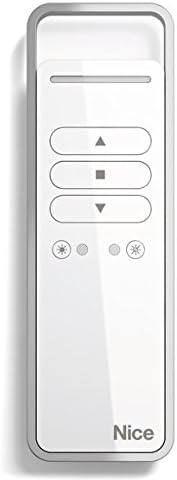
Figure 1: NICE P1S Portable Radio Transmitter. This image shows the sleek white design of the transmitter with its intuitive control buttons for up, stop, down, and light/dark settings. The 'Nice' brand logo is visible at the bottom.
Key Features:
- Ergonomic Design: Intuitive operation for user comfort.
- Easy Programming: Ability to store the same transmitter for multiple blinds or rolling shutters to create groups.
- MemoGroup Function: Allows recalling the latest multi-group setting.
- Compatibility: Designed for Era Mat and Era Fit series tubular motors with integrated receivers.
- Automatic Copying: New transmitters can be automatically copied from an already configured transmitter by simply pressing a button.
- Long Battery Life: Powered by 2 x 1.5 V DC AAA batteries, with an approximate battery life of 2 years (based on 10 transmissions per day).
- Extended Range: Up to 200 meters in open field and 35 meters indoors.
3. Setup
3.1 Battery Installation
- Locate the battery compartment on the back of the transmitter.
- Open the battery compartment cover.
- Insert 2 x 1.5 V AAA alkaline batteries, ensuring correct polarity (+/-).
- Close the battery compartment cover securely.
3.2 Initial Programming (Pairing with Motors)
For Era Mat and Era Fit series tubular motors with integrated receivers, the programming process is simplified via buttons located on the back of the transmitter within the battery compartment.
- Refer to your motor's instruction manual for specific pairing instructions.
- Typically, this involves putting the motor into programming mode.
- Press the designated programming button on the P1S transmitter (often located near the battery compartment) to send the pairing signal.
- Confirm successful pairing as indicated by the motor (e.g., a jog movement or LED indicator).
3.3 Copying Existing Transmitters
The P1S can automatically copy settings from an already configured transmitter.
- Place the new P1S transmitter close to the already configured transmitter.
- Activate the copying mode on the new P1S (refer to specific instructions, often a combination of button presses).
- Press a button on the already configured transmitter.
- The new P1S will copy the configuration.
4. Operating Instructions
The NICE P1S features intuitive buttons for controlling your blinds and rolling shutters.
- Up Button (▲): Press to raise the blind/shutter.
- Stop Button (■): Press to stop the blind/shutter at any desired position.
- Down Button (▼): Press to lower the blind/shutter.
- Light/Dark Buttons (☀ / ☽): These buttons, indicated by LED lights, control the reception of automatic commands from climate sensors. Press to enable or disable automatic control based on light conditions.
4.1 Group Control (MemoGroup)
If you have programmed the transmitter to control multiple blinds/shutters as a group, the MemoGroup function allows you to recall the latest multi-group setting. Simply press the desired control button (Up, Stop, Down) to operate the entire group.
5. Maintenance
5.1 Battery Replacement
When the transmitter's range decreases or the LED indicators dim, it's time to replace the batteries.
- Open the battery compartment on the back.
- Remove the old 2 x 1.5 V AAA alkaline batteries.
- Insert new 2 x 1.5 V AAA alkaline batteries, observing correct polarity.
- Close the battery compartment.
- Dispose of old batteries responsibly according to local regulations.
5.2 Cleaning
Clean the transmitter with a soft, dry cloth. Do not use abrasive cleaners or solvents.
6. Troubleshooting
| Problem | Possible Cause | Solution |
|---|---|---|
| Transmitter not responding | Dead batteries | Replace batteries (see Section 5.1). |
| Reduced operating range | Low batteries or interference | Replace batteries. Check for sources of radio interference (e.g., other wireless devices). |
| Motor not responding to commands | Transmitter not paired or motor out of range | Ensure transmitter is correctly paired (see Section 3.2). Move closer to the motor. |
7. Specifications
| Feature | Detail |
|---|---|
| Model | P1S |
| Power Supply | 2 x 1.5 V AAA Alkaline batteries |
| Battery Life | Approx. 2 years (10 transmissions/day) |
| Frequency | 433.92 MHz ± 100 KHz |
| Protection Rating (IP) | IP40 (Indoor or protected environment use) |
| Range | 200 m (open field), 35 m (indoors) |
| Wireless Code | Rolling Code |
| Operating Temperature | -5 °C to +55 °C |
| Dimensions (mm) | 49 x 150 x 14 |
| Weight | 85 g |
Related documentsP1S


Ask a question about this manual
Ask about setup, troubleshooting, compatibility, parts, safety, or missing instructions. Manuals+ will review the question and use this page’s manual context to help answer it.