
Introduction
This manual provides detailed instructions for the installation, operation, and maintenance of your ALEKO AS600 Automatic Swing Gate Opener. Please read this manual thoroughly before beginning installation or operation to ensure proper function and safety. This opener is designed for gates up to 10 feet long and 660 pounds.
Safety Information
Always prioritize safety during installation and operation. Failure to follow these instructions may result in serious injury or property damage.
- Read all instructions carefully before installation and use.
- Ensure the gate area is clear of obstructions before operating.
- Do not allow children or pets near the gate while it is in motion.
- Only use the gate opener for its intended purpose.
- Disconnect power before performing any maintenance or repairs.
- Keep remote controls out of reach of children.
- In case of power failure, use the manual release key to operate the gate.
- Install safety sensors (photocells) to prevent the gate from closing on obstructions.
Package Contents
The basic kit for the ALEKO AS600 Automatic Swing Gate Opener typically includes the following components:
- Gate Opener Actuator
- Control Box
- Two Remote Controls (Key Fobs)
- Manual Release Key
- Mounting Hardware
- Instruction Manual
Note: Additional accessories such as wireless keypads, photocell sensors, solar panels, and backup batteries may be included with specific kit variations (e.g., Backup Kit, Accessory Kit, Smart Accessory Kit, Solar Kits).
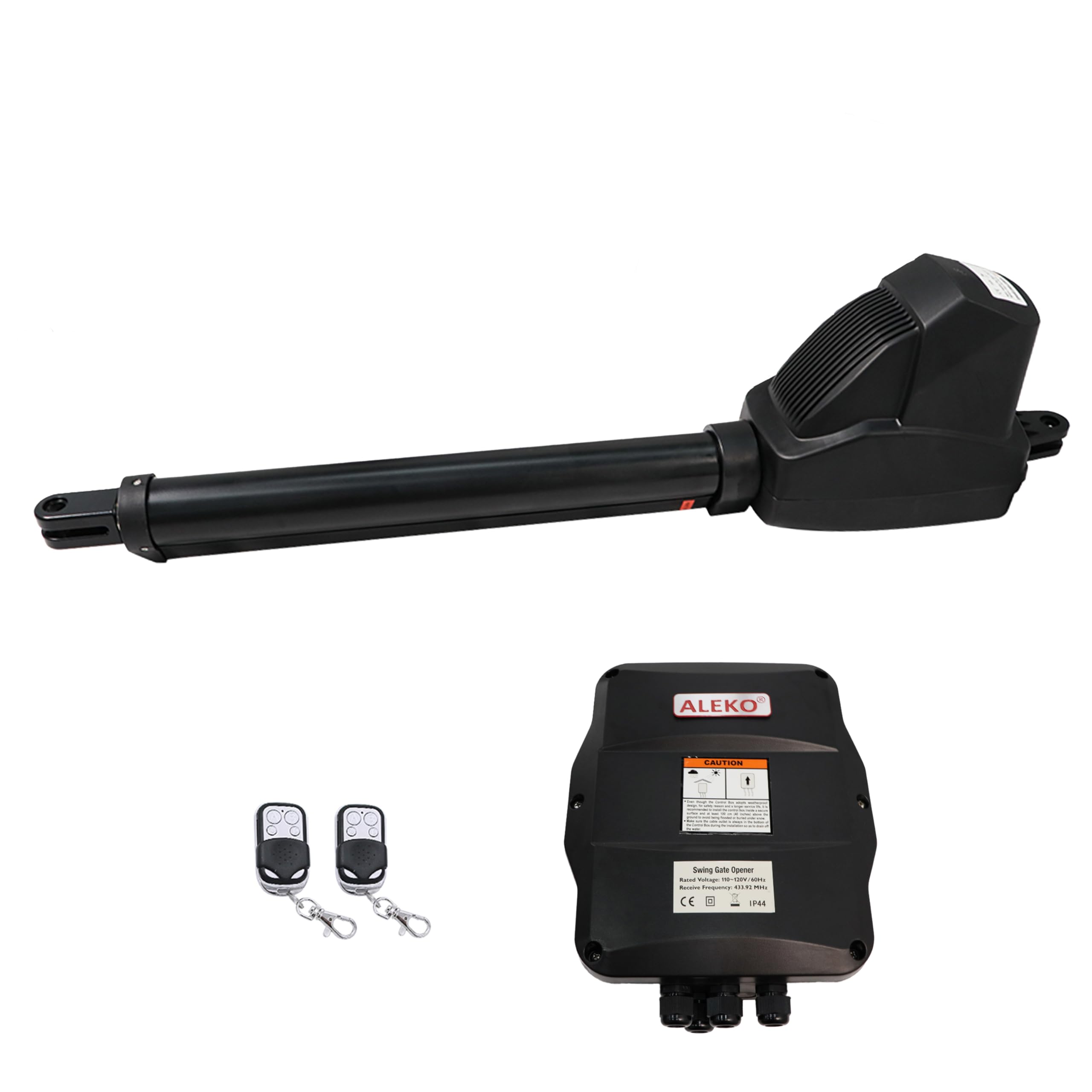
Image: Main components of the ALEKO AS600 Swing Gate Opener, including the actuator and control box.

Image: The remote control key fob and manual release key for the gate opener.
Setup & Installation
Proper installation is crucial for the reliable operation and longevity of your gate opener. It is recommended to have this installed by a qualified professional.
Pre-Installation Checklist:
- Ensure your gate is properly installed, swings freely, and is not binding.
- Verify the gate dimensions and weight are within the opener's specifications (up to 10 ft / 660 lbs).
- Confirm access to a suitable power source (AC/DC).
- Gather all necessary tools for installation.
Mounting the Actuator:
- Determine the optimal mounting position for the actuator on the gate and post, ensuring proper clearance for full gate swing.
- Securely attach the mounting brackets to the gate and post using the provided hardware.
- Connect the actuator to the mounting brackets.
Installing the Control Box:
- Mount the control box in a protected location, ideally inside the property, to shield it from weather and tampering.
- Connect the actuator cables to the control board inside the control box, following the wiring diagram in the full manual.
- Connect the power supply to the control box.
Connecting Accessories:
- If using a wireless keypad, follow its specific instructions for pairing with the control unit.
- Install photocell sensors at the appropriate height and distance to detect obstructions.
- Connect any solar panels or backup batteries as per their respective manuals.
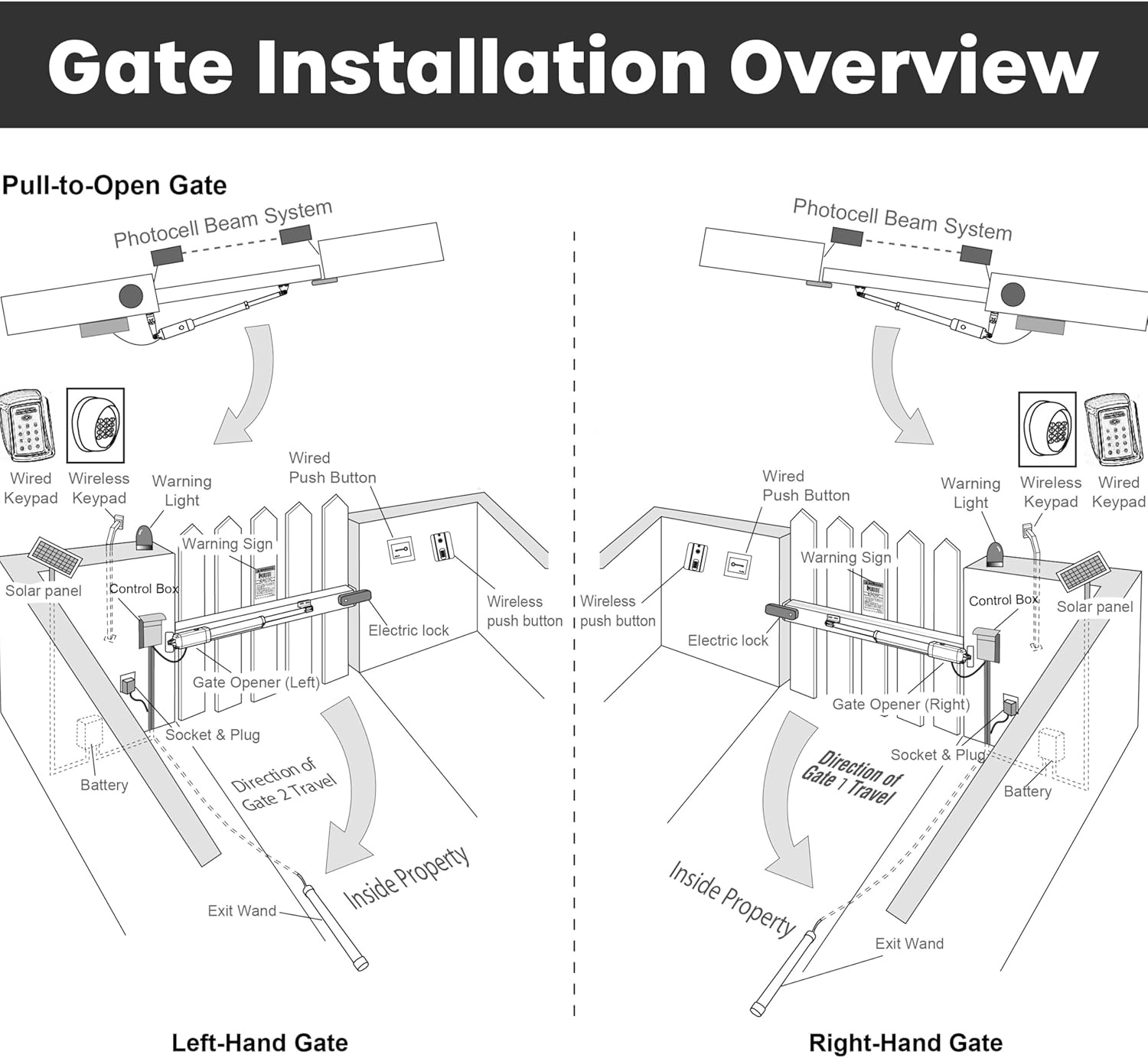
Image: Diagram illustrating the general overview of gate opener installation for both left-hand and right-hand swing gates, showing placement of components like the control box, solar panel, and keypad.
Operating Instructions
Using the Remote Control:
- Press the designated button on your remote control to open or close the gate.
- The remote has a range of up to 100 feet.
- Multiple gates can be programmed to a single remote (up to four gates).
Keypad Operation:
- Enter your programmed access code on the wireless keypad to operate the gate.
Features:
- Smooth Soft Start and Stop: The gate opener is designed to start and stop smoothly, reducing wear and tear on the gate and motor.
- Adjustable Auto-Close: The gate can be programmed to automatically close after a set period (0-99 seconds).
- Obstruction Detection: The system will stop or reverse if an obstruction is detected during opening or closing, enhancing safety.
- Manual Release: In case of power outage, use the manual release key to disengage the motor and operate the gate manually.
Video: A demonstration of the ALEKO Automatic Single Swing Gate Opener in operation, showcasing its quiet and smooth movement, keypad functionality, and remote control features. The video highlights the soft close and soft open capabilities, as well as the tension adjustment for secure closure.
Maintenance
Regular maintenance ensures optimal performance and extends the lifespan of your gate opener.
- Monthly: Inspect the gate and opener for any signs of wear, damage, or loose connections. Ensure the gate moves freely without resistance.
- Quarterly: Clean the photocell sensors to ensure they are free from dirt or debris that could obstruct their beam.
- Annually: Check and lubricate all moving parts of the gate and opener as recommended in the full product manual. Verify all safety features are functioning correctly.
- Keep the area around the gate and opener clear of vegetation and debris.
Troubleshooting
If you encounter issues with your gate opener, refer to the following common troubleshooting steps:
| Problem | Possible Cause | Solution |
|---|---|---|
| Gate does not respond to remote/keypad. | No power; remote battery dead; remote not programmed; obstruction. | Check power supply; replace remote battery; reprogram remote; clear obstructions. |
| Gate opens/closes partially. | Obstruction; limit settings incorrect; low battery (if applicable). | Clear obstruction; adjust limit settings; check/charge battery. |
| Gate reverses unexpectedly. | Obstruction detected by safety sensors. | Inspect and clean photocell sensors; ensure no physical obstructions. |
| Motor makes noise but gate does not move. | Manual release engaged; mechanical issue with gate or opener. | Disengage manual release; inspect gate hinges/wheels; contact support if mechanical issue persists. |
For more complex issues or if troubleshooting steps do not resolve the problem, please contact ALEKO customer support.
Specifications
| Feature | Detail |
|---|---|
| Model Number | AS600 |
| Max Gate Length | 10 feet (3 meters) |
| Max Gate Weight | 660 pounds (300 kg) |
| Power Source | AC/DC (Battery powered, DC, Solar compatible) |
| Item Weight | 40 pounds (18.14 kg) |
| Package Dimensions | 35 x 18 x 7 inches (88.9 x 45.7 x 17.8 cm) |
| Manufacturer | ALEKO |
| Remote Control Range | Up to 100 feet |
| Operating Temperature | -4°F to +122°F (-20°C to +50°C) |
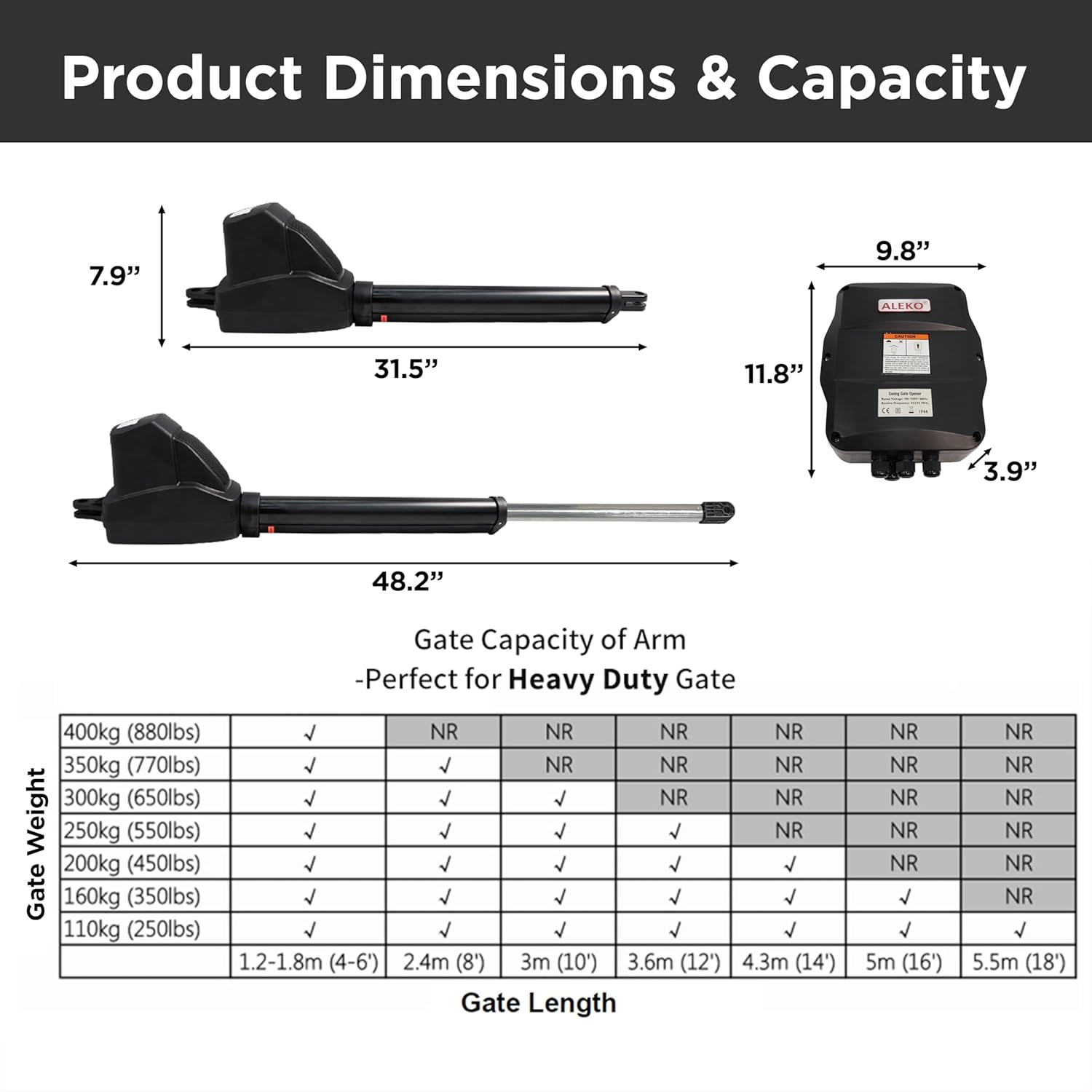
Image: Detailed product dimensions of the gate opener actuator and control box, along with a capacity table indicating suitable gate weights and lengths for heavy-duty gates.
Warranty & Support
The ALEKO AS600 Automatic Swing Gate Opener comes with a standard manufacturer's warranty. Please refer to the warranty card included in your package for specific terms and conditions. Typically, a 1-year warranty is provided.
For technical assistance, replacement parts, or warranty claims, please contact ALEKO customer support through their official website or the contact information provided in your product documentation. When contacting support, please have your model number (AS600) and purchase date readily available.
Visit the official ALEKO Store for more information: ALEKO Store


