
1. Introduction
This manual provides essential information for the proper installation, operation, and maintenance of your Ohaus Adventurer AX423 Precision Balance. Please read this manual thoroughly before using the balance to ensure accurate results and safe operation. The Ohaus Adventurer AX423 is a high-precision laboratory balance designed for accurate weighing in various scientific and industrial applications.
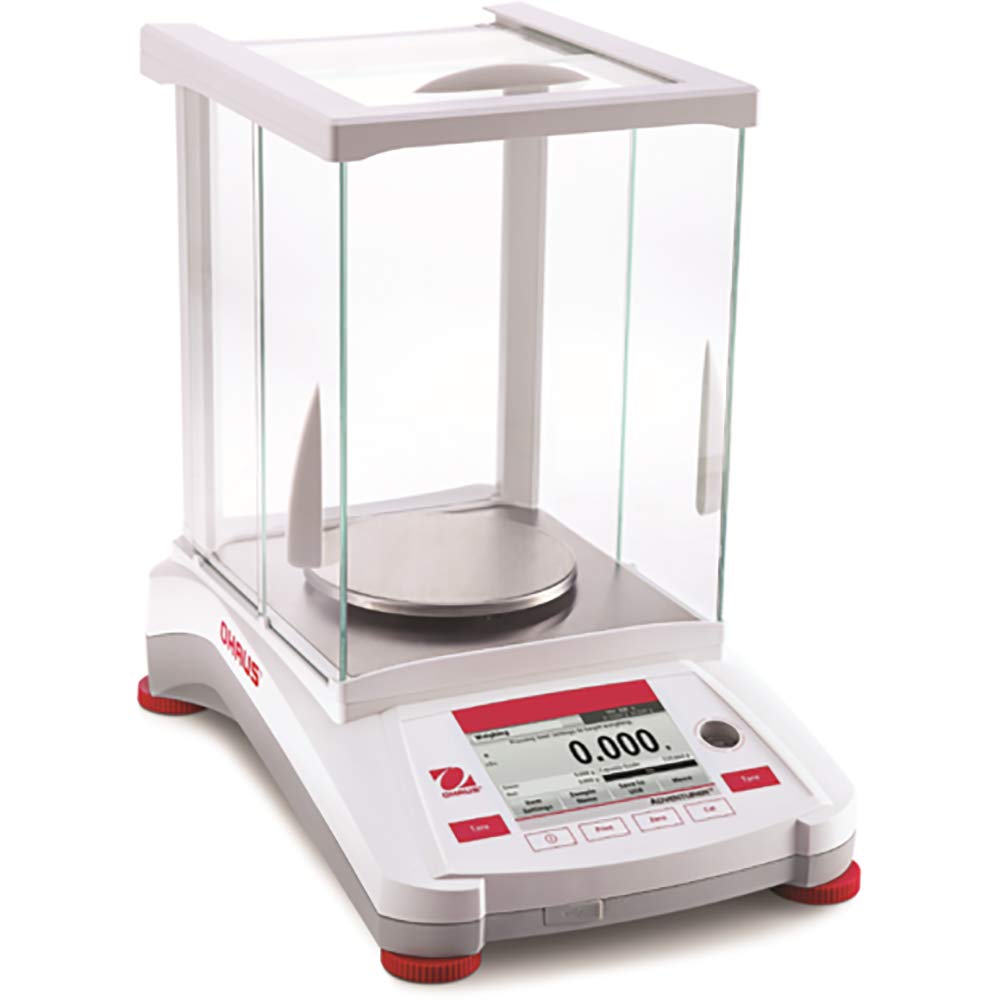
Figure 1: Ohaus Adventurer AX423 Precision Balance. This image displays the overall design of the Ohaus Adventurer AX423 Precision Balance, including its display, keypad, and weighing pan with a draft shield.
2. Safety Information
Always observe the following safety precautions to prevent injury and damage to the balance:
- Read all instructions before use.
- Use the balance only for its intended purpose as described in this manual.
- Ensure the power supply voltage matches the requirements specified on the balance or power adapter.
- Do not operate the balance in hazardous environments or where explosive gases or vapors are present.
- Avoid spilling liquids on the balance. If a spill occurs, disconnect power immediately and clean thoroughly.
- Do not attempt to service the balance yourself. Refer all servicing to qualified personnel.
- Keep the weighing pan and surrounding area clean and free from obstructions.
3. Package Contents
Verify that all components are present upon unpacking:
- Ohaus Adventurer AX423 Precision Balance unit
- Weighing pan
- Draft shield (if applicable)
- AC power adapter
- User Manual (this document)
If any items are missing or damaged, contact your supplier immediately.
4. Setup
4.1 Unpacking
Carefully remove the balance from its packaging. Retain the packaging material for future transport or storage.
4.2 Placement
Place the balance on a stable, level surface free from vibrations, drafts, and direct sunlight. Avoid locations near air conditioning vents, open windows, or heavy machinery that could affect weighing accuracy. Ensure sufficient space around the balance for operation and maintenance.
4.3 Assembly
- Place the weighing pan securely onto the pan support.
- If your model includes a draft shield, assemble it according to the diagrams provided in the quick start guide (if separate) or by carefully placing the glass panels into their designated slots.
4.4 Leveling
The balance must be perfectly level for accurate measurements. Use the two leveling feet located at the rear of the balance and the bubble indicator (level indicator) usually found near the display. Adjust the feet until the bubble is centered within the circle.
4.5 Power Connection
Connect the supplied AC power adapter to the power input port on the rear of the balance. Plug the adapter into a suitable electrical outlet. Allow the balance to warm up for at least 30 minutes after connecting power for optimal performance.
5. Operating Instructions
5.1 Power On/Off
Press the [ON/OFF] button to turn the balance on or off. The display will show a self-test sequence upon startup.
5.2 Basic Weighing
- Ensure the weighing pan is empty and clean.
- Press the [ZERO] button to set the display to zero.
- Carefully place the item to be weighed onto the center of the weighing pan.
- Wait for the stability indicator (usually a star or circle) to appear on the display, then read the weight value.
5.3 Tare Function
To weigh an item in a container, use the tare function:
- Place the empty container on the weighing pan.
- Press the [TARE] button. The display will return to zero.
- Add the item to be weighed into the container. The display will show the net weight of the item.
5.4 Unit Selection
Press the [UNIT] button to cycle through available weighing units (e.g., grams (g), milligrams (mg), carats (ct), ounces (oz), etc.). The currently selected unit will be displayed.
5.5 Calibration
For optimal accuracy, regular calibration is recommended. The Adventurer AX423 features internal calibration. Refer to the on-screen prompts or the full technical manual for detailed calibration procedures. External calibration with certified weights may also be performed.
6. Maintenance
6.1 Cleaning
Clean the balance regularly using a soft cloth dampened with a mild detergent or isopropyl alcohol. Do not use abrasive cleaners, solvents, or harsh chemicals. Ensure no liquids enter the balance housing. The weighing pan and draft shield components can be removed for more thorough cleaning.
6.2 Calibration Checks
Perform routine calibration checks using certified reference weights to ensure continued accuracy. The frequency of these checks depends on your application's requirements and regulatory standards.
6.3 Storage
When not in use for extended periods, disconnect the power adapter and store the balance in a clean, dry, and stable environment, preferably in its original packaging.
7. Troubleshooting
If you encounter issues with your balance, consult the table below for common problems and solutions:
| Problem | Possible Cause | Solution |
|---|---|---|
| Unstable readings | Drafts, vibrations, unlevel surface, temperature fluctuations | Relocate balance, ensure level, close draft shield, allow temperature stabilization |
| Balance does not power on | No power, faulty adapter | Check power connection, try another outlet, verify adapter functionality |
| Inaccurate readings | Not calibrated, dirty pan, incorrect leveling | Perform calibration, clean pan, re-level balance |
| Display shows 'Error' message | Overload, internal fault | Remove excess weight, power cycle the balance. If error persists, contact support. |
If the problem persists after attempting these solutions, contact Ohaus customer support.
8. Specifications
| Feature | Specification |
|---|---|
| Model | AX423 |
| Capacity | 420 grams |
| Readability | 0.001 grams |
| Pan Size | 5.1 Inches ø |
| Units of Measure | ct, grain, g, mg, oz, ozt, dwt, kg |
| Product Dimensions | 21 x 20 x 16 inches |
| Item Weight | 20 pounds |
| Manufacturer | Ohaus |
9. Warranty and Support
9.1 Warranty Information
The Ohaus Adventurer AX423 Precision Balance comes with a 2-year limited warranty from the date of purchase, covering defects in materials and workmanship. Please retain your proof of purchase for warranty claims. The warranty does not cover damage caused by misuse, accidents, unauthorized service, or improper installation.
9.2 Customer Support
For technical assistance, service, or warranty inquiries, please contact Ohaus customer support. Visit the official Ohaus website for contact details and additional resources.


