
1. Introduction
This manual provides detailed instructions for the safe and efficient operation of your QFX SBX-410202BT Bluetooth Tower Home Theater Speaker System. Please read this manual thoroughly before using the product and retain it for future reference. This system is designed to deliver high-quality audio for your home entertainment needs, featuring Bluetooth connectivity and a built-in amplifier.
2. Important Safety Instructions
- Power Source: Ensure the speaker system is connected to a power source that matches the voltage specified on the unit. Use only the provided power cord.
- Ventilation: Do not block any ventilation openings. Install in accordance with the manufacturer's instructions. Maintain adequate space around the unit for proper airflow.
- Water and Moisture: Do not expose this appliance to rain or moisture. Do not place objects filled with liquids, such as vases, on the apparatus. This product is not waterproof.
- Heat: Do not install near any heat sources such as radiators, heat registers, stoves, or other apparatus (including amplifiers) that produce heat.
- Cleaning: Unplug this apparatus before cleaning. Clean only with a dry cloth.
- Servicing: Refer all servicing to qualified service personnel. Servicing is required when the apparatus has been damaged in any way, such as power-supply cord or plug is damaged, liquid has been spilled or objects have fallen into the apparatus, the apparatus has been exposed to rain or moisture, does not operate normally, or has been dropped.
- Placement: Place the speaker system on a stable, flat surface to prevent it from falling.
3. Package Contents
Verify that all items listed below are present in your package:
- QFX SBX-410202BT Tower Speaker System (Main Unit)
- Remote Control
- Power Cord
- Audio Cable (RCA to 3.5mm)
- User Manual (this document)
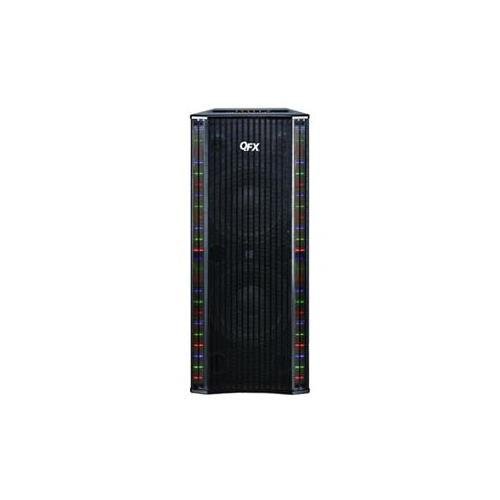
Image: The QFX SBX-410202BT Bluetooth Tower Home Theater Speaker System, showing its tall, black design with speaker grilles and control panel. This image represents the main unit of the product.
4. Setup Instructions
4.1 Unpacking and Placement
- Carefully remove all components from the packaging.
- Place the tower speaker system on a flat, stable, and level surface. Ensure there is adequate space around the unit for ventilation.
- Avoid placing the unit near direct sunlight, heat sources, or areas with high humidity.
4.2 Power Connection
- Insert the power cord into the AC IN port on the back of the speaker system.
- Plug the other end of the power cord into a standard wall outlet (AC 120V/60Hz).
- Ensure the power switch on the back of the unit is in the OFF position before plugging it in.
4.3 Audio Connections
The SBX-410202BT offers multiple ways to connect audio sources:
4.3.1 Bluetooth Connection
- Turn on the speaker system using the power switch.
- Press the "MODE" button on the control panel or remote control until "Bluetooth" mode is selected. The Bluetooth indicator light will flash.
- On your Bluetooth-enabled device (smartphone, tablet, etc.), enable Bluetooth and search for available devices.
- Select "QFX SBX-410202BT" from the list of devices.
- Once paired, the Bluetooth indicator light will stop flashing and remain solid. You can now play audio from your device.
4.3.2 AUX/RCA Connection
- Connect one end of the provided RCA to 3.5mm audio cable to the AUX IN ports (red and white) on the back of the speaker system.
- Connect the 3.5mm end of the cable to the headphone jack or audio output of your external audio device (e.g., TV, MP3 player).
- Press the "MODE" button on the control panel or remote control until "AUX" mode is selected.
4.3.3 USB/SD Card Playback
- Insert a USB flash drive or SD card (with MP3 audio files) into the respective port on the control panel.
- The system will automatically switch to USB/SD mode and begin playing audio files. If not, press the "MODE" button to select USB or SD.
5. Operating Instructions
5.1 Control Panel Functions
The main control panel is located on the top or front of the tower speaker. Key functions include:
- POWER: Turns the unit ON/OFF.
- MODE: Switches between input sources (Bluetooth, AUX, USB, SD).
- VOLUME +/-: Adjusts the master volume level.
- PLAY/PAUSE: Plays or pauses audio playback (for Bluetooth, USB, SD modes).
- PREV/NEXT: Skips to the previous or next track (for Bluetooth, USB, SD modes).
- BASS/TREBLE: Adjusts bass and treble levels (may be separate knobs or buttons).
5.2 Remote Control Functions
The included remote control provides convenient access to all functions from a distance. Ensure batteries are correctly inserted.
- All functions available on the control panel are also accessible via the remote.
- Additional functions may include direct input selection buttons (e.g., BT, AUX, USB, SD), EQ presets, and mute.
5.3 Microphone Input (if applicable)
If your model includes a microphone input, connect a standard 1/4-inch microphone cable to the MIC IN jack. Adjust the microphone volume using the dedicated MIC VOL knob (if present) or the master volume.
6. Maintenance
6.1 Cleaning
- Always unplug the speaker system from the power outlet before cleaning.
- Use a soft, dry cloth to wipe the exterior surfaces of the unit.
- Do not use liquid cleaners, aerosol sprays, or abrasive chemicals, as these may damage the finish or internal components.
- Use a soft brush or vacuum cleaner with a brush attachment to gently clean speaker grilles if dust accumulates.
6.2 Storage
If storing the unit for an extended period:
- Unplug the power cord and disconnect all audio cables.
- Store the unit in a cool, dry place, away from direct sunlight and extreme temperatures.
- It is recommended to keep the original packaging for storage and transport.
7. Troubleshooting Guide
| Problem | Possible Cause | Solution |
|---|---|---|
| No power | Power cord not connected; Power switch off; Wall outlet not working. | Ensure power cord is securely plugged in; Turn power switch ON; Test wall outlet with another device. |
| No sound | Volume too low; Incorrect input mode selected; Audio cables not connected properly; Bluetooth not paired. | Increase volume; Press MODE button to select correct input; Check audio cable connections; Re-pair Bluetooth device. |
| Bluetooth not connecting | Speaker not in Bluetooth mode; Device too far; Interference; Device already paired to another speaker. | Ensure speaker is in Bluetooth mode; Move device closer; Turn off other Bluetooth devices; Disconnect from other speakers. |
| Remote control not working | Batteries dead or incorrectly inserted; Obstruction between remote and unit. | Replace batteries; Ensure correct polarity; Remove obstructions; Point remote directly at the unit's sensor. |
| Distorted sound | Volume too high; Source audio quality poor; Speaker placed too close to a wall. | Reduce volume; Try a different audio source; Adjust speaker placement. |
8. Specifications
- Model: SBX-410202BT
- Brand: QFX
- Type: Tower Home Theater Speaker System
- Connectivity: Bluetooth, AUX (RCA), USB, SD
- Power Source: Corded Electric (AC 120V/60Hz)
- Item Weight: Approximately 49 pounds (22.2 kg)
- Mounting Type: Floor Standing
- Special Feature: Built-in Amplifier, Built-in Microphone (if applicable)
- UPC: 804892190241