Introduction
This manual provides comprehensive instructions for the RCA CRK17TA1 remote control. It covers setup, operation, maintenance, and troubleshooting to ensure optimal performance with compatible RCA, GE, and PROSCAN television models. This remote is designed as an original equipment manufacturer (OEM) replacement or a compatible substitute for specific models.
Setup
1. Battery Installation
The RCA CRK17TA1 remote control requires two AAA batteries for operation. Follow these steps to install them:
- Locate the battery compartment cover on the back of the remote control.
- Press down on the tab and slide the cover off.
- Insert two AAA batteries, ensuring the positive (+) and negative (-) terminals align correctly with the markings inside the compartment.
- Slide the battery compartment cover back into place until it clicks securely.
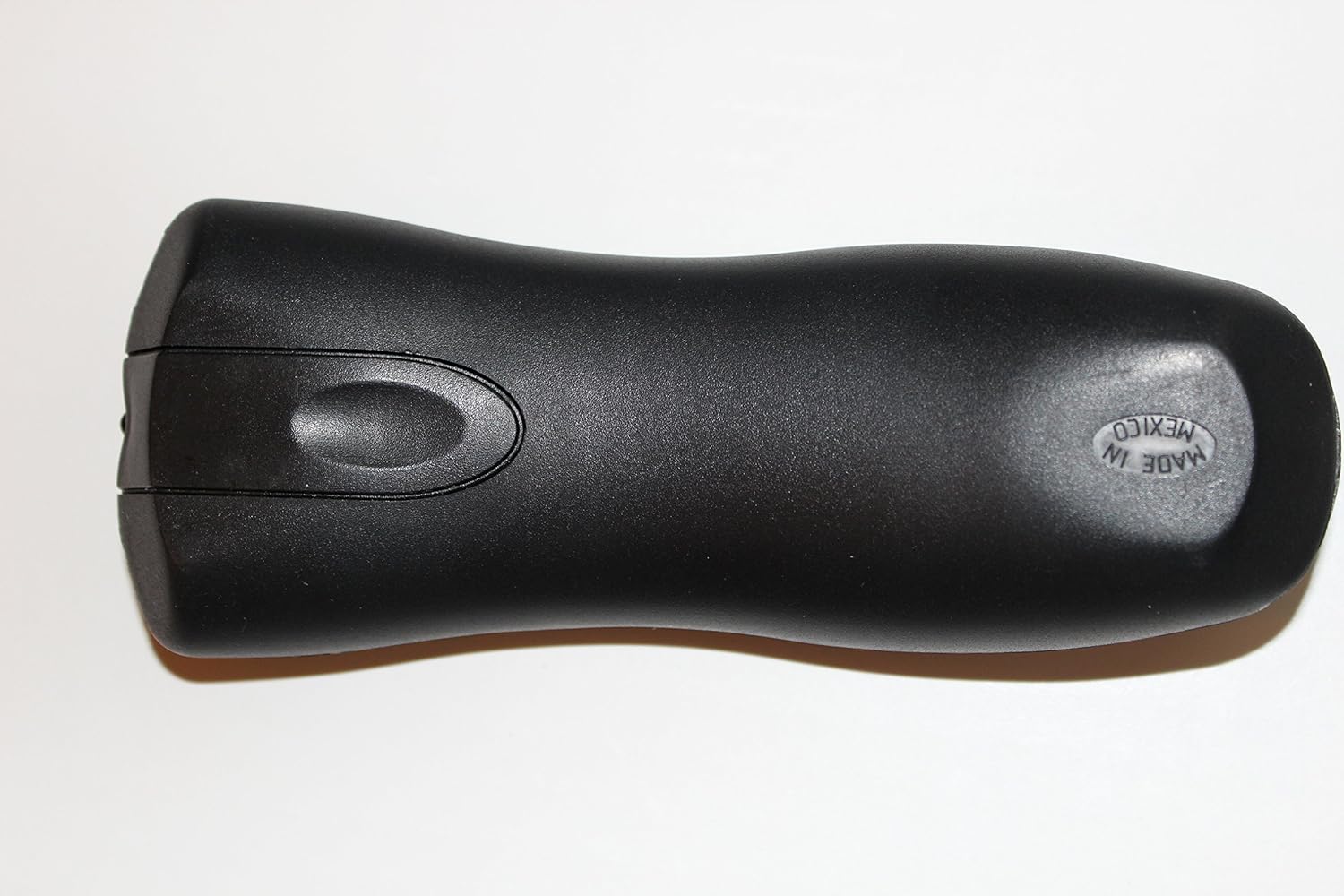
Figure 1: Back view of the RCA CRK17TA1 remote control, illustrating the location of the battery compartment. The "MADE IN MEXICO" text is visible on the lower right side.
2. Initial Use
This remote control is designed as an OEM replacement for specific RCA, GE, and PROSCAN television models. In most cases, no programming is required; it should function directly with compatible devices after battery installation. Refer to the "Compatibility" section for a list of supported models.
Operating Instructions
The RCA CRK17TA1 remote control features a standard layout for easy navigation and control of your television. Below is a description of the primary buttons and their functions.

Figure 2: Front view of the RCA CRK17TA1 remote control, displaying all control buttons. Buttons are black with purple and pink accents.
Button Functions:
- POWER: Turns the television on or off.
- MUTE: Silences or restores the television audio.
- VOL +/-: Increases or decreases the volume level.
- CHAN +/-: Changes the television channel up or down.
- GO BACK: Returns to the previous channel or menu screen.
- INFO: Displays information about the current program or input.
- GUIDE: Accesses the electronic program guide (EPG) or Guide Plus feature.
- MENU: Opens the television's main menu.
- INPUT: Cycles through available video input sources (e.g., HDMI 1, AV, Component).
- CLEAR: Clears on-screen displays or cancels selections.
- SKIP: Skips forward in certain media or menu contexts.
- Number Pad (0-9): Directly enters channel numbers.
- Directional Arrows (Up, Down, Left, Right): Navigates through menus and options.
- OK: Confirms selections or enters menu items.
Maintenance
Battery Replacement
Replace the batteries when the remote control's response becomes sluggish or stops functioning. Always replace both AAA batteries at the same time with new ones. Do not mix old and new batteries, or different types of batteries.
Cleaning
To clean the remote control, gently wipe its surface with a soft, dry cloth. For stubborn dirt, slightly dampen the cloth with water. Avoid using harsh chemicals, abrasive cleaners, or excessive moisture, as these can damage the remote's electronics or finish.
Troubleshooting
- Remote not responding:
- Ensure there is a clear line of sight between the remote control and the television's infrared sensor.
- Replace the batteries with fresh AAA batteries.
- Verify that the remote control is compatible with your television model (refer to the "Compatibility" section).
- Specific buttons not working:
- Check for any obstructions or debris around the button.
- If only certain buttons are unresponsive, the remote control may require replacement.
- Television not turning on/off:
- Confirm the television is plugged into a working power outlet.
- Ensure the remote control is pointed directly at the television's IR receiver.
Specifications
| Model Number | CRK17TA1 |
| Brand | RCA |
| Connectivity Technology | Infrared |
| Compatible Devices | Television |
| Max Number of Supported Devices | 1 |
| Special Feature | Ergonomic |
| Batteries Required | 2 AAA batteries |
| Item Weight | 7.1 ounces |
| Package Dimensions | 7.8 x 2.8 x 1.5 inches |
Compatibility
The RCA CRK17TA1 remote control (PN: 242778) is an OEM replacement for the following RCA television models:
- F19422, F19422TX1, F19422TX51
- F19424, F19424TX1, F19424TX41, F19424TX51, F19424TX52
- F19426, F19436, F19440, F19440TX1, F19442, F19442TX1
- F25305, F25305TX1, F25305TX2
- F25424, F25424TX51, F25442, F25442T, F25442TX41, F25442TX51
- F26432, F26432TX41, F26432TX51, F26433, F26433TX51
- F27440, F27440TX51, F27442, F27442TX1, F27442TX41, F27442TX51
- F27615TX, MR27310, MR29310
It also serves as a compatible substitute for the following models, including GE models:
- 242779 CRK17TB1
- GE 27GT630, 27GT630TX, 27GT630YX
- GE 27GT720, 27GT720TX, 27GT720YX
Note: For any television model not listed, please verify compatibility with the seller before purchase.
Warranty and Support
Information regarding specific warranty terms for this replacement remote control is not provided in the product details. For warranty inquiries or technical support, please contact the original seller or the manufacturer, RCA, directly. Always retain your purchase receipt for any warranty claims.
Legal Disclaimer: This product is guaranteed as a replacement for the original application and any substitutes listed in this manual only. For other applications, contact the seller with your complete model number before placing an order.


