Introduction
This manual provides essential instructions for the proper installation, maintenance, and troubleshooting of your Genuine Nissan 24080-EA200 Battery Cable Assembly. Please read this manual thoroughly before proceeding with installation to ensure safe and correct usage.
Safety Information
WARNING: Working with automotive batteries and electrical systems can be hazardous. Improper handling can lead to severe injury, electric shock, burns, or damage to the vehicle. Always follow these safety precautions:
- Wear appropriate personal protective equipment, including safety glasses and gloves.
- Ensure the vehicle's ignition is off and the parking brake is engaged.
- Disconnect the negative (-) battery terminal first, then the positive (+) terminal. When reconnecting, connect the positive (+) terminal first, then the negative (-) terminal.
- Avoid contact with battery acid. If contact occurs, flush immediately with water and seek medical attention.
- Do not smoke or allow open flames near the battery. Batteries produce flammable hydrogen gas.
- Consult a qualified automotive technician if you are unsure about any step.
Package Contents
Verify that all components are present and undamaged before beginning installation.
- 1 x Genuine Nissan 24080-EA200 Battery Cable Assembly
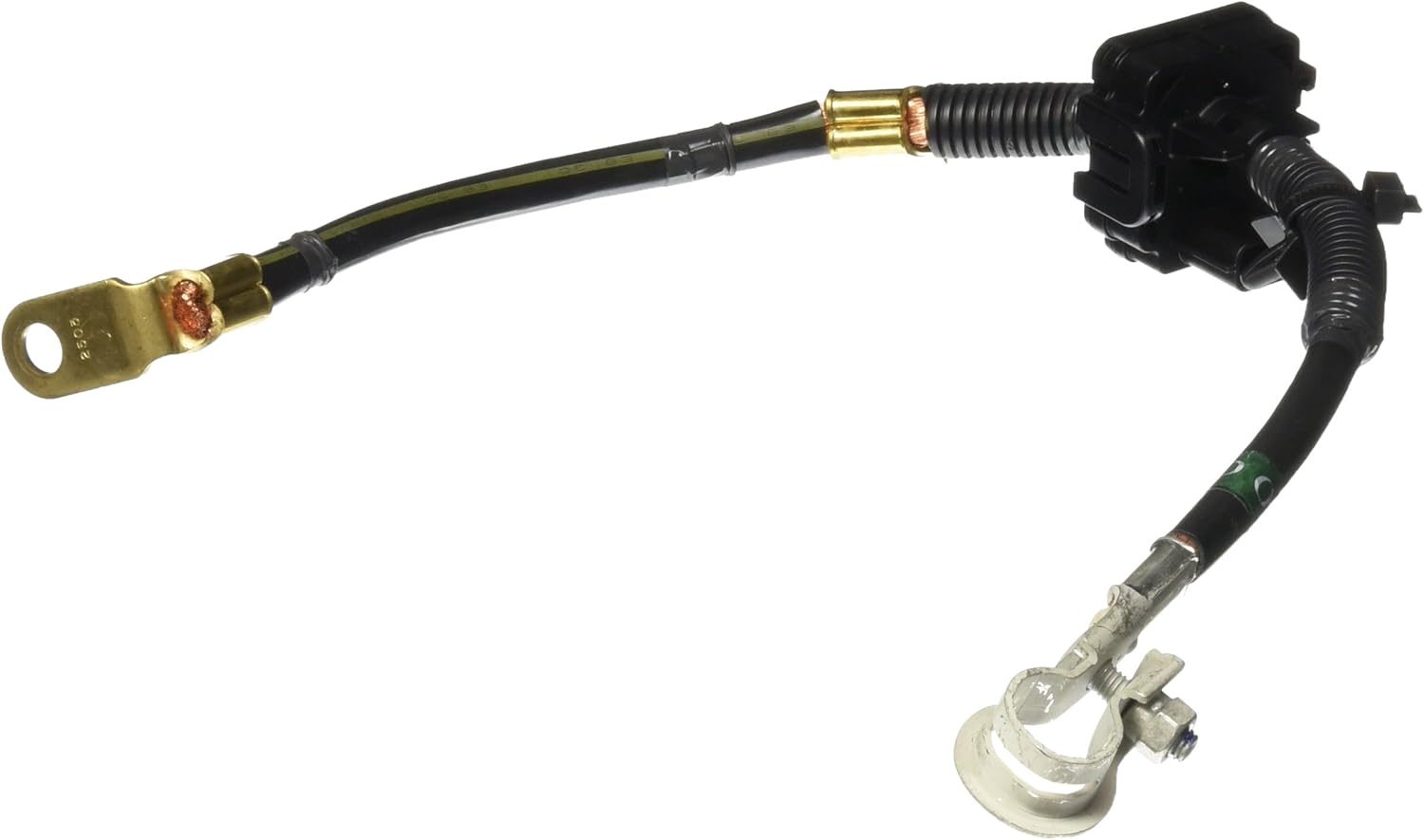
Image 1: The Genuine Nissan 24080-EA200 Battery Cable Assembly, showing the positive terminal connector, the main cable, and the integrated fuse/junction box.
Installation
This section outlines the general procedure for replacing the positive battery cable assembly. Specific vehicle models may have variations. Refer to your vehicle's service manual for detailed instructions.
Required Tools:
- Wrench set (typically 10mm, 12mm, 13mm, 14mm)
- Battery terminal cleaner (wire brush)
- Dielectric grease (optional, for corrosion prevention)
- Safety glasses and gloves
Procedure:
- Prepare the Vehicle: Ensure the vehicle is off and the parking brake is engaged. Open the hood and locate the vehicle battery.
- Disconnect Negative Terminal: Using an appropriate wrench, loosen the nut on the negative (-) battery terminal. Carefully remove the negative cable and secure it away from the battery to prevent accidental contact.
- Disconnect Positive Terminal: Loosen the nut on the positive (+) battery terminal. Carefully remove the old positive battery cable assembly.
- Disconnect from Vehicle: Trace the positive battery cable assembly from the battery to its connection points on the vehicle (e.g., starter, fuse box, alternator). Disconnect all attachment points and remove the old assembly. Note the routing for correct reinstallation.
- Clean Terminals: Use a battery terminal cleaner to remove any corrosion from the battery posts. Ensure a clean, conductive surface.
- Install New Assembly: Carefully route the new Genuine Nissan 24080-EA200 Battery Cable Assembly in the same manner as the old one. Connect all attachment points to the vehicle components, ensuring they are secure.
- Connect Positive Terminal: Attach the new positive (+) battery cable terminal to the positive (+) battery post. Tighten the nut securely, but do not overtighten.
- Connect Negative Terminal: Attach the negative (-) battery cable terminal to the negative (-) battery post. Tighten the nut securely.
- Apply Dielectric Grease (Optional): Apply a thin layer of dielectric grease to the battery terminals to help prevent corrosion.
- Verify Connections: Double-check all connections to ensure they are tight and secure.
Post-Installation Checks
After installation, perform the following checks:
- Start Vehicle: Attempt to start the vehicle. If it starts, check for any warning lights on the dashboard.
- Electrical System Check: Verify that all electrical components (lights, radio, power windows, etc.) are functioning correctly.
- Visual Inspection: Periodically inspect the battery terminals and cable for any signs of corrosion, looseness, or damage.
Maintenance
Proper maintenance extends the life of your battery cable assembly and ensures reliable vehicle operation.
- Regular Inspection: Annually inspect the cable for cracks, fraying, corrosion, or loose connections.
- Clean Terminals: If corrosion is present, disconnect the battery (negative first, then positive) and clean the terminals and cable ends with a battery terminal brush and baking soda solution (1 tablespoon baking soda to 1 cup water). Rinse with clean water and dry thoroughly before reconnecting.
- Tighten Connections: Ensure all connections remain tight. Loose connections can cause poor electrical contact and heat buildup.
Troubleshooting
| Symptom | Possible Cause | Solution |
|---|---|---|
| Vehicle does not start or cranks slowly | Loose or corroded battery terminals; faulty battery; other electrical issue | Check and clean battery terminals. Ensure connections are tight. Test battery charge. Consult a technician if issues persist. |
| Electrical components not working | Loose connections; blown fuse in the cable assembly; faulty component | Verify all cable connections are secure. Inspect any integrated fuses within the cable assembly. |
| Corrosion on battery terminals | Battery acid leakage; environmental factors; lack of maintenance | Clean terminals as described in the Maintenance section. Apply dielectric grease. |
| Cable appears damaged (cracked insulation, fraying) | Wear and tear; physical damage | Replace the battery cable assembly immediately to prevent electrical shorts or failures. |
Specifications
- Brand: Nissan
- Model Number: 24080-EA200
- Manufacturer Part Number: 24080-EA200
- OEM Part Number: 24080-EA200
- Item Weight: 9.1 ounces
- Package Dimensions: 9.96 x 8.86 x 2.05 inches
- ASIN: B00P2PKCAG
- Date First Available: October 31, 2014
Warranty and Support
This Genuine Nissan part is typically covered by Nissan's standard parts warranty. For specific warranty details, please refer to the warranty information provided with your purchase or contact an authorized Nissan dealership. For technical support or further assistance, please contact your local Nissan service center or the retailer from whom the part was purchased.