
Carrier HD44AR331
Contents
Carrier HD44AR331 Motor EON 5.0 .50 HP User Manual
Model: HD44AR331
Product Overview
This manual provides essential information for the installation, operation, maintenance, and troubleshooting of the Carrier HD44AR331 Motor. This motor is designed for HVAC applications, specifically as a furnace replacement motor.
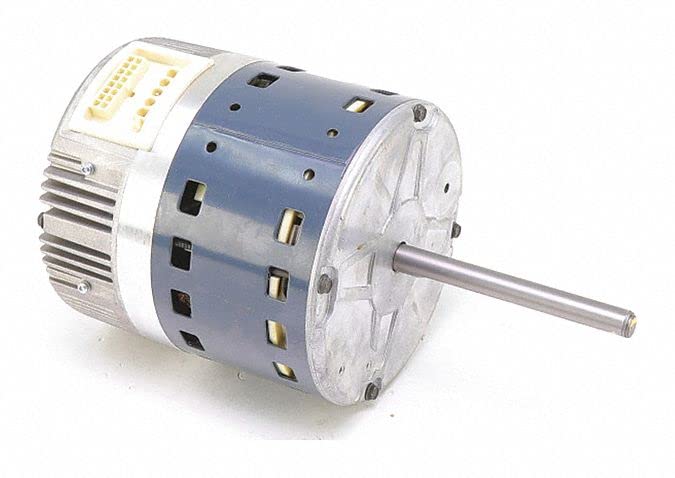
Image: The Carrier HD44AR331 Motor, a grey cylindrical motor with a protruding shaft and a white electrical connector block on one end. The motor casing has ventilation slots.
The Carrier HD44AR331 is a 120/240V, single-phase, 0.5 HP motor operating at 1050 RPM. It is a robust component designed for reliable performance in compatible systems.
Safety Information
Always disconnect power before installing, servicing, or cleaning the motor. Failure to do so can result in serious injury or death. Installation should be performed by a qualified technician in accordance with all local and national electrical codes.
- Ensure proper grounding to prevent electrical shock.
- Do not operate the motor if it is damaged or has exposed wiring.
- Wear appropriate personal protective equipment (PPE) during installation and maintenance.
- Refer to the wiring diagram provided with your HVAC unit for correct electrical connections.
Setup and Installation
- Power Disconnection: Before beginning installation, ensure that all power to the HVAC unit is completely disconnected at the circuit breaker or fuse box. Verify with a voltage tester.
- Old Motor Removal: Carefully disconnect the wiring from the old motor, noting the connections. Remove any mounting bolts or clamps securing the old motor.
- New Motor Placement: Position the Carrier HD44AR331 motor in the designated mounting location. Ensure it is securely fastened using appropriate bolts and brackets.
- Wiring Connections: Connect the electrical wiring to the new motor according to the wiring diagram of your HVAC system. Pay close attention to voltage (120V or 240V) and phase connections. The motor is designed for 120/240V, 1-phase operation.
- Shaft Alignment: Ensure the motor shaft is properly aligned with the blower wheel or fan assembly. Misalignment can cause vibration and premature wear.
- Final Checks: Double-check all connections and mounting hardware for tightness. Ensure no wires are pinched or exposed.
Operating Instructions
The Carrier HD44AR331 motor operates as part of your HVAC system's blower assembly. Its operation is typically controlled by the thermostat and the HVAC system's control board.
- Once installed and wired correctly, restore power to the HVAC unit.
- Set your thermostat to a mode that requires blower operation (e.g., "Fan On" or a heating/cooling mode).
- Observe the motor for smooth operation and listen for any unusual noises.
- The motor is designed for continuous duty within its specified ratings.
Maintenance
Regular maintenance helps ensure the longevity and efficient operation of your Carrier HD44AR331 motor. Always disconnect power before performing any maintenance.
- Cleaning: Periodically inspect the motor for dust and debris accumulation. Use a soft brush or compressed air to gently clean the motor's exterior and ventilation openings. Do not allow moisture to enter the motor.
- Bearings: This motor typically features sealed bearings that do not require lubrication. Do not attempt to lubricate sealed bearings.
- Vibration Check: Annually check for excessive vibration during operation. Excessive vibration can indicate a problem with the motor, blower wheel, or mounting.
- Wiring Inspection: Inspect electrical connections for signs of wear, corrosion, or looseness. Tighten any loose connections.
Troubleshooting
| Problem | Possible Cause | Solution |
|---|---|---|
| Motor does not start | No power supply Incorrect wiring Overload protector tripped Faulty motor | Check circuit breaker/fuse Verify wiring against diagram Allow motor to cool, reset protector Consult a qualified technician for replacement |
| Motor runs hot | Insufficient ventilation Overload Incorrect voltage Bearing issues | Clear obstructions around motor Check for restricted airflow in system Verify supply voltage Motor replacement may be necessary |
| Excessive noise or vibration | Loose mounting Unbalanced blower wheel Worn bearings Debris in blower | Tighten mounting bolts Inspect and clean blower wheel Motor replacement Clean blower assembly |
If troubleshooting steps do not resolve the issue, contact a certified HVAC technician for further assistance.
Specifications
- Model Number: HD44AR331
- Brand: Carrier
- Voltage: 120/240V
- Phase: Single Phase (1ph)
- Horsepower (HP): 0.5 HP
- RPM: 1050 RPM
- Frame: FR39
- Product Dimensions: 9 x 7 x 5 inches
- Item Weight: 4 Pounds
- Manufacturer: Carrier Corporation
Warranty and Support
For warranty information and technical support, please refer to the official Carrier website or contact Carrier customer service directly. Keep your purchase receipt and model number (HD44AR331) readily available when seeking support.
Note: Specific warranty terms and conditions may vary based on region and point of purchase.
Documents and downloads
Ask a question about this manual
Ask about setup, troubleshooting, compatibility, parts, safety, or missing instructions. Manuals+ will review the question and use this page’s manual context to help answer it.