
1. Introduction
The EMB Professional DJR30 is a versatile 1U rack-mountable dual USB and SD digital player and recorder. This unit is designed for professional audio applications, offering playback from USB drives and SD cards, as well as line-level recording capabilities. Its compact design integrates various functions for audio management in diverse environments.
2. Safety Instructions
- Power Supply: Connect the unit only to the specified power source. Ensure the voltage matches the unit's requirements.
- Ventilation: Do not block ventilation openings. Ensure adequate airflow around the unit to prevent overheating.
- Moisture: Keep the unit away from water, moisture, and high humidity. Do not operate with wet hands.
- Cleaning: Disconnect power before cleaning. Use a dry, soft cloth. Do not use liquid cleaners or aerosols.
- Servicing: Do not attempt to service this unit yourself. Refer all servicing to qualified service personnel.
- Placement: Place the unit on a stable surface or mount it securely in a standard 1U rack. Avoid placing it near heat sources.
3. Package Contents
Verify that the following items are included in your package:
- EMB Professional DJR30 Unit
- Power Cable
- User Manual (this document)
4. Product Overview
4.1 Front Panel

Image Description: This image displays the front panel of the EMB Professional DJR30. It features two distinct player sections, each with a blue LCD display, a USB port, and an SD card slot. Central controls include a mix selector knob and various playback and recording buttons. The left side shows the power switch and volume control, while the right side has a headphone output and level control.

Image Description: A close-up view of the left player section's display and control buttons. The display shows 'NO USB', indicating no USB device is connected. Below the display are buttons for playback control (forward, record, stop, play/pause) and media selection.
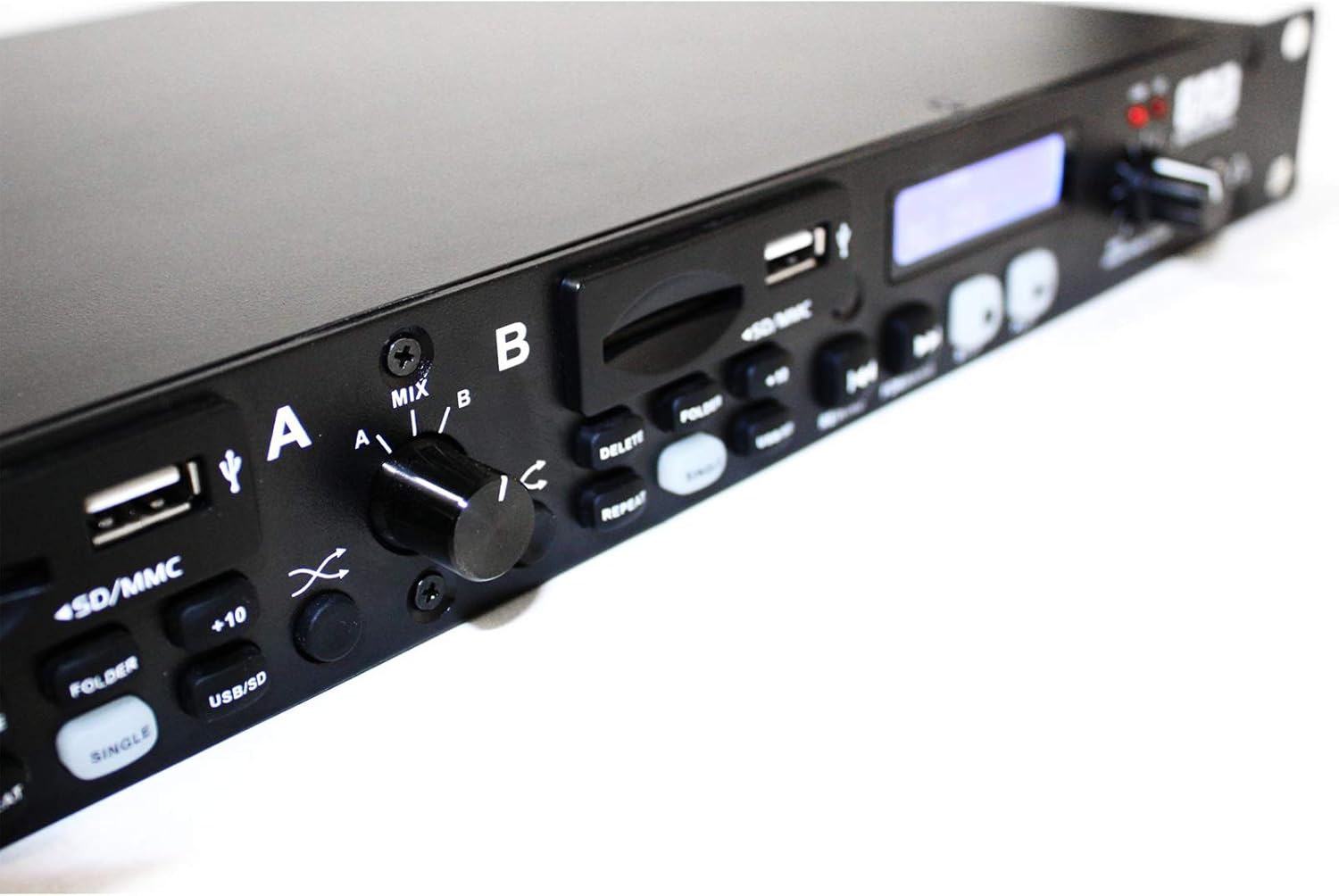
Image Description: This image provides a detailed view of the central controls and the right player section. It highlights the 'MIX' knob for output selection (A, B, Mix), along with buttons for 'DELETE', 'REPEAT', '+10', 'FOLDER', 'SINGLE', and 'USB/SD' copy functions. The right player section also has its own USB port, SD/MMC slot, and playback controls.
- Power Switch: Turns the unit on or off.
- Power Indicator: Illuminates when the unit is powered on.
- USB Ports (x2): For connecting USB flash drives.
- SD/MMC Card Slots (x2): For inserting SD or MMC memory cards.
- LCD Displays (x2): Show track information, time, and operational status.
- Playback Controls: Play/Pause, Stop, Forward, Rewind for each player.
- Record Button: Initiates recording to the selected media.
- Delete Button: Deletes selected files.
- Repeat Function: Toggles repeat modes (e.g., single track, folder, all).
- +10 Track Button: Jumps forward by 10 tracks for faster navigation.
- Folder Button: Navigates through folders on the media.
- USB to SD / SD to USB Copy Function: Initiates file transfer between connected USB and SD media.
- Selectable Output (A/B/Mix): Knob to choose output source (Player A, Player B, or a mix of both).
- Headphone Output: 1/4-inch jack for monitoring audio.
- Headphone Level Control: Adjusts the volume for the headphone output.
4.2 Rear Panel

Image Description: The rear panel of the DJR30 unit. It shows the power input socket on the far right. To the left, there are RCA output jacks labeled 'OUTPUT (MIX)' for the combined signal, and separate 'OUTPUT A' and 'OUTPUT B' RCA jacks. A 'RECORD LEVEL' knob is also visible, allowing adjustment of the input level for recording.
- AC Power Input: Connects to the main power supply.
- Output A (RCA): Stereo RCA outputs for Player A.
- Output B (RCA): Stereo RCA outputs for Player B.
- Mix Output (RCA): Stereo RCA outputs for the combined A/B signal.
- Record Level Control: Adjusts the input level for line recording.
5. Setup
5.1 Rack Mounting
The DJR30 is designed for standard 1U (1HE) rack installation. Secure the unit using appropriate rack screws to prevent movement and ensure proper ventilation.
5.2 Power Connection
- Ensure the unit's power switch is in the OFF position.
- Connect the supplied power cable to the AC Power Input on the rear panel.
- Plug the other end of the power cable into a suitable electrical outlet.
5.3 Audio Connections
- Connect the desired RCA outputs (Output A, Output B, or Mix Output) from the rear panel of the DJR30 to the corresponding inputs on your mixer or amplifier.
- For line recording, connect the audio source to the input of the DJR30 (input jacks are not explicitly listed in product description, assume internal line-in for recording function).
6. Operating Instructions
6.1 Power On/Off
Press the Power switch on the front panel to turn the unit ON. The power indicator will illuminate. Press it again to turn the unit OFF.
6.2 Media Insertion
Insert a USB flash drive into a USB port or an SD/MMC card into an SD card slot. Ensure the media is inserted correctly. The display will show 'USB' or 'SD' when recognized.
6.3 Playback
- Select the desired player (A or B) using the output selector if you wish to monitor a specific player.
- Press the Play/Pause button to start playback. Press again to pause.
- Use the Forward and Rewind buttons to navigate between tracks. Hold them down for fast forward/rewind within a track.
- Press the Stop button to end playback.
- Use the Repeat button to cycle through repeat modes (e.g., repeat one, repeat all, repeat folder).
- The Folder button allows navigation through different folders on your media.
- The +10 Track button advances the track selection by ten tracks.
- For random playback, select the appropriate mode (Folder Random or Total Random) if available via the Folder/Repeat buttons.
6.4 Recording
The DJR30 supports line recording to USB or SD media in MP3 format at 128 kbps.
- Ensure a USB drive or SD card is inserted into the desired recording slot.
- Adjust the Record Level Control on the rear panel to an appropriate level to prevent distortion.
- Press the Record button to begin recording.
- Press the Stop button to end the recording.
6.5 USB to SD / SD to USB Copy Function
This function allows direct transfer of files between a connected USB drive and an SD card.
- Ensure both a USB drive and an SD card are inserted into the unit.
- Press the USB/SD Copy button. Follow any on-screen prompts to confirm the transfer direction (USB to SD or SD to USB).
6.6 Output Selection
Use the Output Selector knob to choose which player's audio is sent to the Mix Output:
- A: Only Player A's audio.
- B: Only Player B's audio.
- Mix: A blend of both Player A and Player B's audio.
6.7 Headphone Use
Connect 1/4-inch headphones to the Headphone Output jack on the front panel. Adjust the Headphone Level Control to a comfortable listening volume.
7. Maintenance
7.1 Cleaning
To clean the unit, first disconnect it from the power supply. Use a soft, dry cloth to wipe the exterior. Do not use abrasive cleaners, solvents, or waxes, as these can damage the finish.
7.2 Storage
When not in use for extended periods, store the unit in a cool, dry place, away from direct sunlight and extreme temperatures. It is recommended to keep the original packaging for storage and transport.
8. Troubleshooting
- No Power:
- Check if the power cable is securely connected to the unit and the power outlet.
- Ensure the power outlet is functional.
- Verify the power switch on the unit is in the ON position.
- No Sound Output:
- Check all audio cable connections between the DJR30 and your mixer/amplifier.
- Ensure the correct output (A, B, or Mix) is selected on the front panel.
- Verify the volume levels on your mixer/amplifier and the DJR30's headphone output.
- Confirm that media is playing and not paused or stopped.
- USB/SD Media Not Recognized:
- Ensure the USB drive or SD card is inserted correctly and fully.
- Check if the media is formatted in a compatible file system (e.g., FAT32).
- Try a different USB drive or SD card to rule out media issues.
- Recording Issues:
- Ensure there is sufficient free space on the USB drive or SD card.
- Adjust the Record Level Control to avoid clipping or low signal.
- Verify that the correct media is selected for recording.
9. Specifications
| Model | DJR30 |
| Type | Dual USB/SD Digital Player & Recorder |
| Rack Size | 1U (1HE) |
| Record Format | MP3 / 128 kbps (Line Record) |
| Connectivity | USB, SD/MMC |
| Outputs | RCA (A, B, Mix), 1/4" Headphone |
| Power Source | Corded Electric |
| Item Weight | 6 Pounds |
10. Warranty and Support
10.1 Warranty Information
This EMB Professional DJR30 unit comes with a 1-year limited warranty from the date of purchase. This warranty covers manufacturing defects and workmanship under normal use. It does not cover damage caused by misuse, accidents, unauthorized modifications, or improper installation.
10.2 Customer Support
For technical assistance, warranty claims, or service inquiries, please contact your authorized EMB Professional dealer or visit the official EMB Professional website for support contact information. Please have your model number (DJR30) and proof of purchase available when contacting support.