
Introduction
This manual provides instructions for the setup, operation, and maintenance of your Omega OWS01 Wireless Indoor/Outdoor Weather Station. Please read this manual thoroughly before use to ensure proper functionality and longevity of the device. Keep this manual for future reference.
Product Overview
The Omega OWS01 is a digital wireless weather station designed to monitor indoor and outdoor temperature and humidity. It also features a weather trend analysis, date and time display, and an alarm function, providing comprehensive environmental information at a glance.

The main display unit of the Omega OWS01 Weather Station, shown with its wireless outdoor sensor. The main unit features a large, backlit LCD screen displaying time, date, indoor/outdoor temperature, humidity, and weather forecast icons. Control buttons are located at the bottom of the unit.

A composite image showing the Omega OWS01 Weather Station main unit against a backdrop of different weather conditions (sunny, cloudy, snowy, rainy), emphasizing its weather forecasting capabilities. The wireless sensor is also visible.

Another view of the Omega OWS01 Weather Station, highlighting the sleek design of both the main unit and the compact wireless sensor. The main unit's display shows current time, temperature, and humidity readings.
Setup
1. Battery Installation
The Omega OWS01 requires batteries for both the main unit and the wireless sensor.
Main Unit:
- Open the battery compartment cover on the back of the main unit.
- Insert 4 AAA batteries (not included) according to the polarity markings (+/-).
- Close the battery compartment cover securely.
Wireless Sensor:
- Open the battery compartment cover on the back of the wireless sensor.
- Insert 2 AAA batteries (not included) according to the polarity markings (+/-).
- Close the battery compartment cover securely.
2. Sensor Placement
Place the wireless sensor outdoors in a shaded, dry location, protected from direct sunlight and rain, to ensure accurate temperature and humidity readings. Avoid placing it near large metal objects or sources of electromagnetic interference. The maximum transmission range is approximately 30 meters (100 feet) in open air, but this can be reduced by obstacles such as walls.
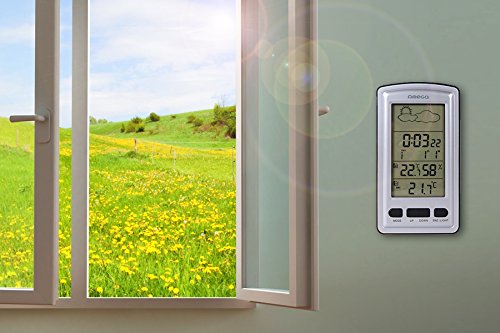
The Omega OWS01 Weather Station main unit displayed mounted on an indoor wall, demonstrating a typical placement for easy viewing of weather data.
3. Initial Synchronization
After inserting batteries into both units, the main unit will automatically search for the wireless sensor. This process may take a few minutes. Once connected, the outdoor temperature and humidity will appear on the main unit's display. If the outdoor readings do not appear, refer to the Troubleshooting section.
Operating Instructions
Button Functions
- MODE: Switches between time display, alarm setting, and date setting.
- UP: Increases values during setting, switches between °C/°F.
- DOWN: Decreases values during setting.
- SNZ/LIGHT: Activates snooze function during alarm, turns on backlight.
Setting Time and Date
- In normal time display mode, press the MODE button once to enter time setting. The hour digits will flash.
- Use UP or DOWN to adjust the hour.
- Press MODE again to set minutes, then year, month, and day, adjusting each with UP or DOWN.
- Press MODE to confirm and exit setting mode.
Setting the Alarm
- In normal time display mode, press the MODE button twice to enter alarm setting. The alarm hour digits will flash.
- Use UP or DOWN to adjust the alarm hour.
- Press MODE again to set alarm minutes, adjusting with UP or DOWN.
- Press MODE to confirm and exit alarm setting.
- To activate/deactivate the alarm, press UP in alarm display mode. An alarm icon will appear/disappear on the screen.
Temperature Unit Selection
In normal display mode, press the UP button to switch between Celsius (°C) and Fahrenheit (°F).
Weather Forecast
The weather station analyzes atmospheric pressure trends over the past 24 hours to predict weather conditions. The display will show one of four icons: Sunny, Slightly Cloudy, Cloudy, or Rainy. This is a prediction and may not always perfectly match actual conditions.

The Omega OWS01 Weather Station main unit positioned on a nightstand next to a lamp, illustrating its use as a bedside clock and weather monitor.
Maintenance
Battery Replacement
When the battery indicator appears on the display, replace the batteries in the respective unit (main unit or sensor) following the "Battery Installation" steps in the Setup section.
Cleaning
Clean the unit with a soft, damp cloth. Do not use abrasive cleaners, solvents, or corrosive chemicals, as these may damage the display or casing.
Storage
If the unit will not be used for an extended period, remove the batteries from both the main unit and the sensor to prevent leakage. Store the device in a cool, dry place, away from direct sunlight and extreme temperatures.
Troubleshooting
No Display on Main Unit
- Check battery polarity in the main unit.
- Replace batteries if they are low or depleted.
Outdoor Temperature/Humidity Not Displaying
- Ensure batteries are correctly installed in the wireless sensor.
- Move the main unit and sensor closer together to improve signal reception.
- Avoid placing the sensor near large metal objects or sources of electromagnetic interference.
- Re-synchronize by removing and reinserting batteries in both units, starting with the main unit, then the sensor.
Inaccurate Readings
- Ensure the sensor is placed in a shaded, well-ventilated area, away from direct sunlight, heat sources, or excessive moisture.
- Allow time (up to 30 minutes) for the sensor to stabilize after placement or battery change.
Specifications
| Feature | Detail |
|---|---|
| Model | OWS01 |
| Indoor Temperature Range | -9.9°C to +50°C |
| Outdoor Temperature Range | -30°C to +70°C |
| Humidity Range | 20% to 95% |
| Temperature Accuracy | +/- 1°C |
| Measurement Interval | Every 30 seconds |
| Weather Forecast | Sunny, Slightly Cloudy, Cloudy, Rainy |
| Display | LED Backlit |
| Power (Main Unit) | 4 x AAA batteries (not included) |
| Power (Sensor) | 2 x AAA batteries (not included) |
| Dimensions (Main Unit) | 10.9 x 2.5 x 16.5 cm |
| Weight | 220 Grams |
| Color | Silver |
Warranty and Support
This product comes with a standard manufacturer's warranty. Please refer to the product packaging or contact your retailer for specific warranty terms and conditions, as this information is not provided in detail here.
For technical support, troubleshooting assistance, or any other inquiries regarding your Omega OWS01 Weather Station, please contact Omega customer service through their official website or the contact information provided with your purchase.