
Introduction
Thank you for choosing the Ergotron LX Triple/Widescreen Dual Display Lift Stand. This product is designed to enhance your workspace by providing a stable and adjustable platform for multiple monitors, optimizing your viewing experience and improving ergonomic comfort. This manual provides detailed instructions for assembly, operation, maintenance, and troubleshooting to ensure you get the most out of your new display stand.
Safety Information
Please read all safety instructions carefully before assembly and use. Failure to follow these instructions may result in property damage, serious injury, or death.
- Ensure all components are present and undamaged before beginning assembly. Do not use if any parts are missing or defective.
- This product is designed for use with monitors within the specified weight and size limits. Exceeding these limits may cause instability and potential injury.
- Always ensure the stand is placed on a stable, level surface.
- Keep children and pets away from the assembly area. Small parts may be a choking hazard.
- Exercise caution when adjusting the height or position of monitors to prevent pinching or crushing injuries.
- Do not attempt to modify the product in any way. Unauthorized modifications may void the warranty and pose safety risks.
- Periodically check all fasteners to ensure they remain tight.
Package Contents
Please verify that all the following components are included in your package:
- Base Assembly
- Horizontal Monitor Bar
- Monitor Mounting Brackets (x3)
- Mounting Hardware Kit (screws, washers, spacers)
- Cable Management Clips
- Hex Keys / Tools for Assembly
- User Manual (this document)
Setup
1. Unpacking and Preparation
Carefully remove all components from the packaging. Lay them out on a clean, flat, and soft surface to prevent scratches. Identify all parts using the package contents list.
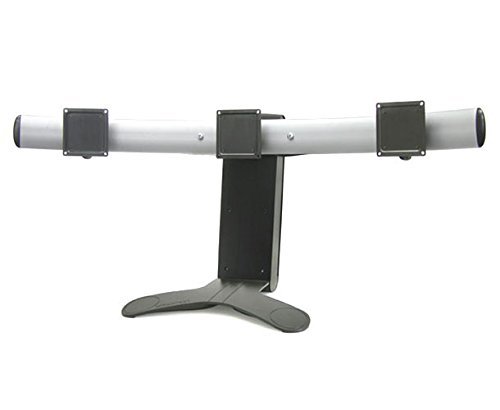
Image: The Ergotron LX Triple/Widescreen Dual Display Lift Stand showing its main components: the base, the vertical support, and the horizontal bar with three monitor mounting points.
2. Assembly of the Stand
- Attach the vertical support arm to the base using the provided screws and hex key. Ensure it is securely fastened.
- Slide the horizontal monitor bar onto the top of the vertical support arm. Secure it in place with the designated fasteners.
- Attach the three monitor mounting brackets to the horizontal bar. These brackets typically slide into a channel and are secured with screws.
3. Attaching Monitors
Before attaching monitors, ensure they are VESA compliant and within the stand's weight and size specifications.
- Carefully place each monitor face down on a soft, clean surface.
- Attach a monitor mounting bracket to the back of each monitor using the appropriate VESA screws from the hardware kit. Ensure the bracket is securely tightened.
- Lift each monitor and slide its attached bracket onto the corresponding mounting point on the horizontal bar. Secure each monitor in place using the provided locking mechanism or screws.
- Once all monitors are attached, gently adjust their positions along the horizontal bar to achieve desired spacing.
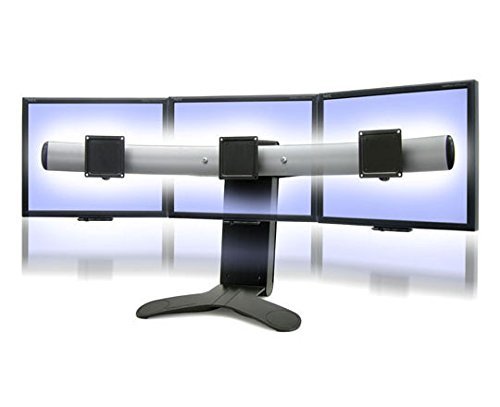
Image: The Ergotron LX Triple/Widescreen Dual Display Lift Stand fully assembled with three monitors mounted, demonstrating its functionality as a multi-display setup.
Operating the Stand
Height Adjustment
The stand features a lift mechanism for easy height adjustment. To adjust the height, gently lift or lower the entire monitor assembly to your desired ergonomic position. The stand is designed to hold its position once released.
Monitor Tilt and Swivel
Each monitor can be independently tilted and swiveled. Loosen the tilt knob or screw on the back of the monitor bracket, adjust the monitor to the desired angle, and then re-tighten the knob/screw to secure it.
Cable Management
Utilize the provided cable management clips or channels on the stand's vertical support to route and organize your monitor and power cables. This helps maintain a tidy workspace and prevents cable damage.
Maintenance
To ensure the longevity and proper functioning of your Ergotron display stand, follow these simple maintenance guidelines:
- Cleaning: Wipe the stand with a soft, damp cloth. Avoid using abrasive cleaners or solvents, as they may damage the finish.
- Fastener Check: Periodically check all screws and fasteners to ensure they are tight. Re-tighten if necessary.
- Weight Limits: Do not exceed the maximum weight capacity of the stand. Refer to the specifications section for details.
Troubleshooting
If you encounter any issues with your display stand, please refer to the following table for common problems and solutions:
| Problem | Possible Cause | Solution |
|---|---|---|
| Stand is wobbly or unstable. | Loose fasteners; uneven surface; monitors too heavy. | Ensure all screws are tightened. Place stand on a level surface. Verify monitor weight is within specifications. |
| Monitors are difficult to adjust or sag. | Tension not properly set; monitors too heavy. | Check the tension adjustment screws (if applicable) on the monitor brackets and vertical arm. Ensure monitor weight is within limits. |
| Monitors are not level. | Improper installation; uneven monitor weight distribution. | Re-check monitor attachment to the horizontal bar. Adjust individual monitor tilt/swivel as needed. |
Specifications
| Feature | Detail |
|---|---|
| Model Number | Ergotron33-296-195 |
| Manufacturer | ERGOTRON |
| Product Type | Triple/Widescreen Dual Display Lift Stand |
| Compatibility | VESA compliant monitors (75x75mm, 100x100mm) |
| Monitor Capacity | Up to three monitors (specific size/weight limits apply, refer to product packaging or Ergotron website for exact details) |
| Adjustments | Height adjustment, tilt, swivel |
| Package Dimensions | 1 x 1 x 1 inches |
| Item Weight | 40 Pounds |
Warranty and Support
Ergotron products are manufactured to the highest quality standards and come with a limited warranty. For specific warranty terms and conditions, please refer to the warranty card included with your product or visit the official Ergotron website.
If you require technical assistance, have questions about assembly, or need to report a missing/damaged part, please contact Ergotron Customer Support:
- Website: www.ergotron.com/support
- Phone: Refer to the Ergotron website for regional contact numbers.
Please have your model number (Ergotron33-296-195) and purchase date ready when contacting support.