
WEN 6530
Contents
WEN 6530 6-Amp Electric Hand Planer User Manual
Model: 6530 | Brand: WEN
Product Overview
The WEN 6530 6-Amp Electric Hand Planer is designed for smoothing joists, planing away chips, splinters, and misshapen edges. It is suitable for tasks such as fixing stubborn doors and fitting wood, providing a smooth and aligned surface.
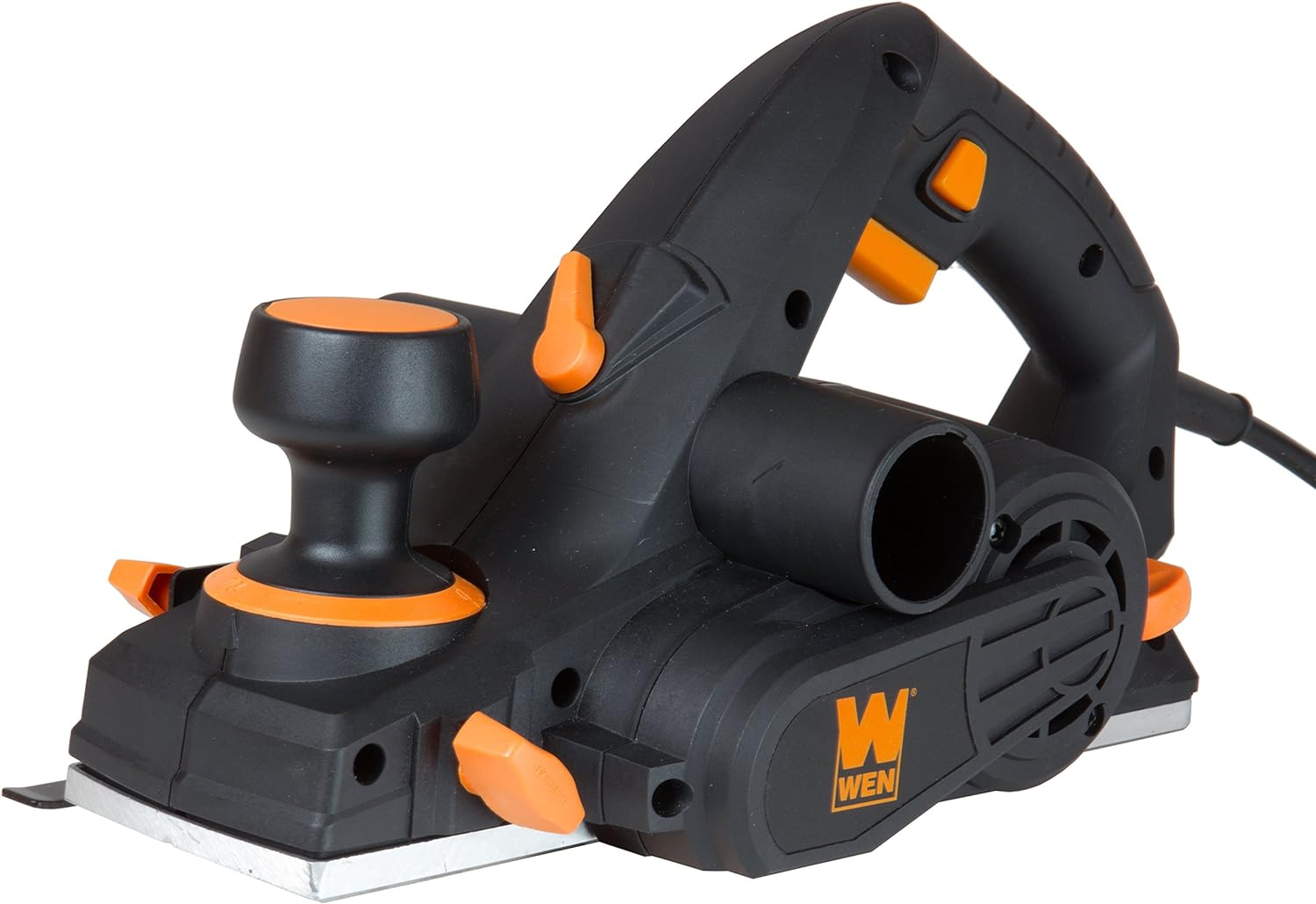
Figure 1: WEN 6530 6-Amp Electric Hand Planer, showing its compact design.
Safety Information
Always read and understand all safety warnings and instructions before operating this power tool. Failure to follow the warnings and instructions may result in electric shock, fire, and/or serious injury. Keep your work area clean and well-lit. Do not operate power tools in explosive atmospheres, such as in the presence of flammable liquids, gases, or dust. Always wear appropriate personal protective equipment, including eye protection, hearing protection, and dust masks.
- Ensure the power switch is off before connecting to a power source.
- Keep hands and body parts away from the blade area.
- Secure the workpiece before planing.
- Disconnect the plug from the power source before making any adjustments, changing accessories, or storing the tool.
Components and What's Included
The WEN 6530 Electric Hand Planer package includes the following components:
- WEN 6530 6-Amp Electric Hand Planer
- Dust Bag
- Rabbeting Guide
- Kickstand
- Parallel Fence Bracket
- Adjustment Wrench (with onboard storage)

Figure 2: The planer shown with the dust bag and rabbeting guide attached.
Setup
Attaching the Dust Bag
The included dust bag helps maintain a clean workspace by collecting wood shavings. It can be attached to either the left or right side of the planer's dust port, depending on user preference and working conditions.

Figure 3: Dust bag securely attached to the planer's dust port.
Attaching the Rabbeting Guide and Parallel Fence
The rabbeting guide and parallel fence bracket can be attached to assist with specific cuts. The rabbeting guide adjusts from 0 to 7/10 inches for rabbets up to an inch deep. The parallel fence ensures straight cuts, particularly useful for planing door edges, wood trim, and boards.
Operating Instructions
The WEN 6530 Electric Hand Planer features a 6-Amp motor that delivers over 34,000 cuts per minute, capable of handling even hard woods. It has a cutting width of 3-1/4 inches.
Adjusting Cutting Depth
The planer offers 16 positive stops for depth adjustment, allowing for fine-tuning of cuts from 0 up to 1/8 inches deep. Adjust the front knob to set the desired cutting depth.

Figure 4: Detail of the depth adjustment knob, showing incremental settings.
Chamfering Corners
The base plate shoe includes a V-shaped groove designed to facilitate chamfering (flattening) sharp post corners, making the process easier and more precise.

Figure 5: The V-shaped groove on the planer's base plate for chamfering.
General Planing Operation
When planing, ensure the workpiece is stable. Guide the planer smoothly across the surface, allowing the blades to remove material. For optimal results, make consistent passes. The kickstand protects the blade and workpiece when the planer is not in use by keeping the blade elevated.

Figure 6: The WEN 6530 Electric Hand Planer in action, smoothing a wooden beam.

Video 1: Official product video demonstrating the features and operation of the WEN 6530 Electric Hand Planer, including depth adjustment, dust collection, and chamfering capabilities.
Maintenance
Dust Collection
Regularly empty the dust bag to ensure efficient dust collection and prevent clogging. For enhanced dust management, the planer's dust port can also be connected to a dust extractor system.
Blade Care
The integrated kickstand helps protect the blade from damage when the planer is set down, preventing contact with the workpiece or other surfaces. Periodically inspect the blades for sharpness and damage. Replace dull or damaged blades as needed using the onboard adjustment wrench.

Figure 7: The kickstand in its deployed position, protecting the planer blade.
Troubleshooting
If the planer is not performing as expected, consider the following common issues:
- Reduced Planing Efficiency: Check if the dust bag is full or if the blades are dull. Empty the dust bag or replace the blades.
- Uneven Cuts: Ensure the depth adjustment is set correctly and consistently. Verify that the workpiece is securely clamped and stable during operation.
- Tool Not Starting: Check the power connection and ensure the power switch is fully engaged.
For further assistance, refer to the official user manual PDF or contact WEN customer support.
Specifications
| Feature | Detail |
|---|---|
| Brand | WEN |
| Model Number | 6530 |
| Power Source | Electric |
| Amperage | 6 Amps |
| Cutting Width | 3-1/4 Inches |
| Maximum Cutting Depth | 1/8 Inches (0.13 Inches) |
| Maximum Rotational Speed | 34000 RPM |
| Item Weight | 6.5 Pounds |
| Product Dimensions | 12"L x 7"W x 7"H |
| Voltage | 120 Volts |
Warranty and Support
The WEN 6530 6-Amp Electric Hand Planer comes backed by a 2-year warranty. For any questions, technical assistance, or warranty claims, please contact WEN customer support. A friendly customer help line and a nationwide network of skilled service technicians are available to assist you.
For the complete user manual, you can download the PDF version from the official product page or directly via this link: WEN 6530 User Manual (PDF).
Documents and downloads
Ask a question about this manual
Ask about setup, troubleshooting, compatibility, parts, safety, or missing instructions. Manuals+ will review the question and use this page’s manual context to help answer it.