
Electro-Voice SxA250
Electro-Voice SxA250 15-Inch 2-Way Powered Speaker User Manual
Model: SxA250
Introduction
This manual provides essential information for the proper setup, operation, and maintenance of your Electro-Voice SxA250 15-Inch 2-Way Powered Speaker. Please read this manual thoroughly before using the product to ensure optimal performance and safety.
The Electro-Voice SxA250 is a high-performance, self-powered loudspeaker designed for professional audio applications. It features a 15-inch dynamic driver, delivering robust and clear audio with an 80 x 55-degree coverage pattern. Its durable construction and versatile mounting options make it suitable for various environments.
Important Safety Information
Always observe the following safety precautions:
- Do not expose the speaker to rain or moisture.
- Ensure proper ventilation around the speaker.
- Only connect to the specified power supply (100-120V).
- Do not attempt to service the unit yourself. Refer all servicing to qualified personnel.
- Avoid placing the speaker in direct sunlight or near heat sources.
What's in the Box
Upon unpacking, verify that all components are present:
- Electro-Voice SxA250 Powered Speaker
- Speaker Stand (if included with specific package)
- Tabletop Mount (if included with specific package)
- Floor Stand (if included with specific package)
- Power Cord
- User Manual (this document)
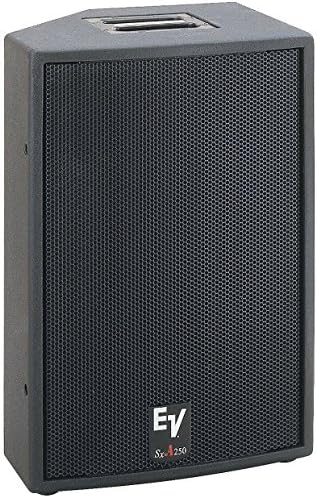
Image: Front view of the Electro-Voice SxA250 powered speaker, showing the black cabinet and metal grille. The EV logo and SxA250 model name are visible on the lower front.
Setup
1. Placement
Position the SxA250 speaker on a stable, flat surface or mount it using a compatible speaker stand or floor stand. Ensure the speaker is placed in a location that allows for optimal sound dispersion and avoids obstructions.
- Floor Standing: Use the integrated mounting points for a floor stand.
- Tabletop Mount: Place the speaker on a sturdy tabletop, ensuring stability.
2. Power Connection
- Ensure the speaker's power switch is in the "OFF" position.
- Connect the provided power cord to the AC inlet on the rear panel of the speaker.
- Plug the other end of the power cord into a grounded electrical outlet (100-120V AC).
3. Audio Connections
The SxA250 features multiple input options:
- Mic/Line Inputs: Two combination XLR/TRS inputs are available for connecting microphones or line-level audio sources.
- Line Level Output: An XLR output is provided for linking multiple speakers or sending the audio signal to another device.
- USB Input: For connecting compatible USB devices.
- Aux Input: For connecting auxiliary audio sources.
- RCA Inputs: For connecting devices with RCA outputs.
Connect your audio source (mixer, microphone, instrument, etc.) to the appropriate input on the speaker's rear panel using high-quality cables.
Operating Instructions
1. Powering On/Off
- Before powering on, ensure all volume controls are set to their minimum level.
- Flip the power switch on the rear panel to the "ON" position. The power indicator LED will illuminate.
- To power off, set the power switch to the "OFF" position.
2. Adjusting Volume and Tone
- Input Gain Controls: Adjust the individual gain controls for each input to achieve the desired input level without clipping.
- Master Volume: Use the master volume control to set the overall output level of the speaker.
- Bass Boost: Activate the Bass Boost feature for enhanced low-frequency response, if desired.
3. Voice Control (if applicable)
The SxA250 is compatible with voice assistants for hands-free operation. Refer to your voice assistant's specific instructions for pairing and command setup. Ensure the speaker is connected to a network if required for voice control functionality.
Maintenance
Cleaning
- Disconnect the speaker from the power outlet before cleaning.
- Use a soft, dry cloth to wipe the exterior surfaces of the speaker.
- Do not use abrasive cleaners, solvents, or chemical sprays, as these may damage the finish.
- Periodically check the grille for dust accumulation and gently clean if necessary.
Storage
When not in use for extended periods, store the speaker in a cool, dry place, away from direct sunlight and extreme temperatures. It is recommended to use the original packaging for storage and transport.
Troubleshooting
| Problem | Possible Cause | Solution |
|---|---|---|
| No Sound Output |
|
|
| Distorted Sound |
|
|
| No Power Indicator Light |
|
|
If the problem persists after attempting these solutions, please contact Electro-Voice customer support.
Specifications
| Feature | Detail |
|---|---|
| Model Name | SxA250 |
| Speaker Type | Powered Speaker |
| Woofer Diameter | 15 Inches |
| Audio Driver Type | Dynamic Driver |
| Coverage Angle | 80 x 55 degrees |
| Connectivity Technology | USB, Aux, RCA |
| Input Voltage | 100-120 Volts |
| Control Method | Voice Control (compatible), Manual Knobs |
| Included Components | Speaker Stand, Tabletop Mount, Floor Stand (depending on package) |
| Color | Black |
| Item Weight | 74 pounds |
| Dimensions (approx.) | 30 x 24 x 17 inches (Package Dimensions) |
Warranty and Support
Warranty Information
The Electro-Voice SxA250 comes with a Limited Warranty. Please refer to the warranty card included with your product or visit the official Electro-Voice website for detailed terms and conditions regarding warranty coverage and duration.
Customer Support
For technical assistance, service, or replacement parts, please contact Electro-Voice customer support. You can find contact information on the official Electro-Voice website or through the customer support link provided by your retailer.
Online Resources: For additional information, FAQs, and software updates, visit the official Electro-Voice website: www.electrovoice.com
Related documentsSxA250


Ask a question about this manual
Ask about setup, troubleshooting, compatibility, parts, safety, or missing instructions. Manuals+ will review the question and use this page’s manual context to help answer it.