
1. Product Overview
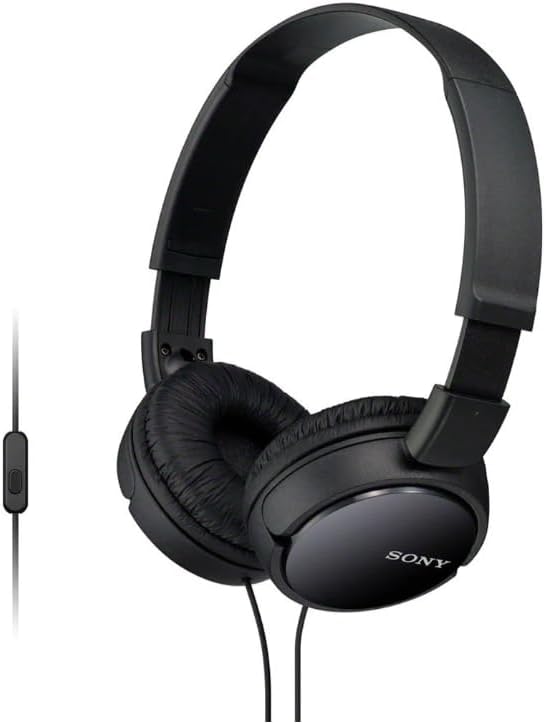
The Sony MDR-ZX110AP headset combines form and function, offering smartphone control for on-the-go use. These over-the-head headphones deliver robust audio performance, an integrated microphone for hands-free calling, and media playback controls for convenient operation.
Key Features:
- Dynamic Drivers: Lightweight 1.38-inch neodymium dynamic drivers provide a punchy, rhythmic response.
- Foldable Design: Swiveling earcups allow for easy storage and enhanced portability, ideal for travel.
- Integrated Microphone & Remote: An inline remote and built-in microphone on the headphone cord enable hands-free calls from selected smartphones and music control.
- Comfortable Earpads: Cushioned earpads ensure total comfort, while the enfolding closed-back design seals in sound.
- Wide Frequency Range: Spanning 12 Hz to 22 kHz, delivering deep bass, rich midrange, and soaring highs.
- Standard Connectivity: Features an L-shaped stereo mini plug 3.5mm.
2. Setup
Setting up your Sony MDR-ZX110AP headphones is straightforward. Follow these steps to begin using your headphones:
- Unpack: Carefully remove the headphones from their packaging.
- Unfold (if necessary): If the headphones are in their folded position, gently unfold the earcups until they are in the listening position. The swiveling earcup design allows for compact storage.
- Adjust Headband: Extend or retract the headband on both sides to achieve a comfortable fit on your head. The headband is designed to be adjustable for various head sizes.
- Connect Audio Cable: Insert the 3.5mm L-shaped stereo mini plug into the headphone jack of your audio device (e.g., smartphone, tablet, laptop, desktop, portable media player). Ensure the plug is fully inserted for optimal sound quality.
Your headphones are now ready for use.

3. Operating Instructions
The Sony MDR-ZX110AP headphones are designed for ease of use with an inline remote and microphone.
3.1 Audio Playback
- Start/Stop Playback: Press the button on the inline remote once to play or pause audio.
- Skip Track: Press the button twice quickly to skip to the next track.
- Previous Track: Press the button three times quickly to go back to the previous track.
- Volume Control: Adjust the volume directly on your connected audio device. The inline remote does not feature volume controls.
3.2 Hands-Free Calling
When connected to a compatible smartphone, the inline microphone allows for hands-free communication.
- Answer/End Call: Press the button on the inline remote once to answer an incoming call or end an active call.
- Reject Call: Press and hold the button for approximately two seconds to reject an incoming call.

4. Maintenance
Proper care and maintenance will extend the lifespan of your Sony MDR-ZX110AP headphones.
- Cleaning: Wipe the headphones with a soft, dry cloth. Do not use liquid cleaners or solvents.
- Storage: When not in use, store the headphones in a cool, dry place. Utilize the foldable design to minimize space and protect them from damage. Avoid wrapping the cable too tightly to prevent kinks or damage.
- Avoid Moisture: These headphones are not water-resistant. Avoid exposure to water, rain, or excessive humidity.
- Temperature: Do not expose the headphones to extreme temperatures (hot or cold) or direct sunlight for extended periods.
5. Troubleshooting
If you encounter issues with your headphones, refer to the following common troubleshooting tips:
- No Sound or Low Volume:
- Ensure the 3.5mm plug is fully inserted into the device's headphone jack.
- Check the volume level on your connected device.
- Test the headphones with a different audio source or device to rule out device-specific issues.
- Poor Sound Quality:
- Verify the audio source is playing high-quality audio.
- Ensure the headphone plug is clean and free of debris.
- Check for any damage to the cable or earcups.
- Microphone Not Working:
- Confirm your device recognizes the external microphone.
- Ensure the microphone is not obstructed.
- Test the microphone with a different application or device.
If problems persist, please contact Sony customer support.
6. Specifications
| Feature | Specification |
|---|---|
| Model Name | ZX Series |
| Connectivity Technology | Wired |
| Headphones Jack | 3.5 mm Jack |
| Audio Driver Type | Dynamic Driver |
| Audio Driver Size | 30 Millimeters |
| Frequency Response | 12 Hz to 22 kHz |
| Sensitivity | 100 dB |
| Impedance | 24 Ohms (1KHz) |
| Noise Control | None |
| Special Feature | Foldable, Microphone Included |
| Control Type | Remote (inline) |
| Compatible Devices | Portable Media Players, Smartphones, Tablets, Laptops, Desktops |
| Color | Black |
| Material | Plastic |
| Item Weight | 4.2 ounces (0.26 Pounds) |
| Product Dimensions | 8 x 5.96 x 1.93 inches |
| Water Resistance Level | Not Water Resistant |
| UPC | 027242867093 |
7. Warranty and Support
Your Sony MDR-ZX110AP headphones are covered by Sony's standard manufacturer's warranty. Please refer to the warranty card included in your product packaging for specific terms and conditions.
For technical support, troubleshooting assistance, or warranty claims, please visit the official Sony support website or contact their customer service department. Keep your proof of purchase handy when contacting support.