1. Product Overview
The Breville Duo Temp Pro Espresso Machine BES810BSS is designed to deliver quality espresso at home. It features precise temperature control and low-pressure pre-infusion for optimal flavor extraction. This manual provides instructions for the safe and efficient operation and maintenance of your espresso machine.

Image: Front view of the Breville Duo Temp Pro Espresso Machine BES810BSS in brushed stainless steel.
2. Setup
2.1 Unpacking and Initial Cleaning
Carefully remove all packaging materials and accessories. Clean the water tank, portafilter, filter baskets, and milk jug with warm water and a mild dishwashing detergent. Rinse thoroughly and dry all parts before assembly.
2.2 Water Tank Installation
- Remove the water tank from the back of the machine.
- Install the water filter into the filter holder, then place it inside the water tank.
- Fill the water tank with fresh, cold filtered water up to the MAX line.
- Return the water tank to its position on the machine, ensuring it is securely seated.

Image: Included accessories for the Breville Duo Temp Pro, including the water filter, milk jug, and various filter baskets.
2.3 Initial Flush
Before first use, perform an initial flush to prime the machine and clean internal components. Ensure the water tank is full. Place a large container under the group head and steam wand. Press the POWER button. Once heated, press the SELECT button to cycle through espresso and steam functions, allowing water to flow through each. Repeat this process until the water tank is nearly empty.
3. Operating Instructions
3.1 Making Espresso
- Prepare the Portafilter: Select the appropriate filter basket (single or dual wall) and place it into the portafilter.
- Dose and Tamp: Grind fresh coffee beans and fill the filter basket. Use the integrated tamper to press the coffee grounds firmly and evenly. The Razor Dose Trimming Tool can be used to ensure the correct dose level.
- Insert Portafilter: Insert the portafilter into the group head and twist firmly to lock it into place.
- Extract Espresso: Place a pre-warmed cup under the portafilter spouts. Press the SELECT button to initiate extraction. The machine uses low-pressure pre-infusion followed by high-pressure extraction. Press SELECT again to stop the flow when the desired volume is reached.
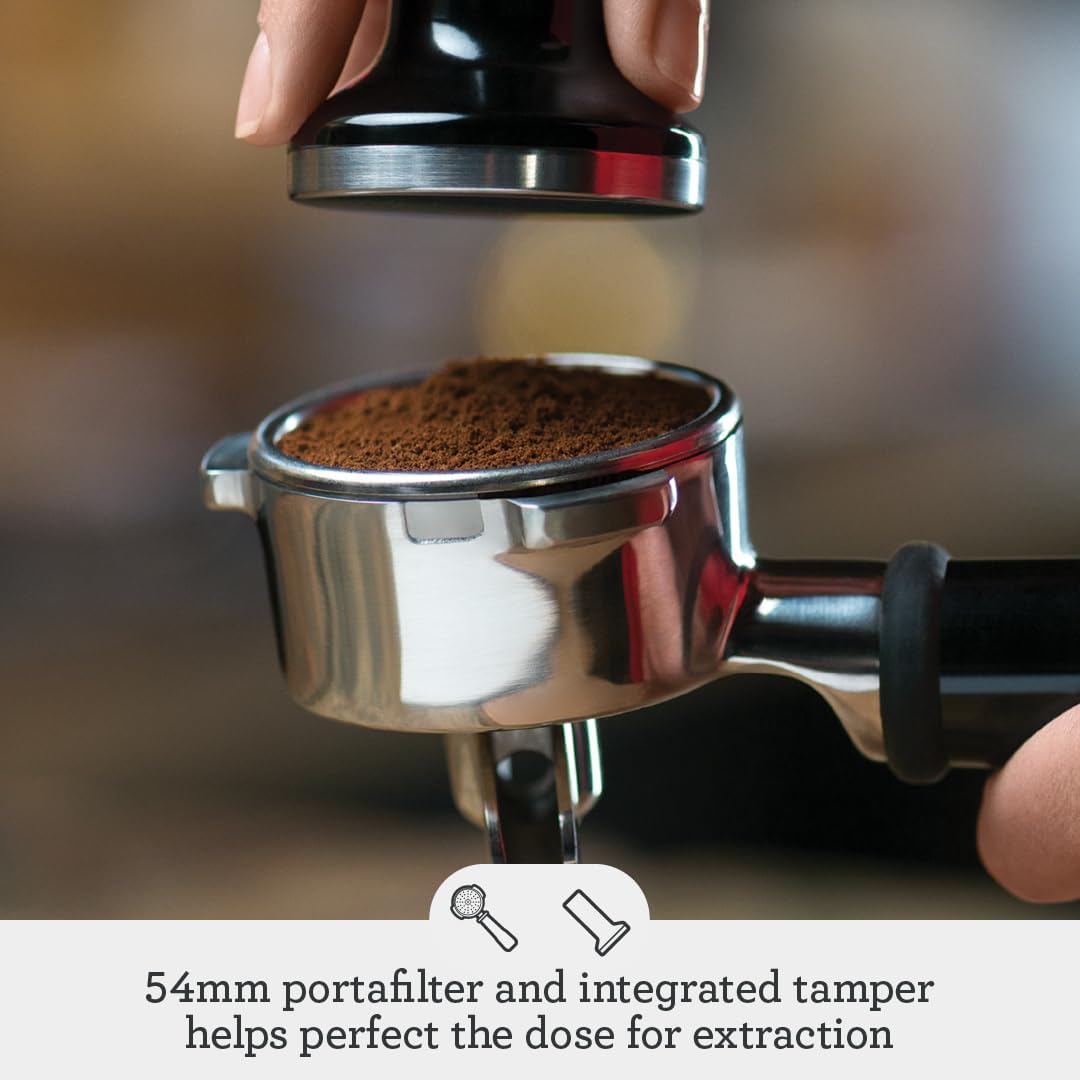
Image: A hand tamping freshly ground coffee into the portafilter basket.

Image: Espresso being extracted from the machine into a small glass cup.
3.2 Steaming Milk
- Fill the stainless steel milk jug with cold milk, just below the bottom of the spout.
- Position the steam wand over the drip tray. Turn the SELECT dial to the STEAM position to purge any water from the wand. Turn it back to the STANDBY position.
- Insert the steam wand into the milk jug, with the tip just below the surface. Turn the SELECT dial to STEAM.
- Lower the jug slightly to introduce air for texturing, then raise it to submerge the tip for heating. Continue until the milk reaches the desired temperature and texture (microfoam).
- Turn the SELECT dial back to STANDBY. Wipe the steam wand immediately with a damp cloth. The machine will automatically purge the heat system after steaming.

Image: A hand holding a stainless steel milk jug under the steam wand of the espresso machine.
3.3 Hot Water Function
To dispense hot water, ensure the machine is heated. Place a cup under the steam wand. Turn the SELECT dial to the HOT WATER position. Turn it back to STANDBY to stop the flow.
4. Maintenance
Regular maintenance ensures optimal performance and longevity of your Breville Duo Temp Pro.
4.1 Daily Cleaning
- Drip Tray: Empty and clean the drip tray daily. The machine features a drip tray alert.
- Portafilter and Filter Baskets: After each use, remove spent coffee grounds and rinse the portafilter and filter basket under hot water.
- Steam Wand: Always wipe the steam wand immediately after steaming milk to prevent milk residue from drying.
- Group Head: Use a damp cloth to wipe the group head seal and screen.
4.2 Weekly Cleaning
- Backflush: Perform a backflush using the cleaning disc and a cleaning tablet (included). Follow the instructions provided with the cleaning tablets.
- Water Tank: Clean the water tank with warm soapy water and rinse thoroughly.
4.3 Descaling
The machine will indicate when descaling is required. Use a descaling solution specifically designed for espresso machines. Follow the instructions provided with the descaling product and the machine's manual for the descaling cycle.
5. Troubleshooting
| Problem | Possible Cause | Solution |
|---|---|---|
| No water flow from group head | Water tank empty; machine not primed; blockage. | Fill water tank; perform initial flush; clean group head. |
| No steam from wand | Steam wand blocked; machine not at steam temperature. | Clean steam wand tip; allow machine to heat fully for steam. |
| Espresso extracts too fast/slow | Grind size incorrect; tamping pressure incorrect; dose incorrect. | Adjust grind size (finer for slow, coarser for fast); adjust tamping pressure; ensure correct coffee dose. |
| Machine not heating | Power issue; internal fault. | Check power connection; contact customer support if issue persists. |
6. Specifications
| Feature | Detail |
|---|---|
| Brand | Breville |
| Model Name | Duo Temp Pro |
| Item Model Number | BES810BSSUSC |
| Color | Brushed Stainless Steel |
| Product Dimensions | 10.12"D x 12.58"W x 13.15"H |
| Coffee Maker Type | Espresso Machine |
| Operation Mode | Manual |
| Voltage | 120 Volts |
| Item Weight | 14.59 pounds |
| Water Tank Capacity | 61 oz (approx. 1.8 liters) |
| Power | 1600 Watts |
| Included Components | 16 oz Stainless Steel Milk Jug, Cleaning tool and cleaning tablets, Filter, Integrated removable tamper, Razor Precision Dose Trimming Tool, Silicon cleaning disc, Water Filter Holder and Water Filter |
7. Warranty and Support
7.1 Product Warranty
The Breville Duo Temp Pro Espresso Machine BES810BSS comes with a 1 Year Limited Product Warranty. Please refer to the warranty card included with your product for full terms and conditions. Keep your purchase receipt as proof of purchase.
7.2 Customer Support
For technical assistance, troubleshooting, or warranty claims, please contact Breville Customer Support. Contact details can typically be found on the official Breville website or in the product packaging.
Online Resources: Visit the official Breville website for additional product information, FAQs, and support videos.


