1. Product Overview
The Fenix UC35 is a high-performance, rechargeable LED flashlight designed for various applications. It features a powerful LED, multiple brightness levels, and convenient USB charging. This manual provides essential information for safe and effective use.

Image 1.1: The Fenix UC35 rechargeable LED flashlight, showcasing its compact design and textured grip.
2. Setup and Initial Use
2.1. Package Contents
- Fenix UC35 Flashlight
- 18650 Rechargeable Battery (1 piece)
- USB Charging Cable
- Lanyard/Hook
- Spare O-ring (typical for flashlights, assumed)
2.2. Initial Battery Charging
Before first use, fully charge the included 18650 battery. The flashlight features a micro-USB charging port for convenience.
- Turn off the flashlight.
- Connect the USB cable to the flashlight's micro-USB port and a power source (e.g., USB wall adapter, computer USB port).
- Press the tail switch to initiate charging.
- A red indicator light will show that charging is in progress.
- The indicator light will turn green when the battery is fully charged.
- Press the tail switch again to stop charging.
- Disconnect the USB cable from the flashlight.
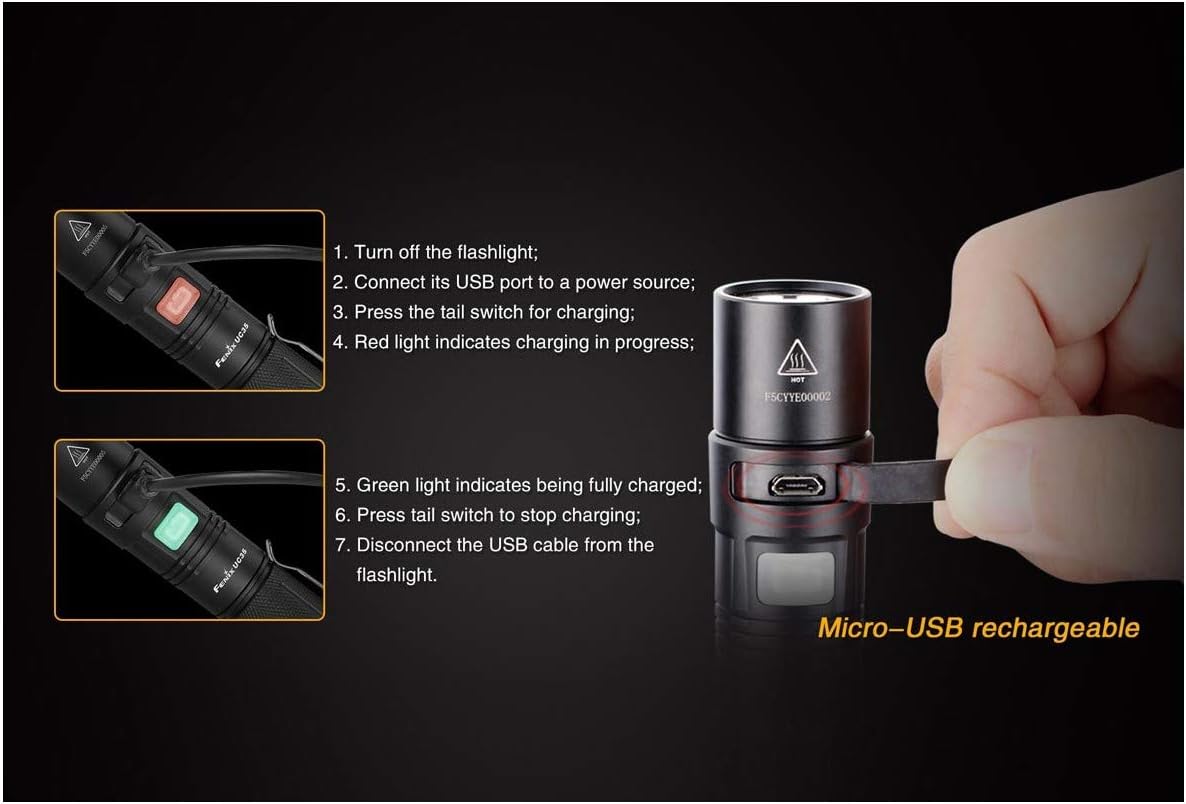
Image 2.1: Visual guide for charging the Fenix UC35 flashlight via its micro-USB port. Shows red light for charging and green for fully charged.
3. Operating Instructions
3.1. Power On/Off
- To Turn On: Fully press the tail switch.
- To Turn Off: Fully press the tail switch again.
3.2. Brightness Level Selection
With the flashlight turned on, press the side switch to cycle through the brightness levels in the following order: Eco → Low → Mid → High → Turbo.
3.3. Strobe and SOS Modes
- Strobe: Press and hold the side switch for 1 second to activate Strobe mode.
- SOS: From Strobe mode, press the side switch again to activate SOS mode.
- Exit: Press the side switch once more to return to the previously used general mode, or fully press the tail switch to turn off the flashlight.
3.4. Low Power Warning Function
The side switch features a built-in indicator that blinks red when the remaining battery power is less than 1/3, signaling that a recharge is needed soon.

Image 3.1: The Fenix UC35 flashlight with its side switch illuminated red, indicating a low power warning.
4. Maintenance
4.1. Cleaning
- Clean the flashlight body with a soft cloth.
- If the threads or O-rings are dirty, clean them with a cotton swab.
4.2. Battery Care
- Store the flashlight with a partially charged battery if not used for extended periods.
- Recharge the battery every 3-4 months to maintain optimal performance and extend battery life.
- Avoid fully discharging the battery frequently.
4.3. O-ring Maintenance
To maintain the flashlight's waterproof rating, periodically lubricate the O-rings with silicone grease. Replace worn O-rings with the provided spares.
5. Troubleshooting
If your Fenix UC35 flashlight is not functioning correctly, please refer to the following common issues and solutions:
| Problem | Possible Cause | Solution |
|---|---|---|
| Flashlight does not turn on. | Battery is depleted or incorrectly inserted. | Charge the battery fully. Ensure the battery is inserted with the positive (+) end towards the head of the flashlight. |
| Light flickers or changes modes unexpectedly. | Loose battery or dirty contacts. | Ensure the battery is securely inserted. Clean battery contacts and flashlight threads. |
| Flashlight does not charge. | USB cable or power source issue, or tail switch not pressed. | Try a different USB cable or power source. Ensure the tail switch is pressed after connecting the USB cable to initiate charging. |
| Water ingress. | Damaged or improperly seated O-rings. | Inspect and replace O-rings if damaged. Ensure all parts are tightly screwed together. |
If the problem persists, please contact Fenix customer support.
6. Specifications
| Feature | Detail |
|---|---|
| Model | UC35 |
| LED Type | Cree XM-L2 U2 |
| Maximum Brightness | 960 lumens |
| Maximum Beam Distance | 200 meters |
| Power Source | Rechargeable 18650 battery (USB rechargeable) |
| Battery Voltage | 3.7 Volts |
| Maximum Runtime | Approx. 150 hours (at 14lm Eco mode) |
| Dimensions | 150 mm (Length) x 25.4 mm (Diameter) |
| Weight | 99.23 grams (excluding battery) |
| Material | 6061-T6 Aluminum Alloy |
| Waterproof Rating | IP68 |
| Recharge Cycles | Approx. 300 cycles |
7. Warranty Information
Fenix products are covered by a manufacturer's warranty. For specific warranty terms and conditions, please refer to the official Fenix website or contact your local distributor. Keep your purchase receipt as proof of purchase for warranty claims.
8. Customer Support
For further assistance, technical support, or inquiries regarding your Fenix UC35 flashlight, please visit the official Fenix website or contact their customer service department. Contact information can typically be found on the Fenix website or product packaging.


