
1. Introduction
This manual provides essential instructions for the safe and effective operation, maintenance, and troubleshooting of your Makita 18V 24mm Cordless Rotary Hammer Drill, Model HR244DZK. Please read this manual thoroughly before using the tool to ensure proper handling and to prevent injury or damage.

Image 1: Makita 18V 24mm Cordless Rotary Hammer Drill HR244DZK. This image displays the main unit of the rotary hammer drill with a drill bit attached, highlighting its compact and ergonomic design.
2. Safety Information
Always observe basic safety precautions to reduce the risk of fire, electric shock, and personal injury. Keep this instruction manual for future reference.
- Work Area Safety: Keep the work area clean and well-lit. Cluttered or dark areas invite accidents. Do not operate power tools in explosive atmospheres, such as in the presence of flammable liquids, gases, or dust.
- Electrical Safety: Avoid body contact with earthed or grounded surfaces. Do not expose power tools to rain or wet conditions.
- Personal Safety: Always wear eye protection. Use hearing protection when operating the tool for extended periods. Wear a dust mask in dusty conditions. Dress properly; avoid loose clothing or jewelry.
- Power Tool Use and Care: Do not force the power tool. Use the correct power tool for your application. Disconnect the battery pack from the power tool before making any adjustments, changing accessories, or storing power tools.
- Battery Tool Use and Care: Recharge only with the charger specified by the manufacturer. Use power tools only with specifically designated battery packs.
3. Components and Features
Familiarize yourself with the various parts of your HR244DZK rotary hammer drill:
- Main Body: Houses the motor, gearing, and control switches.
- SDS-Plus Chuck: For quick and secure bit changes.
- Side Handle: Provides additional grip and control.
- Depth Gauge: For precise drilling depth control.
- Mode Selector: Allows switching between rotation, hammer drilling, and chiseling modes.
- Trigger Switch: Activates the tool.
- Battery Port: For inserting the 18V Li-ion battery pack.
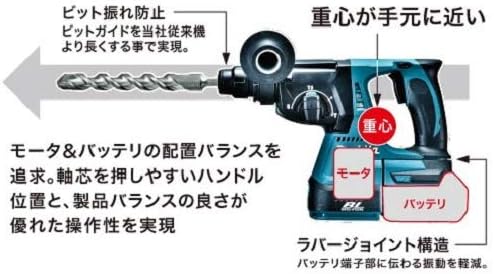
Image 2: Design and Balance. This diagram illustrates the optimized weight distribution with the center of gravity close to the handle, enhancing operability and reducing user fatigue. It also shows the rubber joint structure designed to reduce vibration transmitted to the battery terminal.
4. Setup
4.1 Battery Installation and Removal
- To install, align the battery pack with the housing and slide it in until it locks into place.
- To remove, press the release button on the battery pack and pull it out.
4.2 Attaching the Side Handle and Depth Gauge
- Loosen the side handle by twisting it counter-clockwise.
- Slide the handle onto the barrel of the tool to the desired position.
- Insert the depth gauge into the hole on the side handle.
- Tighten the side handle by twisting it clockwise to secure both the handle and the depth gauge.
4.3 Bit Installation (SDS-Plus)
- Clean the bit shank and apply a small amount of grease.
- Insert the bit into the chuck, pushing it firmly until it clicks into place.
- Pull the bit to ensure it is securely locked. A slight movement is normal for SDS-Plus bits.
- To remove, pull back the chuck sleeve and pull the bit out.
5. Operating Instructions
5.1 Mode Selection
The HR244DZK offers three operating modes:
- Rotation + Hammering (Hammer Drill Mode): For drilling into concrete, masonry, and stone.
- Rotation Only (Drill Mode): For drilling into wood, metal, and plastic.
- Hammering Only (Chiseling Mode): For light chiseling, chipping, or demolition work.
To select a mode, rotate the mode change lever to the desired icon.

Image 3: Mode Selector. This image shows the mode selection dial on the tool, indicating the three available modes: Rotation + Hammering, Rotation Only, and Hammering Only. It also illustrates the angle adjustment mechanism for chisels in the neutral position.
5.2 Starting and Stopping
- To start the tool, pull the trigger switch.
- To stop the tool, release the trigger switch.
5.3 Drilling and Chiseling Techniques
- Apply steady, even pressure. Do not force the tool.
- For hammer drilling, allow the tool's hammering action to do the work.
- When chiseling, hold the tool firmly and guide it along the desired path.
6. Maintenance
6.1 Cleaning
- Regularly clean the tool's ventilation openings to prevent overheating.
- Wipe the tool body with a soft, damp cloth. Do not use harsh chemicals or abrasive cleaners.
- Clean the chuck regularly to ensure smooth bit changes.
6.2 Battery Care
- Store batteries in a cool, dry place away from direct sunlight and heat.
- Do not store fully discharged batteries for extended periods.
6.3 Dust Collection System (if applicable)
The HR244DZK can be used with an optional dust collection system (e.g., DX-01). This system features a HEPA filter for efficient dust capture.

Image 4: Dust Collection System. This image shows the rotary hammer drill equipped with an integrated dust collection unit, highlighting the HEPA filter's high collection rate (99.97% or more) and how the system operates in conjunction with the main switch.
7. Troubleshooting
| Problem | Possible Cause | Solution |
|---|---|---|
| Tool does not start | Battery not charged or improperly installed. | Charge battery or re-install correctly. |
| Reduced power or performance | Battery low or worn out. Tool overloaded. | Recharge/replace battery. Reduce load or use appropriate bit. |
| Bit not holding in chuck | Bit not fully inserted. Chuck mechanism dirty or damaged. | Ensure bit is fully inserted. Clean chuck. If damaged, seek service. |
| Excessive vibration | Worn bit. Internal component issue. | Replace bit. If problem persists, seek service. |
8. Specifications
The following are the technical specifications for the Makita HR244DZK:
| Feature | Specification |
|---|---|
| Brand | Makita |
| Product Model Number | HR244DZK |
| Product Size | 56 x 15 x 45 cm |
| Product Weight | 4 kg |
| Color | Blue |
| Power Source | Rechargeable Battery |
| Voltage | 18 Volts |
| Max Rotation Speed | 1350 RPM |
| Max Chuck Size | 27 mm |
| Number of Speeds | 3 |
| Attached Components | None (Battery/Charger sold separately) |

Image 5: Product Dimensions. This image provides a visual representation of the tool's length, indicating a measurement of 328mm.
9. Warranty and Support
Warranty information for your Makita HR244DZK Cordless Rotary Hammer Drill is typically provided with your purchase documentation. Please refer to the warranty card or contact Makita customer support for details regarding warranty coverage, service, and repairs.
For further assistance or technical support, please visit the official Makita website or contact an authorized Makita service center.


