
JVC CS-J620
JVC CS-J620 6.5" CS Series 2-Way Coaxial Car Speakers User Manual
Model: CS-J620 | Brand: JVC
Introduction
This manual provides detailed instructions for the installation, operation, and maintenance of your JVC CS-J620 6.5" CS Series 2-Way Coaxial Car Speakers. These speakers are designed to deliver enhanced audio clarity and powerful sound for your vehicle's audio system. Please read this manual thoroughly before installation and use to ensure proper function and longevity of your product.
Product Features
- 300W Peak / 30W RMS Power: Each speaker delivers robust audio performance.
- 6.5" Mica Cone Woofer: Provides clear and dynamic mid-range and bass.
- 1" PEI Tweeter: Ensures crisp and detailed high-frequency sound.
- Hybrid Surround: Designed for durability and improved sound reproduction.
- Frequency Response: 35Hz - 22KHz for a wide audio spectrum.
- High Sensitivity: 92 dB sensitivity for efficient power usage.
- 4 Ohms Impedance: Compatible with most car audio systems.
- Black ABS Composite Grills: Durable and aesthetically pleasing design.
- Shallow Top-Mount Depth (1-23/32"): Facilitates easier installation in various vehicle models.
- Included Accessories: Speaker wire extension cables, screws, and mounting tabs for flexible installation.
Setup and Installation
Proper installation is crucial for optimal performance. If you are unsure about any steps, it is recommended to consult a professional installer.
Tools and Materials Required:
- Screwdriver set (Phillips and flathead)
- Wire strippers/crimpers
- Drill (if new mounting holes are required)
- Speaker wire (if not using existing wiring or included extensions)
- Electrical tape or heat shrink tubing
- Panel removal tools (optional, for interior trim)
Installation Steps:
- Disconnect Vehicle Battery: Before starting any electrical work, disconnect the negative terminal of your vehicle's battery to prevent short circuits.
- Remove Old Speakers: Carefully remove the door panels or speaker grilles to access the existing speakers. Disconnect the wiring and unscrew the old speakers.
- Prepare Mounting Location: Ensure the mounting surface is clean and free of obstructions. The shallow top-mount depth of the CS-J620 speakers helps prevent interference with window tracks or other internal components.
- Connect Speaker Wires: Connect the positive (+) and negative (-) terminals of the JVC CS-J620 speakers to the corresponding wires from your vehicle's audio system. Use the provided speaker wire extension cables if needed. Ensure connections are secure and insulated.
- Mount New Speakers: Place the JVC CS-J620 speakers into the mounting location. Use the provided screws and mounting tabs to secure them firmly. Do not overtighten.
- Test Speakers: Before reassembling the interior, reconnect the vehicle battery and test the speakers with your car's audio system to ensure they are functioning correctly.
- Reassemble Interior: Once confirmed, carefully reattach the speaker grilles and door panels.
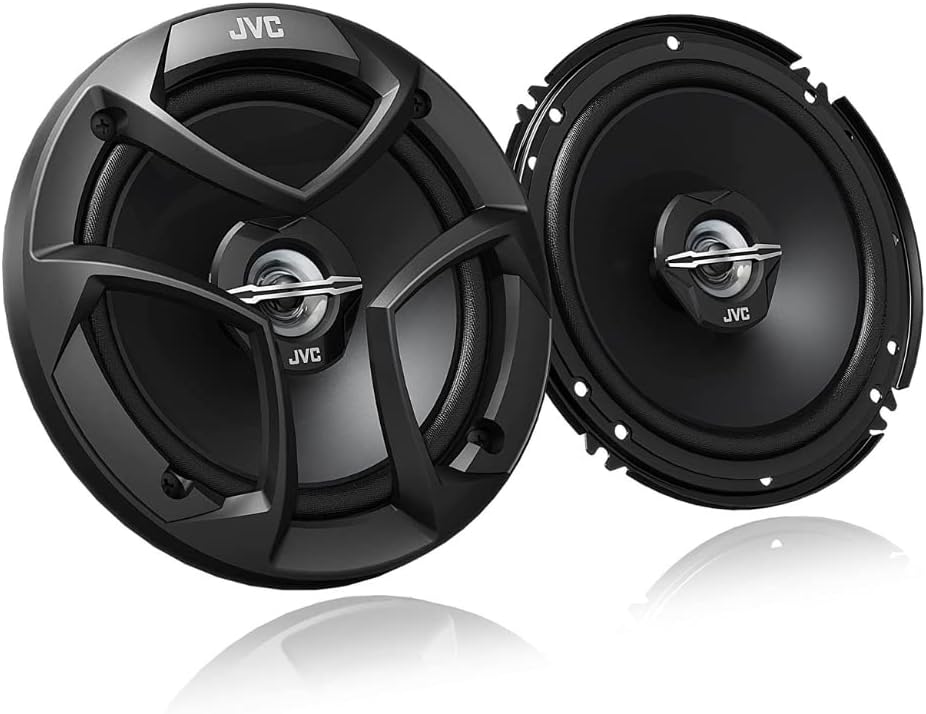
Image: Front view of the JVC CS-J620 6.5" coaxial car speakers, showing the speaker cone and tweeter with the protective grille installed.

Image: A JVC CS-J620 speaker shown alongside its included accessories, such as speaker wire extensions, mounting screws, and clips, ready for installation.
Operating Instructions
The JVC CS-J620 speakers are passive components and do not require specific operating instructions beyond proper connection to a car audio head unit or amplifier. Their performance is directly influenced by the quality of the audio source and amplification.
- Audio Source: Connect your car speakers to a compatible car stereo or amplifier.
- Volume Control: Adjust the volume level from your head unit. Avoid excessively high volumes that cause distortion, as this can damage the speakers.
- Equalizer Settings: Experiment with your head unit's equalizer settings to fine-tune the sound to your preference. The CS-J620 speakers are designed to provide balanced audio across their frequency range.
Maintenance
Regular maintenance helps preserve the sound quality and lifespan of your speakers.
- Cleaning: Use a soft, dry cloth to wipe down the speaker grilles and surrounds. Avoid using harsh chemicals or abrasive cleaners.
- Environmental Protection: While designed for automotive use, avoid exposing speakers to excessive moisture or extreme temperatures beyond typical vehicle conditions.
- Connection Check: Periodically check speaker wire connections to ensure they remain secure and free from corrosion.
Troubleshooting
If you experience issues with your JVC CS-J620 speakers, refer to the following common problems and solutions:
| Problem | Possible Cause | Solution |
|---|---|---|
| No sound from speakers |
|
|
| Distorted sound |
|
|
| Weak or no bass |
|
|
Specifications
| Feature | Detail |
|---|---|
| Model Name | CS-J620 |
| Speaker Type | Coaxial |
| Speaker Size | 6.5 Inches |
| Woofer Diameter | 6.5 Inches |
| Tweeter Diameter | 1 Inches |
| Speaker Maximum Output Power | 300 Watts (Peak) |
| RMS Power | 30 Watts |
| Frequency Response | 35 Hz - 22 KHz |
| Impedance | 4 Ohm |
| Sensitivity | 92 dB |
| Mounting Type | Surface Mount or Flush Mount |
| Top-Mount Depth | 1-23/32" |
| Product Dimensions | 13"D x 8"W x 4"H |
| Item Weight | 2.2 Pounds |
| Color | Black |
| Included Components | Speakers |
| Manufacturer | JVC |

Image: Side profile of the JVC CS-J620 speaker, highlighting its shallow mounting depth for easier installation in various car doors.

Image: Rear view of the JVC CS-J620 speaker, displaying the model number (CS-J620) and power specifications (300W Peak, 30W RMS, 4 Ohm) on the magnet.
Warranty and Support
JVC products are manufactured to high-quality standards and are backed by a limited warranty. For specific warranty terms and conditions, please refer to the warranty information included with your purchase or visit the official JVC website.
For technical support, troubleshooting assistance, or to inquire about replacement parts, please contact JVC customer service. You may also find additional resources, including a detailed user guide, on the JVC support website.
- Official User Guide (PDF): Download User Guide
- Manufacturer: JVC
- Brand Store: Visit the JVC Store on Amazon
Related documentsCS-J620


Ask a question about this manual
Ask about setup, troubleshooting, compatibility, parts, safety, or missing instructions. Manuals+ will review the question and use this page’s manual context to help answer it.