1. Introduction
The HEXBUG VEX IQ Robotics Construction Kit is an educational platform designed to foster STEM learning through the construction and programming of custom robots. This kit allows users to snap together colorful components without the need for specialized tools, providing an intuitive entry into robotics.
This manual provides detailed instructions to guide you through the assembly, operation, and maintenance of your VEX IQ robot. It covers essential information to help you get started and explore the full capabilities of the system.

Image 1.1: The HEXBUG VEX IQ Robotics Construction Kit packaging and an example robot configuration.
2. Safety Information
Please read and understand all safety instructions before using the VEX IQ Robotics Construction Kit. Failure to follow these instructions may result in injury or damage to the product.
- Adult Supervision: Recommended for users under the age of 12.
- Small Parts: This kit contains small parts that may pose a choking hazard for young children. Keep out of reach of children under 3 years old.
- Battery Safety:
- Use only the specified battery type (6 AA batteries for the robot brain).
- Do not mix old and new batteries, or different types of batteries.
- Insert batteries with correct polarity (+ and -).
- Remove exhausted batteries promptly.
- Do not recharge non-rechargeable batteries.
- The remote control uses a rechargeable lithium-ion battery; follow charging instructions carefully.
- Electrical Components: Handle the robot brain, motors, and sensors with care. Do not expose them to water or extreme temperatures.
- Moving Parts: Keep fingers, hair, and loose clothing away from moving gears and wheels during operation.
3. Package Contents
The HEXBUG VEX IQ Robotics Construction Kit includes over 750 snap-together pieces and the following key components:
- Robot Brain with 12 self-configuring input/output ports
- Video game style remote control with a rechargeable lithium-ion battery
- 4 Smart Motors with built-in rotational sensors
- 1 Bumper Switch sensor
- 1 Touch LED sensor
- 1 Color Sensor
- Over 750 additional structural and mechanical components (beams, gears, pins, etc.)
Note: 6 AA batteries are required for the robot brain and are not included in the kit.
4. Setup
4.1. Unpacking and Organization
Carefully unpack all components from the kit. It is recommended to sort the pieces using small containers or the included part identifier on the packaging to facilitate assembly.
4.2. Battery Installation
- Robot Brain: Locate the battery compartment on the Robot Brain. Insert 6 AA batteries, ensuring correct polarity. Close the compartment securely.
- Remote Control: The remote control comes with a rechargeable lithium-ion battery. Connect the remote control to a USB power source using the provided cable to charge it before first use. The indicator light will show charging status.
4.3. Initial Assembly (Clawbot Example)
The kit includes step-by-step instructions to build your first robot, such as the Clawbot. Follow these instructions carefully. The VEX IQ system uses tool-less components that snap together easily.
- Begin by identifying the main structural pieces.
- Connect the Smart Motors to the designated ports on the Robot Brain. The ports are self-configuring.
- Attach the Bumper Switch, Touch LED, and Color Sensor to their respective ports as indicated in the build instructions.
- Assemble the chassis, wheels, and any manipulators (like the claw) according to the visual guides.

Image 4.1: An example of a fully assembled Clawbot robot with its remote control.
4.4. Pairing the Remote Control
Once the robot brain is powered on and the remote control is charged, they should automatically attempt to pair. If pairing does not occur, consult the detailed pairing instructions provided in the quick start guide or on the official VEX IQ website.
5. Operating Instructions
5.1. Basic Robot Control
After successful assembly and pairing, you can immediately drive your robot using the video game style remote control. The default configuration allows for basic movement and control of any attached manipulators (e.g., a claw).
- Use the joysticks on the remote control to move the robot forward, backward, and turn.
- Buttons on the remote control are typically mapped to control accessories like claws or lifts. Refer to your specific robot build instructions for default button assignments.
5.2. Programming Your Robot
The VEX IQ system offers two primary software options for programming your robot, allowing for advanced functionality beyond basic remote control:
- Modkit for VEX: A free online, block-based programming environment suitable for beginners. It allows users to drag and drop code blocks to create programs.
- ROBOTC VEX IQ Curriculum: A text-based programming language (C-based) that offers more advanced control and is free for all users. This option is ideal for those looking to delve deeper into robotics programming.
Detailed tutorials and curriculum materials for both programming options are available on the official VEX Robotics website.
5.3. Building Advanced Configurations
The VEX IQ system is highly versatile, allowing you to build a wide array of robot designs. Beyond the initial Clawbot, you can explore other models like a dinosaur-inspired robot or a robotic arm with multiple degrees of freedom.
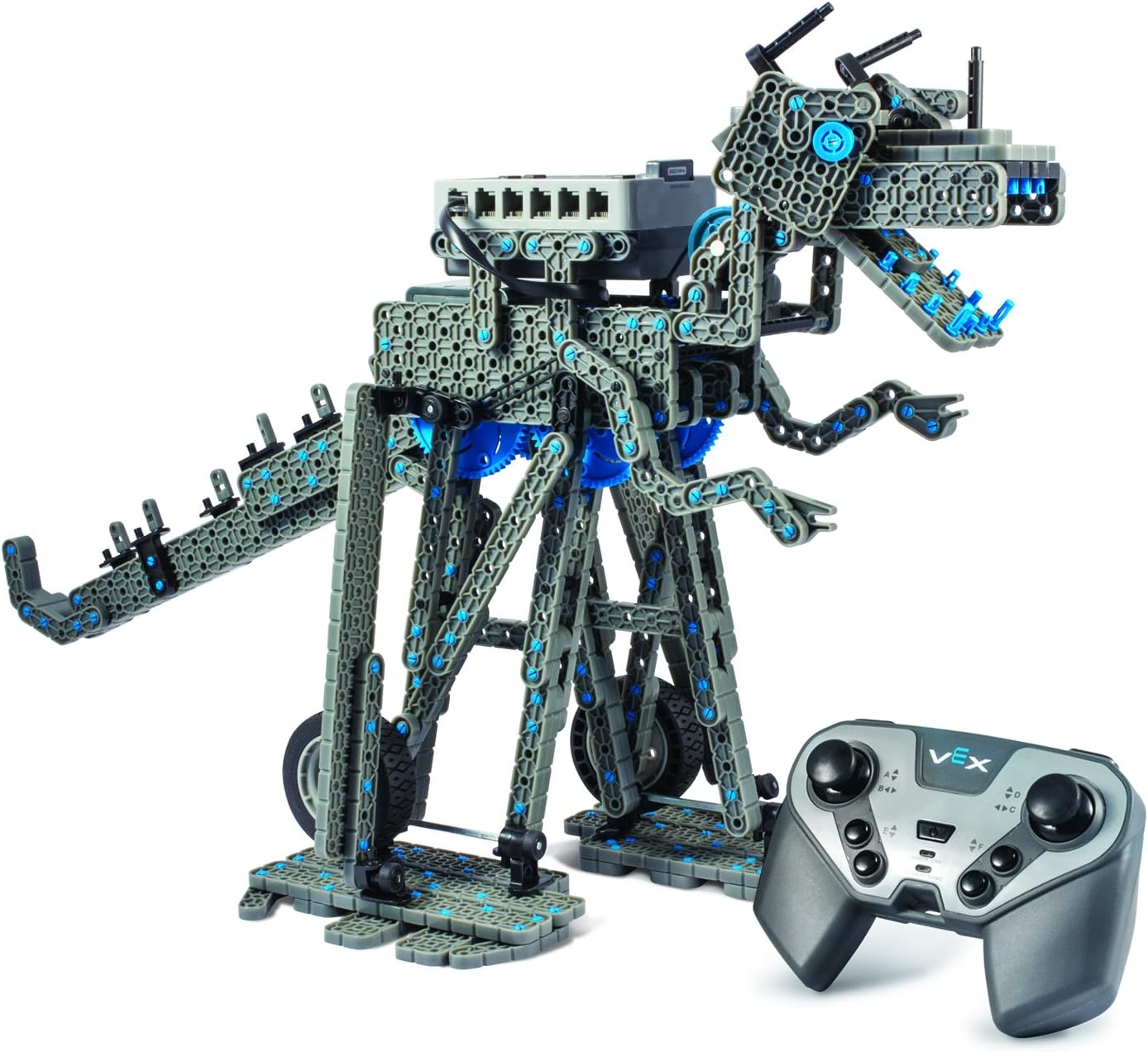
Image 5.1: An example of a dinosaur-inspired robot built with the VEX IQ kit.

Image 5.2: An example of a robotic arm configuration built with the VEX IQ kit.
Additional build instructions and design ideas are available online through the VEX Robotics community and educational resources.
6. Maintenance
- Cleaning: Use a dry, soft cloth to clean the robot components. Avoid using harsh chemicals or abrasive materials.
- Storage: Store the kit components in a dry, cool place away from direct sunlight. Keep small parts organized to prevent loss.
- Battery Care: Remove AA batteries from the Robot Brain if the kit will not be used for an extended period. Ensure the remote control's rechargeable battery is not left fully discharged for long durations.
- Component Inspection: Periodically inspect all snap-together pieces for wear or damage. Replace any broken parts to ensure optimal performance and safety.
7. Troubleshooting
- Robot Not Responding:
- Check if the Robot Brain is powered on and has fresh AA batteries.
- Ensure the remote control is charged and powered on.
- Verify that the remote control and Robot Brain are properly paired.
- Check all cable connections between motors, sensors, and the Robot Brain.
- Motors/Sensors Not Working:
- If you swap components, turn the Robot Brain off and then back on to ensure they are properly recognized.
- Confirm that the components are connected to the correct ports as per your build instructions or program.
- Test individual motors/sensors if possible, or try them in different ports.
- Wireless Connectivity Issues:
- Ensure there are no obstructions between the remote control and the robot.
- Minimize interference from other wireless devices.
- Re-pair the remote control and Robot Brain.
- Robot Movement is Erratic:
- Check for any loose connections or misaligned gears.
- Ensure wheels are properly attached and can rotate freely.
- Verify that the programming code (if applicable) is correct and free of errors.
8. Specifications
| Feature | Detail |
|---|---|
| Product Dimensions | 8.5 x 23.5 x 15.5 inches |
| Item Weight | 6.3 pounds |
| Model Number | 228-4444 |
| Manufacturer Recommended Age | 8 years and up |
| Batteries Required | 6 AA batteries (for Robot Brain, not included) |
| Manufacturer | Hexbug |
9. Warranty Information
Specific warranty details for the HEXBUG VEX IQ Robotics Construction Kit are not provided in the available product data. For comprehensive warranty information, please refer to the official HEXBUG website or contact their customer support directly.
10. Support
For further assistance, technical support, or to access additional resources such as advanced build instructions and programming tutorials, please visit the official HEXBUG or VEX Robotics websites. You can also contact HEXBUG customer service for direct support.
- Official HEXBUG Website: www.hexbug.com
- VEX Robotics Website: www.vexrobotics.com


