
Introduction
Thank you for choosing the iBall Nightingale K9 Portable Bluetooth Speaker. This manual provides essential information for setting up, operating, and maintaining your speaker. Please read it carefully before use to ensure proper functionality and longevity of your product.
Important Safety Instructions
- Do not expose the device to rain, moisture, or extreme temperatures.
- Do not open the speaker casing. Refer all servicing to qualified personnel.
- Ensure proper ventilation around the speaker.
- Keep away from direct sunlight and heat sources.
- Use only attachments/accessories specified by the manufacturer.
- Charge the speaker using a compatible power adapter.
Package Contents
Verify that all items are present in the package:
- iBall Nightingale K9 Speaker Unit
- Remote Control
- Audio Cable (AUX)
- Charging Cable (USB)
- User Manual (this document)
Product Overview
The iBall Nightingale K9 is a versatile portable speaker featuring Bluetooth connectivity, USB and SD card playback, FM radio, and AUX input. It comes with a built-in rechargeable battery and can be controlled via the included remote.
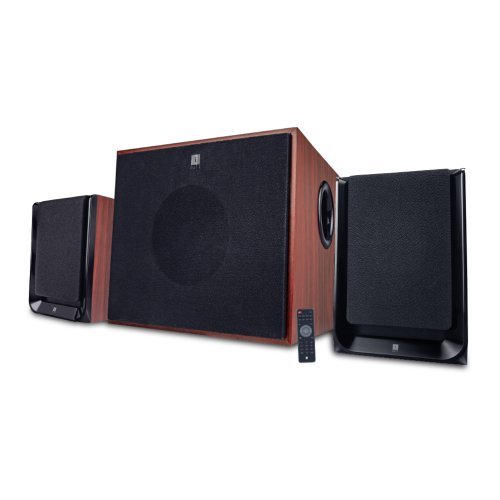
Image: Front view of the iBall Nightingale K9 Portable Speaker, showing the main unit with controls and display.
Setup Instructions
1. Charging the Speaker
- Before first use, fully charge the speaker. Connect the charging cable to the speaker's charging port and the other end to a USB power adapter (not included) or a computer's USB port.
- The charging indicator will illuminate during charging and turn off or change color when fully charged.
2. Initial Power On
Press and hold the Power button on the speaker or the remote control to turn the speaker on. The LED display will illuminate.
3. Remote Control Setup
Insert batteries into the remote control, ensuring correct polarity. The remote is ready for use immediately.
Operating Instructions
1. Power On/Off
Press the Power button on the remote control or the main unit to turn the speaker on or off. The LED display will illuminate when the unit is powered on.
2. Mode Selection
Press the "Mode" button on the remote control or the front panel to cycle through available input modes: AUX, USB, SD, FM, Bluetooth.
3. Volume Control
Use the Volume Up (+) and Volume Down (-) buttons on the remote control or the main unit to adjust the master volume.
4. USB/SD Card Playback
- Insert a USB flash drive or SD card containing MP3 audio files into the respective port/slot on the speaker. The system will automatically switch to USB/SD mode and begin playing compatible audio files.
- Use the "Play/Pause", "Next Track", and "Previous Track" buttons on the remote control to manage playback.
- Direct track selection is available via the numeric keypad on the remote control.
5. FM Radio Operation
- Switch to FM mode using the "Mode" button.
- Press and hold the "Play/Pause" button to initiate an automatic scan for FM stations. The system will save all found stations.
- Use the "Next Track" and "Previous Track" buttons to navigate between saved FM stations.
6. Bluetooth Pairing
- Switch the speaker to Bluetooth mode. The LED display will show "BT" and a pairing indicator will flash.
- On your mobile device, enable Bluetooth and search for available devices.
- Select "iBall Nightingale K9" from the list of devices.
- Once paired, the speaker will emit a confirmation tone, and the pairing indicator will stop flashing. You can now play audio wirelessly from your device.
7. AUX Input
Connect one end of the provided audio cable to the AUX input port on the speaker and the other end to the audio output (e.g., headphone jack) of your device. Switch the speaker to AUX mode.
8. Remote Control Functions
The remote control provides full functionality for the speaker. Ensure the remote control has working batteries and is pointed towards the speaker's IR sensor.
Image: Example of a remote control for the iBall Nightingale K9 Speaker, showing various function buttons.
Maintenance
- Cleaning: Use a soft, dry cloth to clean the speaker surfaces. Do not use liquid cleaners or abrasive materials.
- Storage: If storing the speaker for an extended period, ensure it is fully charged and store it in a cool, dry place.
- Remote Control Batteries: Replace batteries in the remote control when its range decreases or it stops responding. Use the specified battery type.
Troubleshooting
| Problem | Possible Cause | Solution |
|---|---|---|
| No power | Battery depleted; Power button not pressed | Charge the speaker. Press and hold the power button. |
| No sound | Volume too low; Incorrect input mode; Audio cable loose/faulty; Source device muted | Increase volume. Select correct input mode. Check audio cable connections. Unmute source device. |
| Remote control not working | Batteries depleted/incorrectly inserted; Obstruction between remote and sensor | Replace remote control batteries. Ensure clear line of sight to the speaker's IR sensor. |
| Bluetooth pairing failure | Speaker not in pairing mode; Device too far; Interference | Ensure speaker is in Bluetooth pairing mode. Move device closer. Reduce interference from other wireless devices. |
| Poor FM reception | Weak signal; Speaker position | Adjust the position of the speaker for better reception. Perform an auto-scan again. |
Technical Specifications
- Model: Nightingale K9
- Brand: iBall
- Speaker Type: Portable Bluetooth Speaker
- Connectivity: Bluetooth, Auxiliary, USB, SD Card, FM Radio
- Audio Output Mode: Surround
- Enclosure Material: Wood
- Control Method: Remote Control
- Speaker Maximum Output Power: 3 Watts RMS
- Bluetooth Version: V2.1
- Power Source: Built-in Rechargeable Battery
- Compatible Devices: Smartphone, Tablet
- Item Weight: Approximately 8.22 Pounds
- Product Features: Wireless, Microphone, Voice Prompt Alerts
Warranty and Support
For warranty information and customer support, please refer to the warranty card included with your product or visit the official iBall website. Keep your purchase receipt for warranty claims.
Legal Disclaimer: PLEASE CHECK YOUR LOCAL LAWS BEFORE PURCHASING THIS PRODUCT.
For further assistance, you may contact iBall customer service through their official channels. Details are typically available on the product packaging or their website.


