1. Introduction
Thank you for choosing the Samsung EZON SHT-4004 Video Intercom System. This manual provides essential information for the proper installation, operation, and maintenance of your new intercom system. Please read this manual thoroughly before using the product to ensure safe and efficient operation.
The SHT-4004 is designed to enhance security and convenience for residential properties, allowing you to see and communicate with visitors at your door before granting access.
2. Setup and Installation
Proper installation is crucial for the optimal performance of your video intercom system. It is recommended that installation be performed by a qualified technician.
2.1 Package Contents
Verify that all components are present in the package:
- Indoor Monitor Unit (SHT-4004)
- Outdoor Door Station
- Mounting Brackets and Screws
- User Manual
2.2 Installation Steps
- Indoor Monitor Unit Installation: Select a suitable indoor location, typically near the main entrance, at eye level. Mount the bracket securely to the wall using the provided screws. Connect the necessary wiring (power, outdoor unit connection, door release) to the monitor unit according to the wiring diagram (refer to the separate wiring diagram provided with the product). Attach the monitor unit to the mounted bracket.
- Outdoor Door Station Installation: Choose an outdoor location near your entrance, ensuring it is protected from direct rain and sunlight if possible. The camera should be positioned to capture a clear view of visitors. Mount the outdoor unit securely. Connect the wiring to the indoor monitor unit.
- Power Connection: Connect the system to a suitable power source as specified in the wiring diagram. Ensure all connections are secure before powering on.
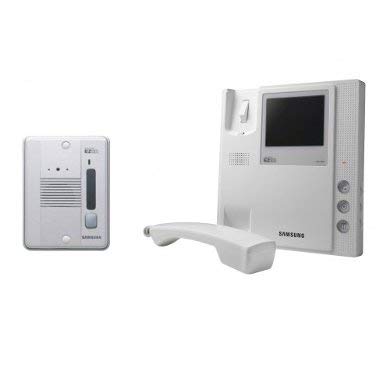
This image displays the complete Samsung EZON SHT-4004 video intercom system. On the left is the indoor monitor unit, featuring a 4-inch black and white display, a telephone-style handset, and control buttons. On the right is the compact outdoor door station, equipped with a camera, speaker, and call button. Both units are white.
3. Operating Instructions
Familiarize yourself with the basic functions of your SHT-4004 system.
3.1 Receiving a Call
- When a visitor presses the call button on the outdoor door station, the indoor monitor unit will ring, and the visitor's image will appear on the 4-inch display.
- To answer the call, lift the handset from the indoor monitor unit. You can now speak with the visitor.
- To end the call, replace the handset.
3.2 Monitoring
- To view the outdoor area without a visitor calling, press the 'Monitor' button on the indoor unit. The display will show the live feed from the outdoor camera.
- The monitoring function typically has a time limit and will automatically turn off after a few minutes.
3.3 Door Release
- During a call or while monitoring, you can unlock an electronically controlled door (if connected) by pressing the 'Door Release' button on the indoor monitor unit.
- Ensure the door is properly connected to the system for this function to work.
3.4 Volume Adjustment
- Adjust the speaker and ringtone volume using the dedicated volume control buttons or dial on the indoor monitor unit.
4. Maintenance
Regular maintenance helps ensure the longevity and reliable operation of your intercom system.
- Cleaning: Use a soft, dry cloth to clean the indoor monitor unit and outdoor door station. For stubborn dirt, slightly dampen the cloth with water. Do not use abrasive cleaners, solvents, or chemical sprays, as these can damage the surfaces.
- Outdoor Unit Care: Periodically check the outdoor unit for any obstructions to the camera lens or microphone/speaker. Clear away dirt, dust, or spiderwebs.
- Wiring Check: Occasionally inspect visible wiring for any signs of damage or loose connections. If damage is found, contact a qualified technician for repair.
5. Troubleshooting
If you encounter issues with your SHT-4004 system, refer to the following common problems and solutions:
| Problem | Possible Cause | Solution |
|---|---|---|
| No image on indoor monitor. | Loose connection; power issue; faulty camera. | Check all wiring connections. Ensure power is supplied. If problem persists, contact support. |
| No sound during communication. | Volume too low; loose wiring; faulty speaker/microphone. | Adjust volume. Check wiring. |
| Door release not working. | Door lock not connected; power issue to lock; faulty door release button. | Verify door lock connection and power. |
| Indoor unit not ringing. | Ringtone volume too low; faulty outdoor unit button; wiring issue. | Adjust ringtone volume. Check outdoor unit button and wiring. |
If the problem persists after attempting these solutions, please contact customer support.
6. Specifications
The following are the general specifications for the Samsung EZON SHT-4004 Video Intercom System:
- Model: SHT-4004
- Display: 4-inch Black and White CRT/LCD
- System Type: Video Intercom System (Villa Set)
- Components: Indoor Monitor Unit with Handset, Outdoor Door Station with Camera and Call Button
- Communication: Two-way audio, one-way video from outdoor to indoor unit
- Door Release: Supports electronic door lock integration
- Power Source: (Refer to product label or separate power supply documentation for specific voltage requirements)
7. Warranty and Support
For warranty information, please refer to the warranty card included with your product or visit the official Samsung website. Keep your purchase receipt as proof of purchase.
If you require technical assistance, have questions about your product, or need to arrange for service, please contact Samsung customer support. Contact details can typically be found on the Samsung official website or in the product packaging.


