
1. Introduction
The Yongnuo YN622C-KIT is a wireless i-TTL flash trigger and controller system designed for Canon EOS DSLR cameras. This kit includes the YN622C-TX master controller and one YN622C transceiver. It provides advanced wireless flash control, supporting E-TTL (II), manual, and multi-flash modes, along with high-speed synchronization (HSS) up to 1/8000s.
The YN622C-TX controller features an LCD display for easy parameter adjustment and a USB port for firmware updates, ensuring compatibility and enhanced performance. The YN622C transceiver allows for remote flash firing and control, operating on a 2.4 GHz FSK digital frequency band with a range of up to 100 meters.

Image 1.1: Overview of the Yongnuo YN622C-KIT components.
2. Package Contents
Please verify that all items listed below are included in your package:
- 1 x Yongnuo YN622C-TX E-TTL Wireless Flash Controller
- 1 x Yongnuo YN622C E-TTL Wireless Flash Trigger Transceiver
- 2 x Connection Cables (C1+C3)
- 1 x WINGONEER Flash Diffuser

Image 2.1: The YN622C-KIT package contents, including the controller, transceiver, cables, and diffuser.

Image 2.2: The included WINGONEER Flash Diffuser.
3. Setup
3.1 Battery Installation
Both the YN622C-TX controller and the YN622C transceiver require 2 AA batteries each. Ensure correct polarity when inserting the batteries.
- Open the battery compartment cover on the back of the unit.
- Insert 2 AA batteries, matching the positive (+) and negative (-) terminals.
- Close the battery compartment cover securely.
3.2 Mounting the Units
- YN622C-TX Controller: Slide the YN622C-TX onto your camera's hot shoe. Secure it by tightening the locking wheel.
- YN622C Transceiver: Mount your external flash unit onto the hot shoe of the YN622C transceiver. Secure it. Then, place the YN622C transceiver with the mounted flash in your desired off-camera position (e.g., on a light stand).

Image 3.1: Front view of the YN622C-TX controller with LCD screen and control buttons.

Image 3.2: Side view of the YN622C-TX controller, showing the hot shoe mount and ports.

Image 3.3: Back view of the YN622C transceiver, showing the hot shoe and control switches.
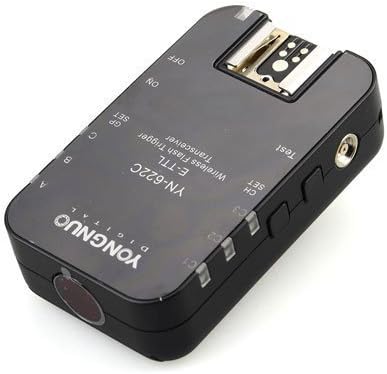
Image 3.4: Angled view of the YN622C transceiver.
3.3 Powering On and Channel/Group Settings
- Turn on your camera, the YN622C-TX controller, and the YN622C transceiver.
- On the YN622C-TX, use the buttons to select the desired channel (1-7) and group (A/B/C).
- On the YN622C transceiver, set the channel and group to match the YN622C-TX controller.
- Perform a test flash by pressing the 'TEST' button on the YN622C-TX to confirm communication.
4. Operating Instructions
4.1 Flash Modes
The YN622C-KIT supports the following flash modes:
- E-TTL (II): Automatic flash exposure control. The camera and flash communicate to determine the appropriate flash output.
- Manual (M): Allows you to manually set the flash power output.
- Multi (Stroboscopic): Fires the flash multiple times during a single exposure, useful for capturing motion sequences.
4.2 Advanced Features
- High-Speed Sync (HSS): Enables flash synchronization at shutter speeds faster than the camera's native sync speed, up to 1/8000s. This is useful for overpowering ambient light outdoors.
- Flash Exposure Compensation (FEC): Adjusts the flash output relative to the camera's metered exposure.
- Flash Exposure Bracketing (FEB): Takes a series of shots at different flash exposure levels.
- Flash Exposure Lock (FEL): Locks the flash exposure reading for recomposing.
- 1st/2nd Curtain Sync: Controls whether the flash fires at the beginning or end of the exposure.
- Flash Modeling: Fires a continuous low-power flash to help visualize lighting before the shot.
- Auto/Manual Zoom: Controls the flash head's zoom position. Auto zoom matches the lens focal length, while manual zoom allows for precise control.
- AF Assist Beam: The YN622C-TX emits a red light to assist the camera's autofocus in low-light conditions.
- Remote Control via Camera Menu: For compatible Canon EOS DSLR cameras with an external flash control menu, many flash parameters can be adjusted directly from the camera's menu.
4.3 Firmware Updates
The YN622C-TX controller features a USB port for firmware updates. Visit the Yongnuo official website for the latest firmware and instructions on how to update your device.
5. Maintenance
- Cleaning: Use a soft, dry cloth to clean the units. Do not use solvents or abrasive cleaners.
- Battery Replacement: Replace batteries when the low battery indicator appears or when performance degrades. Remove batteries if the units will not be used for an extended period.
- Storage: Store the units in a cool, dry place away from direct sunlight and extreme temperatures.
- Hot Shoe Contacts: Keep the hot shoe contacts clean and free from dust or debris to ensure reliable communication.
6. Troubleshooting
If you encounter issues with your YN622C-KIT, please refer to the following common solutions:
| Problem | Possible Cause / Solution |
|---|---|
| Flash not firing |
|
| Inconsistent firing or range issues |
|
| HSS not working |
|
| Flash parameters not controllable via camera menu |
|
7. Specifications
| Feature | Detail |
|---|---|
| Brand | Yongnuo |
| Model | YN622C-KIT (includes YN622C-TX and YN622C) |
| Compatible Camera Mounts | Canon EOS DSLR |
| Flash Mount Type | Hot Shoe |
| Sync Speed | Up to 1/8000s (High-Speed Sync) |
| Connectivity Technology | 2.4 GHz FSK Digital Radio (Wireless Trigger), Infrared (AF Assist) |
| Operating Range | Approximately 100 meters |
| Channels | 7 |
| Groups | 3 (A/B/C) |
| Flash Modes | E-TTL (II), Manual, Multi |
| Power Source | 2 x AA batteries (per unit) |
| Additional Features | FEC, FEB, FEL, 1st/2nd Curtain Sync, Flash Modeling, Auto/Manual Zoom, AF Assist Beam, USB for Firmware Updates |
8. Warranty and Support
For detailed warranty information, technical support, and service inquiries, please refer to the official Yongnuo website or contact your authorized dealer. Keep your proof of purchase for warranty claims.


