
Technical Pro AX1200
Technical Pro AX1200 1200 Watt 2-Channel Amplifier
User Instruction Manual
Model: AX1200 | Brand: Technical Pro
1. Introduction
The Technical Pro AX1200 is a powerful 1200 Watt 2-channel amplifier designed for professional audio applications, including DJ setups and rack installations. This manual provides essential information for the safe and efficient operation of your amplifier, covering setup, operation, maintenance, and troubleshooting.
Key features include 1200 Watts Peak Power, RCA inputs, and Banana binding post outputs, along with an iridescent blue LED meter for visual monitoring.
2. Safety Instructions
Please read and understand all safety instructions before operating the amplifier. Retain this manual for future reference.
- Power Source: Connect the unit only to an AC power outlet of the specified voltage (110V-60Hz). Ensure the power cord is not pinched or walked on.
- Ventilation: Do not block any ventilation openings. Ensure adequate airflow around the unit to prevent overheating. Avoid placing the amplifier in enclosed spaces.
- Water and Moisture: Do not expose the unit to rain or moisture. Do not place objects filled with liquids, such as vases, on the unit.
- Heat: Keep the unit away from heat sources such as radiators, heat registers, stoves, or other apparatus (including amplifiers) that produce heat.
- Cleaning: Unplug the unit from the wall outlet before cleaning. Use a dry cloth for cleaning.
- Servicing: Do not attempt to service this product yourself. Refer all servicing to qualified service personnel. Opening the amplifier casing may expose you to dangerous voltage or other hazards.
- Placement: Place the amplifier on a stable, level surface. This unit is designed for 2U rack mounting.
3. Package Contents
Upon opening the package, please verify that all items listed below are present and in good condition:
- Technical Pro AX1200 2-Channel Amplifier
- AC Power Cable
- User Instruction Manual (this document)

Figure 3.1: Technical Pro AX1200 Amplifier and Power Cable.

Figure 3.2: Included AC Power Cable.
4. Product Overview
4.1 Front Panel
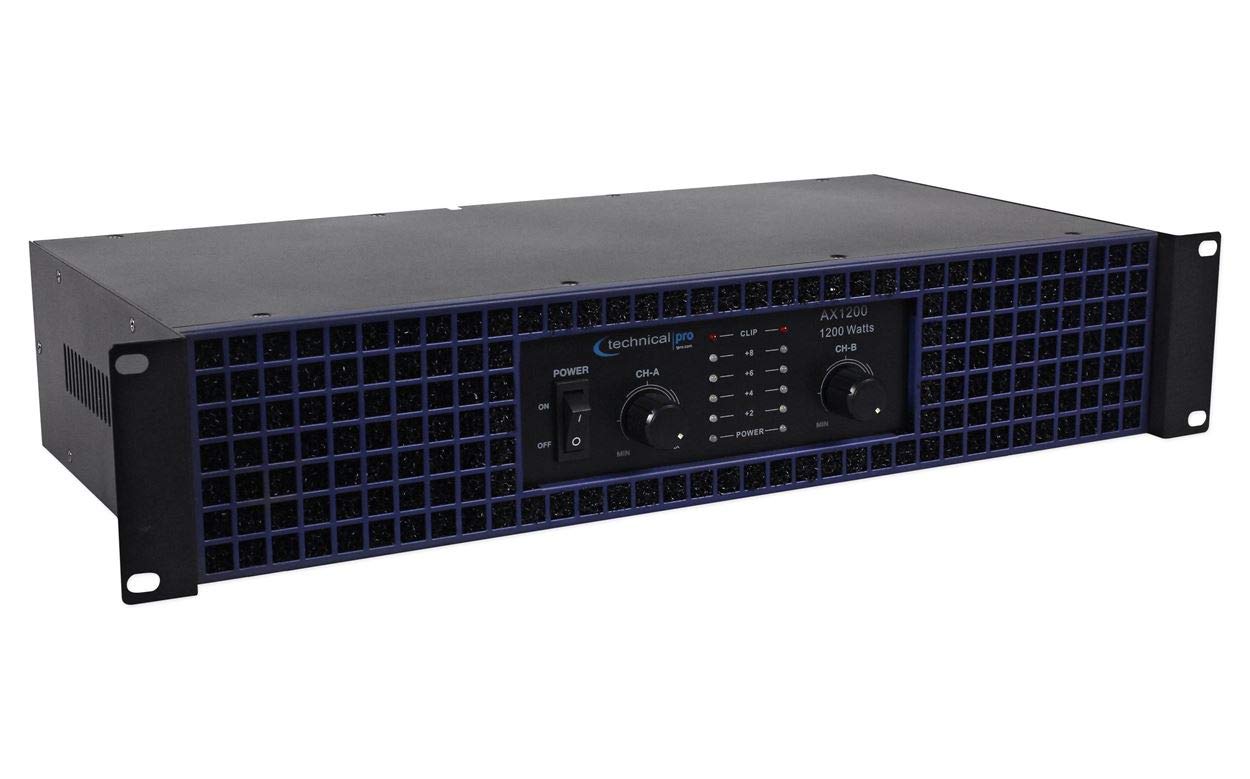
Figure 4.1: Front Panel Controls and Indicators.
- POWER Switch: Toggles the amplifier's power ON or OFF.
- CH-A / CH-B Level Controls: Rotary knobs to adjust the output level for Channel A and Channel B independently.
- CLIP Indicators: LEDs that illuminate when the input signal is too high, indicating potential audio clipping and distortion. Reduce the input level if these light up consistently.
- POWER Indicators: LEDs that illuminate when the respective channel is powered on.
- Iridescent Blue LED Meter: Visual display indicating the output level of each channel.
4.2 Rear Panel

Figure 4.2: Rear Panel Connections.
- AUDIO INPUTS (RCA): Connect your audio source (e.g., mixer, pre-amplifier) to these RCA jacks for Channel A and Channel B.
- CH A / CH B OUTPUTS (Banana Binding Post): Connect your speakers to these binding posts. Ensure correct polarity (+ to + and - to -) for optimal sound.
- AC Power Inlet: Connect the supplied AC power cable here.
5. Setup
Follow these steps to set up your Technical Pro AX1200 amplifier:
- Placement:
- Place the amplifier in a well-ventilated area. Avoid direct sunlight or heat sources.
- The AX1200 is designed for 2U rack mounting. Ensure proper rack ventilation if installed in an equipment rack.
- Audio Input Connection:
- Using RCA cables, connect your audio source (e.g., DJ mixer, audio interface) to the AUDIO INPUTS (RCA) on the rear panel. Match Channel A to your left audio signal and Channel B to your right audio signal.
- Speaker Output Connection:
- Connect your passive speakers to the CH A / CH B OUTPUTS (Banana Binding Post) on the rear panel.
- Ensure correct polarity: connect the positive (+) terminal of the amplifier to the positive (+) terminal of the speaker, and the negative (-) terminal of the amplifier to the negative (-) terminal of the speaker. Incorrect polarity can result in poor sound quality.
- Verify that your speakers' impedance is compatible with the amplifier's output capabilities (e.g., 2 ohms, 4 ohms, 8 ohms).
- Power Connection:
- Ensure the amplifier's POWER switch is in the OFF position.
- Connect the supplied AC power cable to the AC Power Inlet on the rear panel of the amplifier.
- Plug the other end of the power cable into a standard 110V-60Hz AC wall outlet.
6. Operating Instructions
Once the amplifier is properly set up, follow these steps for operation:
- Power On:
- Before powering on, ensure the CH-A / CH-B Level Controls on the front panel are set to their minimum (MIN) position.
- Flip the POWER Switch to the ON position. The POWER indicators and iridescent blue LED meters should illuminate.
- Adjusting Levels:
- Start playing audio from your source at a moderate level.
- Slowly increase the CH-A / CH-B Level Controls on the amplifier until the desired volume is reached.
- Monitor the CLIP Indicators. If they light up frequently or stay lit, reduce the input level from your source or the amplifier's level controls to prevent distortion and potential speaker damage.
- Power Off:
- Before powering off, it is recommended to reduce the CH-A / CH-B Level Controls to their minimum position.
- Flip the POWER Switch to the OFF position.
7. Maintenance
Proper maintenance ensures the longevity and optimal performance of your amplifier.
- Cleaning:
- Always unplug the amplifier from the power outlet before cleaning.
- Use a soft, dry cloth to wipe down the exterior surfaces. Do not use liquid cleaners, aerosols, or abrasive chemicals.
- Ventilation:
- Regularly check that the ventilation openings are clear of dust and debris. Blocked vents can lead to overheating.
- Ensure there is sufficient space around the amplifier for proper airflow, especially if rack-mounted.
- Cable Connections: Periodically check all cable connections (power, input, output) to ensure they are secure and free from damage.
8. Troubleshooting
If you encounter issues with your Technical Pro AX1200 amplifier, refer to the following common problems and solutions:
| Problem | Possible Cause | Solution |
|---|---|---|
| No power / Unit does not turn on. |
|
|
| No sound output. |
|
|
| Distorted sound / CLIP indicator lights up. |
|
|
| Amplifier gets hot. |
|
|
9. Specifications
Technical specifications for the Technical Pro AX1200 2-Channel Amplifier:
| Feature | Detail |
|---|---|
| Model Number | AX1200 |
| Peak Power | 1200 Watts |
| Power @ 2 ohms | 465 Watts |
| Power @ 4 ohms | 375 Watts |
| Power @ 8 ohms | 210 Watts |
| Frequency Response | 20Hz - 20KHz |
| Signal to Noise Ratio | 79dB |
| Input Impedance | 10 k ohm unbalanced |
| Inputs | RCA |
| Outputs | Banana binding post |
| Dimensions (L x H x W) | 19" x 3.5" x 8" |
| Rack Size | 2U |
| Manufacturer | Technical Pro |
10. Warranty and Support
For warranty information and customer support, please refer to the warranty card included with your purchase or visit the official Technical Pro website. Keep your proof of purchase for any warranty claims.
Technical Pro is committed to providing quality products and support. If you require further assistance, please contact their customer service department.
Ask a question about this manual
Ask about setup, troubleshooting, compatibility, parts, safety, or missing instructions. Manuals+ will review the question and use this page’s manual context to help answer it.