
1. Product Overview
The Stanley FATMAX FMC625D2-QW is a powerful 18V Lithium-Ion percussion drill designed for a wide range of drilling and screwdriving tasks. Its compact and lightweight design, combined with an ergonomic rubberized handle, ensures optimal user comfort and control, even in confined spaces. This model includes two 2Ah batteries, a charger, and a durable carrying case.
Key Features:
- 18V Lithium-Ion Power: Provides consistent power and extended runtime.
- Self-Tightening Chuck: 13mm metal chuck with automatic spindle lock for quick and easy bit changes with one hand.
- Variable Speed Control: Two-speed mechanical motor (0-400 / 0-1600 RPM) for optimized drilling and screwdriving.
- Percussion Function: Delivers up to 27200 strokes/min for efficient drilling in masonry.
- Integrated LED Light: Illuminates the work area for improved visibility.
- Ergonomic Design: Rubberized handle and compact form factor for comfortable use.
- Belt Clip: Steel belt clip for convenient portability.

Figure 1: The Stanley FATMAX 18V Percussion Drill, including the carrying case, two 18V 2Ah Lithium-Ion batteries, and the battery charger. This image provides a comprehensive view of all components included in the FMC625D2-QW package.
2. Safety Instructions
Always observe basic safety precautions when using electric tools to reduce the risk of fire, electric shock, and personal injury. Read all instructions carefully before operation.
General Safety:
- Work Area Safety: Keep your work area clean and well-lit. Cluttered or dark areas invite accidents. Do not operate power tools in explosive atmospheres, such as in the presence of flammable liquids, gases, or dust.
- Electrical Safety: Avoid body contact with earthed or grounded surfaces (e.g., pipes, radiators, ranges, refrigerators). Do not expose power tools to rain or wet conditions.
- Personal Safety: Always wear eye protection. Use hearing protection when operating percussion mode. Wear a dust mask if operations create dust. Dress properly; avoid loose clothing or jewelry.
- Tool Use and Care: Do not force the power tool. Use the correct power tool for your application. Disconnect the battery pack from the power tool before making any adjustments, changing accessories, or storing power tools.
- Battery Pack Use and Care: Recharge only with the charger specified by the manufacturer. Do not use battery packs with any other power tools. Do not disassemble, drop, or damage the battery pack.
3. Setup
3.1 Charging the Battery
- Connect the charger to a standard electrical outlet.
- Slide the battery pack onto the charger until it clicks into place.
- The charging indicator light on the charger will show the charging status. A full charge typically takes approximately 60 minutes for a 2Ah battery.
- Once fully charged, remove the battery pack from the charger.
3.2 Installing/Removing the Battery Pack
- To Install: Align the battery pack with the base of the drill handle and slide it in until it clicks securely into place.
- To Remove: Press the battery release button (usually located on the front or sides of the battery pack) and slide the battery pack out of the drill handle.
3.3 Installing/Removing Drill Bits or Screwdriver Bits
- Ensure the drill is switched off and the battery pack is removed for safety.
- Grip the rear part of the chuck (the part closest to the drill body) with one hand.
- Rotate the front part of the chuck (the part with the jaws) counter-clockwise to open the chuck jaws.
- Insert the drill bit or screwdriver bit fully into the chuck jaws.
- Rotate the front part of the chuck clockwise to tighten the jaws firmly around the bit. The self-tightening mechanism ensures a secure grip.
- To remove, reverse the process.
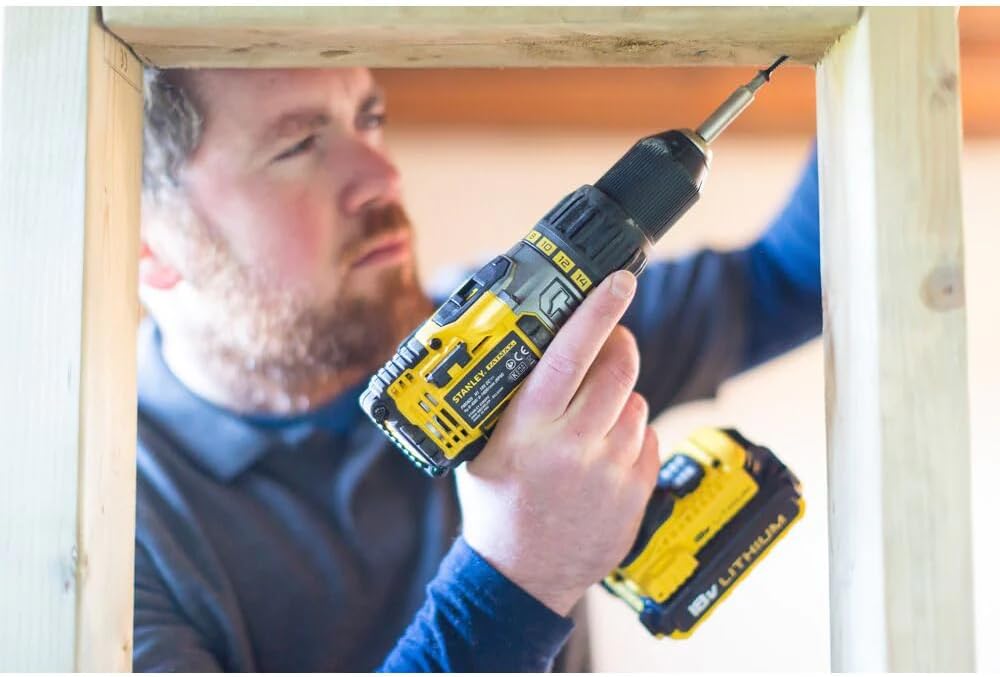
Figure 2: A user demonstrating the installation of a drill bit into the 13mm self-tightening chuck of the Stanley FATMAX drill. This process is designed for quick and secure bit changes.
4. Operating Instructions
4.1 Powering On/Off
- To turn the drill ON, press the variable speed trigger switch. The speed increases as you press the trigger further.
- To turn the drill OFF, release the variable speed trigger switch.
4.2 Forward/Reverse Rotation
The forward/reverse selector switch is located above the trigger. Push it to the left for forward rotation (drilling/screwing in) and to the right for reverse rotation (removing screws/bits).
4.3 Speed Selection
The drill features a two-speed mechanical gearbox:
- Gear 1 (Low Speed): 0-400 RPM. Ideal for high-torque applications, such as driving large screws or drilling large holes in wood.
- Gear 2 (High Speed): 0-1600 RPM. Suitable for faster drilling in wood, metal, and general screwdriving.
To change gears, slide the gear selector switch located on top of the drill. Ensure the drill is stopped before changing gears to prevent damage.
4.4 Torque Settings and Drilling Modes
The torque adjustment collar allows you to select the desired torque setting (22 positions) for screwdriving applications or switch to drilling modes.
- Screwdriving (1-22): Rotate the collar to the desired torque setting. Lower numbers are for smaller screws or softer materials; higher numbers are for larger screws or harder materials. The clutch will disengage once the set torque is reached, preventing overtightening or stripping.
- Drilling (Drill Bit Symbol): For drilling into wood or metal without percussion.
- Percussion Drilling (Hammer Symbol): For drilling into masonry or concrete. This mode activates the hammer action.
4.5 Using the LED Work Light
The integrated LED light automatically illuminates when the trigger is pressed, providing improved visibility of the work surface, especially in dimly lit areas.
4.6 Using the Belt Clip
The steel belt clip allows for convenient temporary storage of the drill on your belt or pocket, keeping it within easy reach during work.

Figure 3: A user demonstrating the proper handling of the Stanley FATMAX drill during a drilling application. The ergonomic design and rubberized grip ensure comfortable and secure operation.
5. Maintenance
Regular maintenance ensures the longevity and optimal performance of your Stanley FATMAX drill.
- Cleaning: Keep the ventilation slots of the drill clean to prevent overheating. Use a soft, damp cloth to wipe down the tool. Do not use abrasive cleaners or solvents.
- Chuck Maintenance: Periodically clean the chuck jaws to ensure smooth operation and proper bit gripping.
- Battery Care: Store batteries in a cool, dry place away from direct sunlight and extreme temperatures. Do not store fully discharged batteries for extended periods.
- Storage: When not in use, store the drill, batteries, and charger in the provided carrying case in a dry, secure location out of reach of children.

Figure 4: The Stanley FATMAX drill resting on a robust toolbox, illustrating a typical work environment or proper storage during breaks. Regular cleaning and proper storage are crucial for tool longevity.
6. Troubleshooting
If you encounter issues with your drill, refer to the following common problems and solutions:
| Problem | Possible Cause | Solution |
|---|---|---|
| Drill does not start | Battery not charged or improperly installed. | Ensure battery is fully charged and securely inserted. |
| Loss of power during operation | Battery is low or tool is overloaded. | Recharge battery. Reduce pressure on the tool or use a lower speed setting. |
| Chuck not holding bit securely | Chuck jaws are dirty or damaged. Bit shank is dirty. | Clean chuck jaws and bit shank. If damage persists, seek professional service. |
| Excessive vibration or noise | Damaged bit. Internal component issue. | Replace damaged bit. If problem persists, contact customer support. |
| Drill overheats | Blocked ventilation slots. Continuous heavy use. | Clean ventilation slots. Allow tool to cool down during prolonged use. |
If the problem persists after attempting these solutions, please contact Stanley customer support.
7. Specifications
Detailed technical specifications for the Stanley FATMAX FMC625D2-QW Percussion Drill:
| Specification | Value |
|---|---|
| Model Number | FMC625D2-QW |
| Voltage | 18 Volts |
| Battery Type | Lithium-Ion |
| Battery Capacity | 2 Ah |
| Max Torque | 50 Nm (Newton-meters) |
| No-Load Speed (Gear 1) | 0-400 RPM |
| No-Load Speed (Gear 2) | 0-1600 RPM |
| Impact Rate (Percussion) | 6800 - 27200 BPM (Blows Per Minute) |
| Chuck Size | 1.5 - 13 mm (Self-tightening) |
| Torque Settings | 22 + Drill + Hammer |
| Max. Drilling Capacity (Wood) | 38 mm |
| Max. Drilling Capacity (Metal) | 13 mm |
| Max. Drilling Capacity (Masonry) | 13 mm |
| Weight (with battery) | 1.8 kg |
| Dimensions (L x W x H) | 23 x 5.5 x 22 cm |
| Charger Recharge Time | Approx. 60 minutes (for 2Ah battery) |
8. Warranty and Support
This Stanley FATMAX product comes with a 3-year warranty. To activate and register your product for the warranty, please visit the official Stanley website at www.STANLEY.Eu/3. Please retain your proof of purchase for warranty claims.
For technical assistance, spare parts, or further inquiries, please contact Stanley customer support through their official website or local service centers. Refer to the packaging or official website for specific contact details in your region.
