
1. Introduction
Thank you for choosing the CareMax 2.0 Classic TENS Unit Machine. This advanced 3-in-1 device combines Transcutaneous Electrical Nerve Stimulation (TENS), Electrical Muscle Stimulation (EMS), and Massage functions to provide natural pain relief, muscle strengthening, and relaxation. Designed for ease of use and portability, it features a dual-channel output, 19 customizable programs, and a powerful 120mA output to meet your therapeutic needs.
Please read this instruction manual thoroughly before using the device to ensure safe and effective operation. Keep this manual for future reference.
2. Important Safety Information
WARNING: The constant pulsing of electrical stimulation from this machine can cause pain and muscle twitching. Use of this massager without proper medical advice may be harmful to your health or even deadly. This machine is NOT designed for use for individuals who have:
- A life support equipment such as an artificial heart-lung devices and respirators
- Pacemaker
- Heart condition or Epilepsy.
- Pregnant.
If still unsure, please CONSULT with your doctor, physiotherapist, health care provider or other medical professionals before purchase.
Examples of incorrect use include, but are not limited to:
- Electrodes should never be placed near the heart, across your eyes, on your head, on the front of your neck, on your chest, on open wounds or broken skin areas, over a malignant tumor, directly over the spinal column, internally, across a pregnant uterus, on areas of skin that are numb or have decreased sensation, on areas of infection.
- Sustained usage at high intensity may cause minor burns.
- Avoid touching the massage pads directly with fingers when power is on.
Legal Disclaimer: The information should not be considered complete and should not be used in place of a visit, call, consultation or advice of your health care provider. Should you have any health care-related questions, please call or see your health care provider promptly. You should never disregard medical advice or delay in seeking it because of something you have read here. Statements regarding dietary supplements have not been evaluated by the FDA and are not intended to diagnose, treat, cure, or prevent any disease or health condition.
3. Package Contents
Upon opening your CareMax 2.0 Classic TENS/EMS Combo Unit package, please verify that all items listed below are present and in good condition:

Figure 3.1: Package Contents Overview
- 1 x CareMax Dual Channel Device
- 1 x Instruction Manual
- 1 x Charging Cable (USB)
- 2 x Lead Wires
- 4 x 2"x2" Electrode Pads
4. Product Overview
The CareMax 2.0 Classic TENS/EMS Combo Unit is a compact and powerful device designed for personal use. It features a clear backlit LCD screen for easy readability and intuitive controls.

Figure 4.1: Device Display and Controls
Device Features:
- Dual Channel Output: Allows for simultaneous treatment of two different areas or larger areas with multiple pads.
- 19 Customizable Programs: Pre-set programs for various pain relief, muscle stimulation, and massage needs.
- 40 Intensity Levels: Fine-tune the intensity from 0 to 40 for precise comfort and effectiveness.
- Rechargeable Battery: Built-in lithium-ion battery provides extended use.
- Backlit LCD Screen: Ensures clear visibility of settings and remaining time.
5. Setup
5.1 Charging the Device
Before first use, fully charge the device. The battery indicator on the screen will show charging status.
- Locate the charging port on the bottom of the device.
- Connect the provided USB charging cable to the device and a USB power source (e.g., computer, wall adapter).
- Allow the device to charge until the battery indicator shows full.
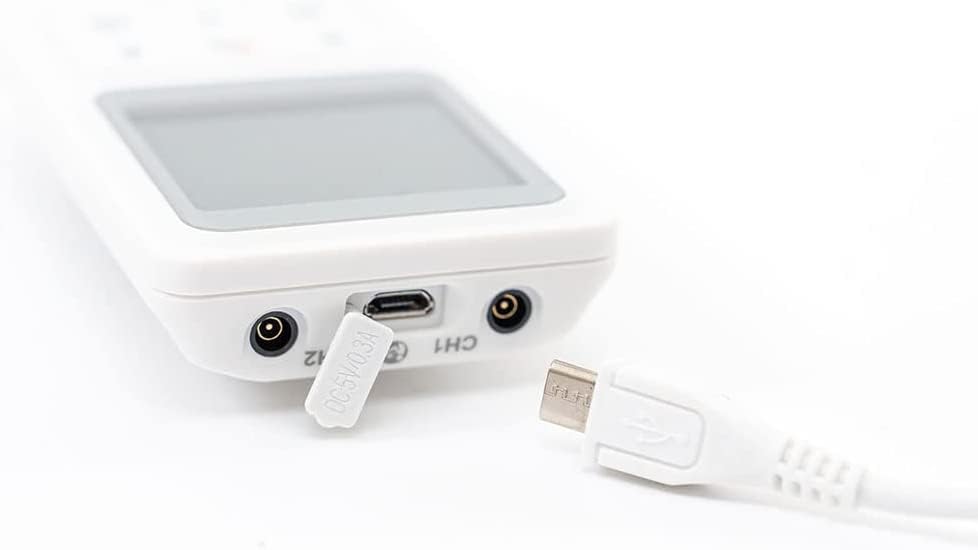
Figure 5.1: Connecting the Charging Cable
5.2 Connecting Electrode Pads
The electrode pads are essential for delivering the electrical impulses to your body.
- Insert the pin connectors of the lead wires into the electrode pads. Ensure a secure connection.
- Plug the other end of the lead wires into the output ports (CH1 or CH2) on the top of the device.
- Peel the protective film from the adhesive side of the electrode pads.
- Apply the pads to clean, dry skin in the desired treatment area. Ensure the pads are flat against the skin and not overlapping.

Figure 5.2: Connecting Lead Wires and Pads
6. Operating Instructions
The CareMax 2.0 Classic offers TENS, EMS, and Massage modes. Always start with low intensity and gradually increase to a comfortable level.
6.1 Powering On/Off and Mode Selection
- Press and hold the Power button (/M) to turn the device ON. The screen will light up.
- Press the Power button (/M) briefly to cycle through the TENS, EMS, and MASSAGE modes. The selected mode will be displayed on the screen.
- To turn OFF, press and hold the Power button (/M) again.
6.2 Program Selection
Each mode has multiple pre-set programs (P1-P19). Use the 'P' button to select a program.
- Once a mode (TENS, EMS, or MASSAGE) is selected, press the 'P' button to cycle through the available programs within that mode.
- Observe the program number changing on the LCD screen.
6.3 Adjusting Intensity
Intensity can be adjusted independently for each channel (CH1 and CH2).
- Use the + and - buttons for CH1 to adjust its intensity.
- Use the + and - buttons for CH2 to adjust its intensity.
- Increase intensity gradually until you feel a comfortable, strong sensation. Avoid increasing to a painful level.

Figure 6.1: Proper Electrode Pad Placement on Arm

Figure 6.2: Electrode Pad Placement on Thigh

Figure 6.3: Electrode Pad Placement on Abdomen
6.4 Understanding TENS, EMS, and Massage Modes
- TENS (Transcutaneous Electrical Nerve Stimulation): Primarily used for pain relief by blocking pain signals to the brain and stimulating endorphin production.
- EMS (Electrical Muscle Stimulation): Used for muscle strengthening, rehabilitation, and preventing muscle atrophy by causing muscle contractions.
- Massage: Provides a relaxing sensation, helps to reduce muscle tension and improve circulation.
6.5 Official Product Video
Video 6.1: Caremax TENS EMS Unit Combo Machine Overview. This video provides a visual guide to the features and benefits of the CareMax TENS/EMS unit, demonstrating its use for pain relief and muscle stimulation.
7. Maintenance
7.1 Cleaning the Device
Wipe the device with a soft, damp cloth. Do not use abrasive cleaners or immerse the device in water.
7.2 Electrode Pad Care
To prolong the life of your electrode pads:
- Always apply pads to clean, dry skin.
- After each use, place the protective film back onto the adhesive side of the pads.
- Store pads in a sealed bag to prevent drying out.
- Replace pads when they lose their stickiness or if you notice decreased sensation during use.
7.3 Storage
Store the device and accessories in a cool, dry place, away from direct sunlight and extreme temperatures.
8. Troubleshooting
| Problem | Possible Cause | Solution |
|---|---|---|
| Device does not turn on. | Low battery; Device not charged. | Charge the device fully. |
| No sensation or weak sensation. | Pads not properly applied; Pads dried out; Lead wires loose; Intensity too low. | Ensure pads are flat on skin; Replace pads; Check lead wire connections; Increase intensity gradually. |
| Pads not sticking. | Skin is oily/dirty; Pads are old/worn out. | Clean skin before application; Replace pads. |
| Irritation on skin. | Pads left on too long; Allergic reaction; Intensity too high. | Reduce session time; Discontinue use if irritation persists; Lower intensity. |
9. Specifications
| Feature | Detail |
|---|---|
| Model | 2.0 Classic TENS/EMS Combo Unit |
| Output Intensity | 120mA (Max) |
| Channels | Dual Channel |
| Programs | 19 Customizable Programs |
| Intensity Levels | 40 Levels |
| Battery | 1 Lithium Ion battery (included) |
| Package Dimensions | 6.02 x 3.58 x 2.44 inches |
| Weight | 7.05 ounces |
| Manufacturer | Caremax |
| ASIN | B00O9W0W7G |
10. Warranty and Support
Specific warranty details for the CareMax 2.0 Classic TENS/EMS Combo Unit are not provided within this manual. For information regarding warranty coverage, product registration, or technical support, please refer to the official CareMax website or contact their customer service directly.
Always ensure you purchase from authorized retailers to guarantee valid warranty support.