
Introduction
The SOUND OFF STV-N01-8P Navigation Control Kit is designed to enhance the functionality of your Mazda vehicle's C9Y7 navigation system. This kit allows passengers to view TV and DVD content and enables full operation of the navigation system while the vehicle is in motion. It utilizes genuine connectors for a straightforward installation process without requiring complex wiring modifications.
This manual provides essential information for the correct installation, operation, and maintenance of your navigation control kit. Please read it thoroughly before installation and keep it for future reference.
Safety Information
- Professional Installation Recommended: While designed for ease of installation, professional installation is recommended to ensure proper function and avoid damage to your vehicle's electrical system.
- Vehicle Operation: The primary purpose of this kit is to allow passengers to view media and operate navigation. The driver must always maintain full attention on the road and obey all traffic laws. Distracted driving is dangerous and illegal.
- Power Disconnection: Always disconnect the vehicle's battery before beginning any electrical installation to prevent short circuits or damage.
- Wiring Integrity: Ensure all connections are secure and properly insulated to prevent electrical hazards.
Package Contents
Please verify that all components are present before beginning installation:
- STV-N01-8P Navigation Control Kit Connector Harness
- Instruction Manual (this document)
Installation
Follow these steps carefully for proper installation of the STV-N01-8P Navigation Control Kit.
- Prepare the Vehicle:
- Ensure the vehicle is turned off and the ignition key is removed.
- Disconnect the negative terminal of the vehicle's battery to prevent electrical shorts.
- Carefully remove the trim panels and components necessary to access the rear of your Mazda C9Y7 navigation unit. Refer to your vehicle's service manual for specific instructions on panel removal.
- Locate Navigation Connectors:
Identify the main wiring harness connector at the rear of your Mazda C9Y7 navigation unit. This kit uses genuine connectors for a direct plug-and-play installation.
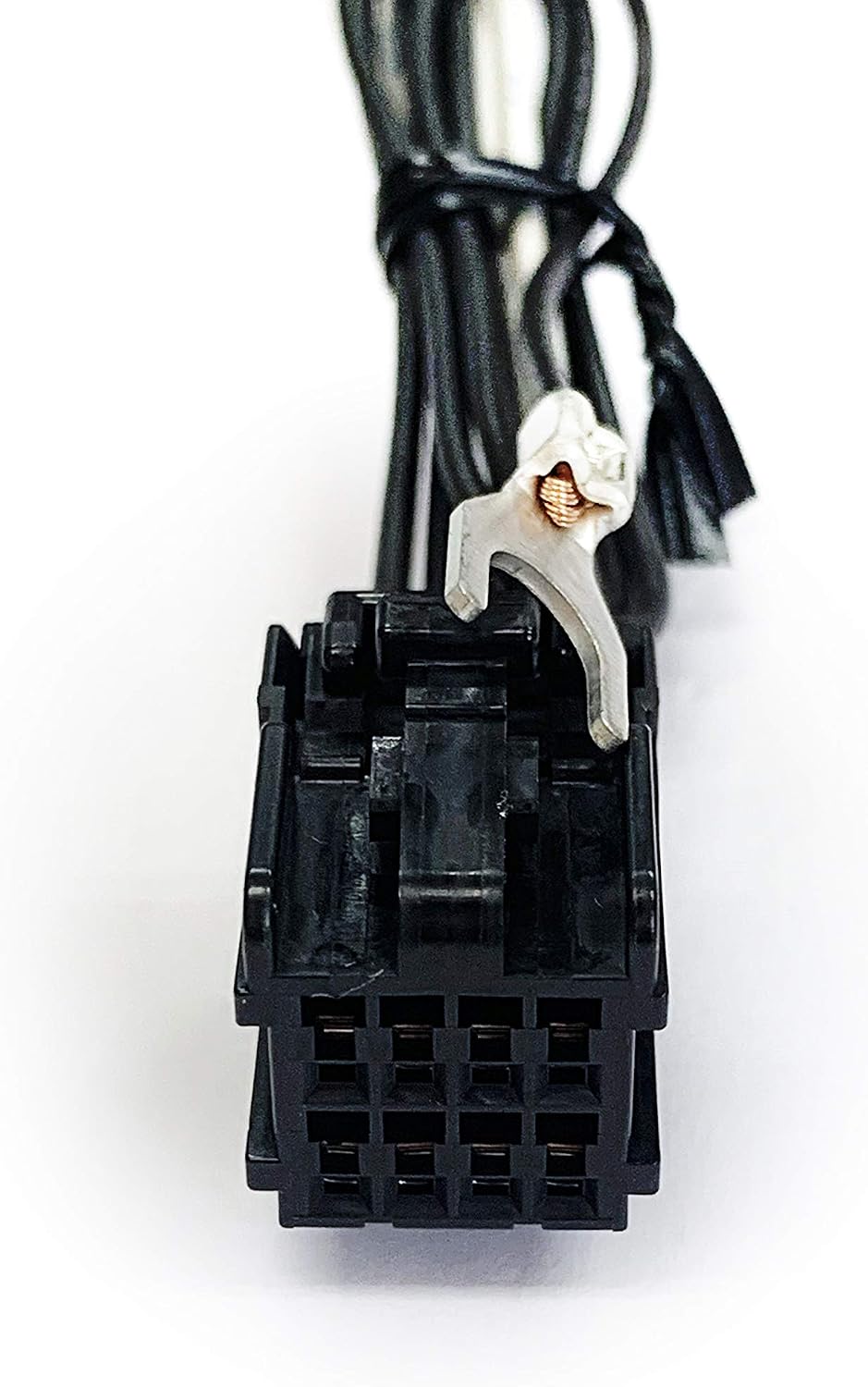
Image 1: Main connector of the STV-N01-8P kit. This connector will interface with the vehicle's existing wiring.

Image 2: Rear view of the kit's connector, showing the specific pin layout for connection.
- Connect the Kit:
- Disconnect the genuine vehicle-side connector from the rear of the navigation unit.
- Connect the STV-N01-8P kit's male connector to the navigation unit's port.
- Connect the vehicle's original female connector to the STV-N01-8P kit's female connector. This creates a pass-through connection.
- Locate the ground wire (typically black or with a metal ring terminal) on the STV-N01-8P kit. Secure this ground wire to a suitable metal screw or bolt on the side of the navigation unit or vehicle chassis. Ensure a good electrical connection.

Image 3: Installation diagram. The kit connects between the genuine vehicle harness and the navigation unit. The ground wire is secured to the navigation unit's side.
- Test and Reassemble:
- Once all connections are secure, reconnect the vehicle's battery.
- Turn on the vehicle and test the navigation and media playback functions to ensure the kit is working correctly.
- If everything functions as expected, carefully reassemble the trim panels and components removed earlier.
Operating Instructions
After successful installation, the STV-N01-8P kit operates automatically. There are no additional buttons or switches to control the kit's functionality.
- TV/DVD Playback: With the kit installed, your Mazda C9Y7 navigation system will allow TV and DVD content to be viewed even when the vehicle is in motion. (Note: DVD playback functionality is dependent on the navigation unit's inherent capabilities.)
- Navigation Operation: The navigation system's input functions (e.g., destination entry, map scrolling) will remain active and operable while driving. The vehicle's position on the map will continue to update accurately.
Troubleshooting
If you encounter issues after installing the STV-N01-8P kit, consider the following:
- No TV/DVD playback or navigation control while driving:
- Check all connections to ensure they are fully seated and secure.
- Verify the ground wire is properly connected to a clean, unpainted metal surface.
- Ensure the vehicle's battery was reconnected properly.
- Navigation unit not powering on or other electrical issues:
- Immediately disconnect the battery.
- Re-check all connections for any misplacements or bent pins.
- If the issue persists, remove the kit and test the navigation unit with its original wiring. If the navigation unit functions normally without the kit, contact customer support.
Specifications
| Manufacturer | SOUND OFF |
| Brand | SOUND OFF |
| Model Number | GN-K02L-K04R (STV-N01-8P) |
| Compatible Navigation | Mazda C9Y7 (C9Y7 V6 650) |
| Package Dimensions | 19.2 x 13.6 x 2 cm |
| Item Weight | 22 g |
| ASIN | B00O5Y4KC6 |
Warranty and Support
This SOUND OFF STV-N01-8P Navigation Control Kit comes with a 1-year warranty from the date of purchase. This warranty covers defects in materials and workmanship under normal use.
For warranty claims, technical support, or further assistance, please contact your authorized dealer or SOUND OFF customer service with your purchase details and product model number.
Please retain your proof of purchase for warranty validation.