
SOUND OFF ACI-01-6P
Contents
SOUND OFF ACI-01-6P VIE-X008 Front Camera Connection Cable User Manual
Model: ACI-01-6P
Introduction
This manual provides detailed instructions for the installation and use of the SOUND OFF ACI-01-6P Front Camera Connection Cable. This cable is designed to facilitate the connection of a commercially available front camera with an RCA output to an Alpine navigation system, specifically the VIE-X008 model. It acts as a conversion cord, allowing for a straightforward, plug-and-play installation without the need for complex wiring modifications.
Product Features
- Direct Compatibility: Specifically designed for Alpine VIE-X008 navigation units.
- RCA Conversion: Enables connection of standard commercial cameras with RCA video output.
- Genuine Connectors: Utilizes authentic connectors for a secure and reliable connection.
- Simplified Installation: Allows for installation without extensive wiring procedures.
- Durable Design: Constructed for long-lasting performance in automotive environments.
Package Contents
Please verify that all items are present and in good condition upon opening the package.
- 1 x SOUND OFF ACI-01-6P Front Camera Connection Cable
Setup and Installation
The ACI-01-6P cable is designed for straightforward installation. Ensure your vehicle's ignition is off and the Alpine navigation unit is powered down before beginning the installation process.
- Locate the Camera Input Port: Identify the dedicated front camera input port on your Alpine VIE-X008 navigation system. This port typically has a specific connector shape designed for Alpine accessories.
- Connect to Navigation Unit: Plug the multi-pin connector end of the ACI-01-6P cable into the corresponding camera input port on your Alpine VIE-X008 navigation unit. Ensure it clicks securely into place.

Image: The multi-pin connector (white) connects to the Alpine navigation unit, and the yellow female RCA connector is for the camera's RCA male plug.
- Connect Commercial Camera: Take your commercially available front camera (with an RCA video output) and connect its RCA male plug to the yellow female RCA connector on the ACI-01-6P cable.
- Secure Wiring: Route the cable safely away from moving parts, heat sources, and areas where it could be pinched or damaged. Use cable ties if necessary.
- Power On and Test: Once all connections are secure, power on your vehicle and the Alpine navigation unit. Access the camera input function on your navigation system to verify the front camera feed.
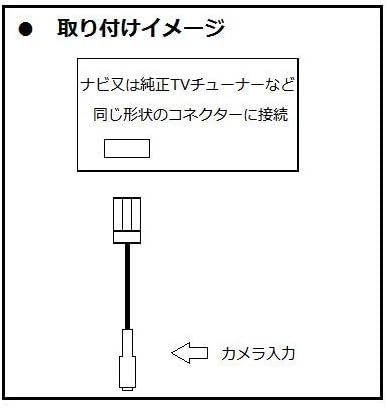
Image: Installation diagram showing the cable connecting to a navigation unit (navi or genuine TV tuner) via a matching connector, with an arrow indicating the camera input.
Operating Instructions
Once the ACI-01-6P cable and your front camera are correctly installed, the operation of the camera feed is managed through your Alpine VIE-X008 navigation system.
- Accessing Camera View: Refer to your Alpine VIE-X008 navigation system's user manual for specific instructions on how to activate and view the front camera input. This is typically done through a dedicated camera button, menu option, or automatically when certain conditions are met (e.g., low speed, specific gear selection).
- Camera Functionality: The ACI-01-6P cable provides the video signal path. Any features of your front camera (e.g., parking lines, night vision) will function as designed by the camera manufacturer, provided they are compatible with your Alpine unit's display capabilities.
Maintenance
The ACI-01-6P cable requires minimal maintenance to ensure long-term performance.
- Regular Inspection: Periodically check the cable and its connections for any signs of wear, damage, or corrosion, especially if exposed to environmental elements.
- Cleaning: If necessary, gently wipe the cable and connectors with a soft, dry cloth. Avoid using harsh chemicals or abrasive materials.
- Secure Routing: Ensure the cable remains securely routed and is not subjected to excessive tension, sharp bends, or crushing.
Troubleshooting
If you encounter issues with your front camera connection, consider the following troubleshooting steps:
- No Camera Signal/Black Screen:
- Verify all connections are secure at both the Alpine navigation unit and the camera.
- Ensure the front camera is receiving power and is functioning correctly. Test the camera with another display if possible.
- Confirm that the correct camera input source is selected on your Alpine navigation unit.
- Poor Image Quality/Interference:
- Check for any kinks or damage along the cable length.
- Ensure the cable is routed away from strong electrical interference sources (e.g., power cables, ignition components).
- Inspect the RCA connectors for dirt or corrosion.
- Incorrect Camera View:
- Ensure the camera itself is mounted correctly and oriented as desired. The ACI-01-6P cable does not affect image orientation.
If problems persist after attempting these steps, consult a professional automotive electronics technician or contact SOUND OFF customer support.
Specifications
| Brand | SOUND OFF |
| Model Name | ACI-01-6P |
| Compatible Navigation Unit | Alpine VIE-X008 (and similar Alpine units with compatible input) |
| Connector Type (Navigation) | Multi-pin proprietary connector (for Alpine) |
| Connector Type (Camera) | RCA Female |
| Cable Type | Composite Video Adapter Cable |
| Number of Items | 1 |
Warranty and Support
The SOUND OFF ACI-01-6P Front Camera Connection Cable comes with a 1-year warranty from the date of purchase. This warranty covers manufacturing defects and ensures the product meets its intended specifications.
For warranty claims, technical assistance, or further inquiries, please contact your retailer or SOUND OFF customer support with your proof of purchase.
Please note that the warranty does not cover damage caused by improper installation, misuse, accidents, or unauthorized modifications.
Ask a question about this manual
Ask about setup, troubleshooting, compatibility, parts, safety, or missing instructions. Manuals+ will review the question and use this page’s manual context to help answer it.