Introduction
This manual provides comprehensive instructions for the Magnasonic Digital AM/FM Clock Radio, Model EAAC201. It covers setup, operation, maintenance, and troubleshooting to ensure optimal performance and longevity of your device. This clock radio features a digital AM/FM tuner with station memory, dual alarms, battery backup, and adjustable display brightness.

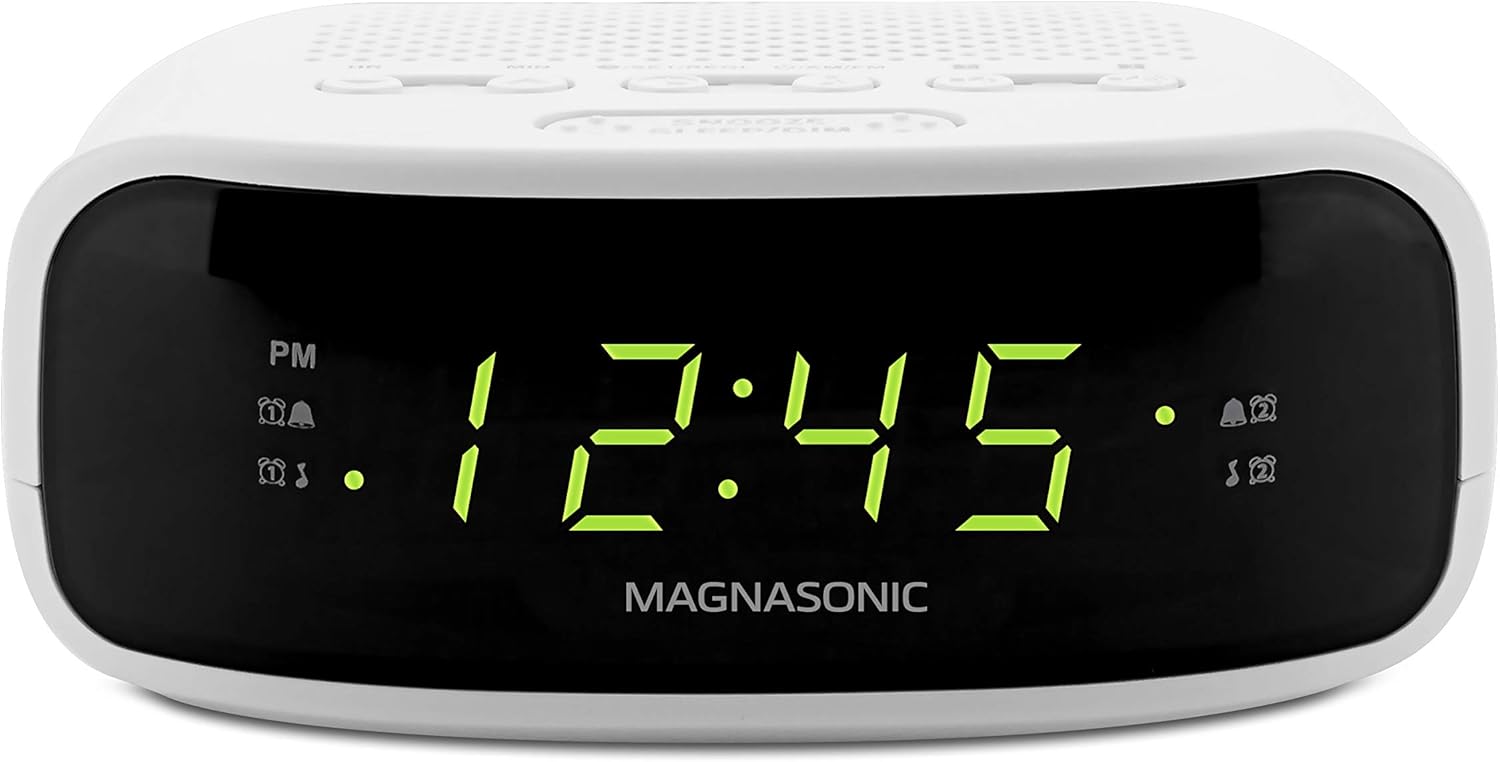
Front view of the Magnasonic Digital AM/FM Clock Radio (EAAC201).
The clock radio positioned on a nightstand, illustrating its compact size and suitability for bedroom use.
Setup
Power Connection
To power the clock radio, plug the AC cord into a standard wall outlet. Upon initial power-up, the display will typically flash "12:00" indicating it is ready for time setting.
Battery Backup Installation
For reliable time and alarm settings during power outages, install two AA 1.5V batteries (not included) into the battery compartment located on the bottom of the unit. Ensure correct polarity.

View of the battery compartment for backup power.
Operating Instructions
Setting the Time
- Plug the clock into a wall outlet. The time display will flash.
- Press the HR (Hour) and MIN (Minute) buttons to adjust the clock to the current time. Hold the buttons down for faster adjustment.
- A small dot will appear next to "PM" on the display after reaching 12 PM.
- Press the SET TIME button to save your changes and set the time.
- To change the time after initial setup, press and hold the SET TIME button until the display flashes, then repeat the previous steps.
Video demonstrating how to set the time and alarm on the Magnasonic EAAC201.
Setting the Alarm (Dual Alarms)
The clock radio features two independent alarms (Alarm 1 and Alarm 2).
- Ensure the radio is off. If it is on, press the AM/FM button to turn it off.
- Press and hold your selected alarm button (ALARM 1 or ALARM 2) for two seconds. The alarm time will start flashing.
- Use the HR (Hour) and MIN (Minute) buttons to change the alarm time.
- Press the alarm button again to cycle through alarm options:
- Buzzer: A bell icon will appear on the display.
- Radio: A music note icon will appear on the display.
- Off: No icon will appear.
- Press the SET TIME button or wait 10 seconds for the settings to save automatically.
Note: Alarm volume cannot be adjusted independently; it uses the last set radio volume.
Snooze and Sleep Functions
- Snooze: When the alarm sounds, press the large SNOOZE/SLEEP/DIM button to temporarily silence the alarm for 9 minutes. The alarm will reactivate after this period.
- Sleep: To set a sleep timer for the radio, press the SNOOZE/SLEEP/DIM button repeatedly while the radio is playing to cycle through sleep timer options (e.g., 90, 60, 30, 15 minutes, or OFF). The radio will automatically turn off after the selected time.
- Dimmer: Press the SNOOZE/SLEEP/DIM button when the alarm is not active to adjust the display brightness between high and low settings.
Radio Operation (AM/FM)
- Press the AM/FM button to turn the radio on or off and to switch between AM and FM bands.
- Use the HR (Hour) and MIN (Minute) buttons to tune the radio frequency.
- Setting Presets: The unit can store up to 20 programmable stations.
- Tune to the desired station.
- Press and hold the SET TIME button until the display flashes.
- Use the ALARM 1 or ALARM 2 buttons to select a preset number (1-20).
- Press SET TIME again to save the station to the selected preset.
- Recalling Presets: Briefly press the SET TIME button to cycle through saved preset stations.

Top view of the clock radio with clearly labeled control buttons.
Maintenance
To ensure the longevity and proper functioning of your Magnasonic clock radio, follow these simple maintenance guidelines:
- Cleaning: Use a soft, dry cloth to clean the exterior of the unit. Do not use abrasive cleaners, waxes, or solvents as they may damage the finish.
- Battery Replacement: Replace the backup batteries annually or when the display shows signs of dimming or erratic behavior during power interruptions.
- Placement: Place the unit on a stable, flat surface away from direct sunlight, heat sources, and excessive moisture. Ensure adequate ventilation around the unit.
Troubleshooting
Refer to the table below for common issues and their solutions.
| Symptom | Possible Cause | Possible Solution |
|---|---|---|
| GENERAL | ||
| Power does not come on. | AC cord not plugged in. | Insert plug firmly into AC outlet. |
| RADIO | ||
| No sound. | Power is not on. Volume control at minimum position. | Turn the unit on. Turn the volume control up. |
| Noise or sound distorted on AM or FM. | AM: Interference. FM: Antenna wire not extended. | Position the radio for better AM reception. Extend antenna wire. |
| CLOCK | ||
| Incorrect time. | Clock not set. Batteries inserted incorrectly, not connected or depleted. | Set the clock. Check batteries. |
| Alarm does not turn on. | Alarm is not set to turn on. Clock is not set. Alarm time is not set. | Press and hold the ALARM 1 or ALARM 2 button to turn the alarm on. Set the clock. Set alarm time. |

Detailed troubleshooting guide for common issues.
Specifications
| Feature | Detail |
|---|---|
| Brand | Magnasonic |
| Model Number | EAAC201 |
| Color | White |
| Display Type | Digital |
| Product Dimensions | 5"W x 2"H |
| Power Source | Battery Powered (for backup) / Electrical (for main operation) |
| Material | Acrylonitrile Butadiene Styrene (ABS) |
| Item Weight | 0.85 Pounds (13.6 ounces) |
| Alarm Clock | Yes, Dual Alarm |
| Radio Type | AM/FM Digital |
| Display Color | Green |

Product dimensions: 5.0 inches wide, 4.5 inches deep, 2.0 inches high.
Warranty and Support
The Magnasonic EAAC201 Digital AM/FM Clock Radio comes with a 1 Year Limited Warranty. Magnasonic also provides Lifetime Customer Support for this product.
For further assistance, please refer to the official Magnasonic website or contact their customer support directly.


