
1. Introduction
The RAM MOUNTS X-Grip Holder RAM-HOL-UN11U is a universal tablet holder designed to securely hold 12-inch tablets. Its spring-loaded 'X' design, combined with rubber-coated tips, provides strong gripping power without obstructing your device's screen or ports. This holder is compatible with RAM B 1-inch and C 1.5-inch size round ball bases, allowing for versatile mounting solutions.
Constructed from powder-coated, marine-grade aluminum, stainless steel components, and high-strength composite, the X-Grip holder is engineered for durability and reliability in various demanding environments.

Image 1.1: The RAM MOUNTS X-Grip Holder securely holding a tablet.
2. Setup and Installation
2.1 Components Overview
Before installation, familiarize yourself with the X-Grip holder components. The holder consists of a central 'X' frame, four adjustable arms with rubber caps, and a diamond plate with a ball for attachment to a RAM mounting system.
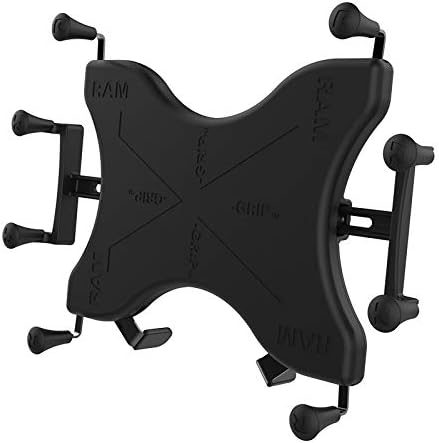
Image 2.1: Disassembled view of the RAM MOUNTS X-Grip Holder, showing its main components.
2.2 Attaching to a RAM Ball Base
- Ensure you have a compatible RAM B (1-inch) or C (1.5-inch) size round ball base and arm assembly (sold separately).
- Align the diamond plate on the back of the X-Grip holder with the corresponding attachment point on your RAM arm.
- Secure the holder to the arm using the provided hardware (typically a screw and nut). Ensure the connection is tight to prevent rotation.
- Adjust the arm and ball base to your desired viewing angle and tighten the knob on the RAM arm to lock it in place.

Image 2.2: Rear view of the X-Grip holder demonstrating attachment to a RAM ball mount.
3. Operating Instructions
3.1 Inserting Your Tablet
- Grasp the X-Grip holder firmly.
- Gently squeeze two opposing arms of the 'X' design inwards to expand the holder.
- Carefully place your 12-inch tablet into the holder, ensuring all four rubber-coated tips securely grip the edges of your device.
- Release the arms slowly, allowing the spring mechanism to close and hold the tablet firmly in place. Verify that the tablet is stable and centered.

Image 3.1: Diagram illustrating how the X-Grip expands and contracts to fit a tablet.
3.2 Removing Your Tablet
To remove your tablet, simply squeeze two opposing arms of the 'X' design inwards again. This will release the tension, allowing you to safely lift your tablet out of the holder. The easy-access grip knobs on the back of the holder facilitate quick release.
3.3 Adjusting Viewing Angle and Orientation
Once your tablet is secured, you can adjust its viewing angle and orientation (portrait or landscape) by loosening the knob on your RAM arm assembly, repositioning the tablet, and then re-tightening the knob. The X-Grip holder allows for full rotation.

Image 3.2: Example of the X-Grip holder in use, mounted in a vehicle.
4. Maintenance
- Cleaning: Wipe the holder with a damp cloth to remove dust and grime. Avoid harsh chemicals that may damage the rubber or composite materials.
- Rubber Caps: Periodically inspect the rubber caps on the 'X' arms for wear or damage. Ensure they are securely seated on the tips of the arms to maintain optimal grip and protect your tablet. If a cap is loose, re-seat it firmly.
- Hardware: Check all screws and knobs on your RAM mounting system for tightness, especially after prolonged use or exposure to vibrations.
- Spring Mechanism: Ensure the spring-loaded mechanism operates smoothly. If it feels stiff, a small amount of silicone lubricant can be applied to the moving parts.
5. Troubleshooting
- Tablet Not Holding Securely:
- Verify that your tablet's dimensions fall within the specified range for the RAM-HOL-UN11U holder (see Specifications section).
- Ensure all four rubber caps are present and properly seated on the 'X' arms.
- Confirm that the tablet is centered and the arms are gripping evenly.
- Difficulty Inserting/Removing Tablet:
- Ensure you are fully expanding the 'X' arms by squeezing them together before attempting to insert or remove the tablet.
- Check for any obstructions or debris in the gripping mechanism.
- Mount Feels Loose or Wobbly:
- Tighten all connection points on your RAM arm and ball base assembly.
- Ensure the X-Grip holder is securely attached to the diamond plate.
6. Specifications
| Feature | Detail |
|---|---|
| Model Number | RAM-HOL-UN11U |
| Product Dimensions | 10.25 x 0.86 x 7.25 inches |
| Item Weight | 1.07 pounds |
| Max Height (with optional supports) | 10.25 inches |
| Width Range | 7.25 - 8.75 inches |
| Max Depth | 0.875 inches |
| Materials | Powder-coated marine-grade aluminum, stainless steel, high-strength composite |
| Compatible Ball Bases | RAM B (1-inch) and C (1.5-inch) size round ball bases |
| Compatible Devices | Apple iPad Pro 12.9 (1st-6th Gen), Dell Latitude 5285, Google Pixelbook, HP Elite X2 1012 G1/G2, HP Pro X2 612/G1, Lenovo IdeaTab Lynx K3011, Lenovo Miix 720, Lenovo Yoga A12, Microsoft Surface 3, Microsoft Surface Book, Microsoft Surface Pro (2017), Microsoft Surface Pro 3/4, Samsung Galaxy Book 12", Samsung Galaxy Pro 12.2, Samsung Galaxy TabPro S, and other 12-inch tablets within specified dimensions. |

Image 6.1: Dimensional diagram of the X-Grip holder.

Image 6.2: Chart detailing compatible tablet models for UN11 products.
7. Warranty and Support
The RAM MOUNTS X-Grip Holder RAM-HOL-UN11U is backed by a lifetime warranty, reflecting the manufacturer's commitment to quality and durability. For warranty claims, technical support, or additional product information, please visit the official RAM MOUNTS website or contact their customer service department.
For further assistance, you may visit the RAM MOUNTS Store.


