
1. Introduction
This manual provides essential information for the proper use and maintenance of your LTWHOME Replacement Foam Filtration Sponges. These high-quality sponges are specifically designed to be compatible with the Oase Biotec 4 filtration system, offering effective mechanical and biological filtration for your pond environment.
The package includes one fine foam sponge and one coarse foam sponge, engineered to provide efficient water flow and long-lasting filtration performance.
2. Product Features
- Package Contents: Includes 1 Fine Foam Sponge and 1 Coarse Foam Sponge.
- Compatibility: Custom designed and manufactured for Oase Biotec 4 filtration systems.
- Enhanced Filtration: Improves both mechanical and biological filtration efficiency.
- Optimized Flow: Provides efficient water flow with reduced clogging for sustained filtration.
- Versatile Use: Suitable for both freshwater and saltwater aquatic environments.
3. Setup and Installation
Follow these steps to correctly install the replacement foam sponges into your Oase Biotec 4 filtration system:
- Power Off: Before beginning, ensure your Oase Biotec 4 filtration system is completely powered off and disconnected from the electrical supply to prevent any accidents.
- Access Filter: Carefully open the filter housing of your Oase Biotec 4 system according to its manufacturer's instructions.
- Remove Old Sponges: Gently remove the old, soiled, or degraded filter sponges from their compartments.
- Insert New Sponges: Place the new LTWHOME replacement sponges into the filter. The blue sponge is typically the fine filter, and the green sponge is the coarse filter. Ensure they are correctly oriented and seated in their respective sections, mirroring the original setup.
- Secure Housing: Close the filter housing securely, ensuring all latches or clamps are properly fastened to prevent leaks.
- Restore Power: Reconnect the power supply and restart your filtration system. Observe the water flow to confirm proper installation.
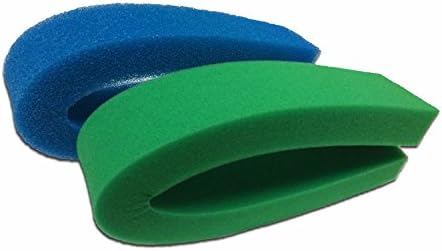
Image 1: LTWHOME Replacement Foam Filtration Sponges (Fine and Coarse) ready for installation.
4. Operation
Once installed, the LTWHOME replacement foam filtration sponges function as integral components of your Oase Biotec 4 system. They continuously work to maintain water clarity and quality:
- Coarse Filtration: The coarse sponge (green) is designed to trap larger debris, leaves, and particulate matter, preventing them from clogging finer media.
- Fine Filtration: The fine sponge (blue) captures smaller suspended particles, contributing to crystal clear water. It also provides a large surface area for beneficial bacteria to colonize.
- Biological Filtration: The porous structure of both sponges, particularly the fine sponge, supports the growth of nitrifying bacteria. These bacteria are crucial for converting harmful ammonia and nitrites into less toxic nitrates, maintaining a healthy aquatic environment.
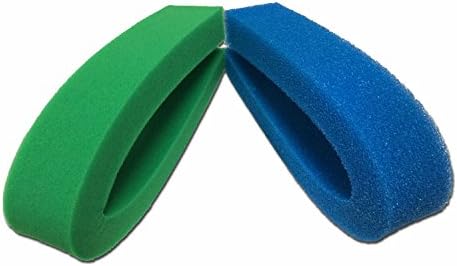
Image 2: Close-up view of the fine (blue) and coarse (green) foam sponges, highlighting their distinct textures.
5. Maintenance
Regular cleaning and timely replacement of your filter sponges are essential for optimal performance and water quality:
- Cleaning Frequency: Inspect sponges regularly, typically weekly or bi-weekly, depending on pond load. Clean when water flow noticeably decreases or sponges appear heavily soiled.
- Cleaning Procedure: Turn off the filter system. Remove the sponges and gently rinse them in a bucket of pond water. Do not use tap water, as chlorine can kill beneficial bacteria vital for biological filtration. Avoid excessive squeezing or scrubbing that could damage the sponge structure or remove too many beneficial bacteria.
- Replacement: Sponges should be replaced when they become too degraded to clean effectively, lose their structural integrity, or if water quality issues persist despite regular cleaning. A general guideline for replacement is every 6 to 12 months, but this can vary based on usage and water conditions.
6. Troubleshooting
If you encounter issues with your filtration system after installing the replacement sponges, consider the following:
| Problem | Possible Cause | Solution |
|---|---|---|
| Reduced Water Flow | Clogged sponges. | Clean the sponges as described in the Maintenance section. Ensure no debris is blocking the filter inlet/outlet. |
| Cloudy Water | Sponges are saturated, degraded, or improperly installed. | Perform a thorough cleaning. If cloudiness persists, consider replacing the sponges. Verify correct placement of fine and coarse sponges. |
| Poor Water Quality (e.g., high ammonia/nitrite) | Insufficient biological filtration; beneficial bacteria may have been removed or not established. | Avoid over-cleaning sponges with chlorinated water. Allow time for beneficial bacteria to establish. If sponges are old, replace them. Consider adding a bacterial starter culture. |
7. Specifications
- Brand: LTWHOME
- Model Number: OB4F4CF01C01
- Material: Sponge (Porous Plastic/Foam)
- Package Contents: 1 Fine Sponge, 1 Coarse Sponge
- Compatibility: Designed for Oase Biotec 4 Filtration Systems
- Approximate Package Dimensions: 33.9 x 28.2 x 23.6 cm (13.3 x 11.1 x 9.3 inches)
- Approximate Item Weight: 330 grams (0.73 lbs)
- UPC: 786471309827
8. Warranty and Support
Specific warranty information for this product is not provided in the available product data. For any questions regarding product defects, returns, or further support, please contact the seller directly through your purchase platform.
For general information on the Oase Biotec 4 filtration system, please refer to the original manufacturer's manual for that specific unit.