
1. Introduction
This manual provides essential instructions for the safe and effective operation of your GIMA 32921 Smart Automatic Digital Blood Pressure Monitor. Please read this manual thoroughly before using the device and retain it for future reference. This device is designed for non-invasive measurement of systolic and diastolic blood pressure and pulse rate in adults.
2. Safety Information
- Consult your physician before using this device if you have any medical conditions.
- Do not self-diagnose or self-medicate based on measurement results. Always consult a healthcare professional.
- Keep the device out of reach of children and pets.
- Do not use the device in a moving vehicle or on an airplane.
- Avoid using the device near strong electromagnetic fields.
- Only use accessories approved by the manufacturer.
3. Package Contents
Verify that all components are present and undamaged upon opening the package:
- GIMA 32921 Blood Pressure Monitor Unit
- Standard Adult Arm Cuff (22-30 cm)
- 4 x AA Batteries
- Instruction Manual (this document)

This image illustrates the typical contents of the GIMA 32921 Blood Pressure Monitor package, including the main monitor unit, a standard adult arm cuff (22-30 cm), and a set of four AA batteries required for operation.
4. Device Overview
The GIMA 32921 monitor features a clear digital display and intuitive controls for ease of use.

This image displays the top view of the GIMA 32921 Smart Automatic Digital Blood Pressure Monitor. It features a large digital display, a 'MEM' button for accessing stored measurements, and a 'START' button to initiate or stop a measurement. Indicators for SYS mmHg, DIA mmHg, and PULSE/min are visible, along with a blood pressure classification scale on the left side of the screen.
Key Components:
- Digital Display: Shows blood pressure readings (systolic, diastolic), pulse rate, and other indicators.
- START Button: Powers on the device and initiates a measurement. Press again to stop.
- MEM Button: Accesses stored measurement records.
- Cuff Port: Located on the side of the unit for connecting the arm cuff.
- Battery Compartment: Located on the bottom of the unit.

This image shows a side profile of the GIMA 32921 Smart Automatic Digital Blood Pressure Monitor, highlighting its compact design and the port for connecting the arm cuff.
5. Setup
5.1. Installing Batteries
- Open the battery compartment cover on the bottom of the monitor.
- Insert four (4) AA batteries, ensuring correct polarity (+/-) as indicated inside the compartment.
- Close the battery compartment cover securely.
5.2. Connecting the Arm Cuff
- Locate the air tube connector on the arm cuff.
- Firmly insert the air tube connector into the air jack located on the side of the monitor unit. Ensure a snug fit.
6. Operating the Device
6.1. Applying the Arm Cuff
- Sit in a comfortable position with your back supported and feet flat on the floor.
- Place the cuff on your bare upper left arm, approximately 1-2 cm (0.4-0.8 inches) above your elbow. The air tube should run down the inside of your arm.
- Ensure the cuff is wrapped snugly but not too tightly around your arm. The indicator mark on the cuff should align with your brachial artery.
- Rest your arm on a table so the cuff is at the same level as your heart.
6.2. Taking a Measurement
- Press the START button. The cuff will begin to inflate automatically.
- Remain still and silent during the measurement. Do not talk or move.
- Once the measurement is complete, the cuff will deflate, and your systolic pressure (SYS), diastolic pressure (DIA), and pulse rate will be displayed on the screen.
- The device will automatically store the measurement in its memory.
- The device features an automatic shut-off function to conserve battery life.
6.3. Understanding Your Results
- Blood Pressure Classification Indicator: The display includes a visual scale (e.g., Normal, Hypertension) to help you interpret your blood pressure level according to European Society of Hypertension (EHS) guidelines.
- Irregular Heartbeat Detection: If an irregular heartbeat is detected during the measurement, a specific symbol will appear on the display. If this symbol appears frequently, consult your physician.
6.4. Accessing Memory Records
- With the device off, press the MEM button.
- The most recent measurement will be displayed.
- Press the MEM button repeatedly to cycle through previous measurements. The device stores 2x60 sets of measurements.
7. Maintenance
7.1. Cleaning
- Wipe the monitor unit and cuff with a soft, dry cloth.
- If necessary, use a cloth lightly dampened with water or a mild detergent. Do not use abrasive cleaners or immerse the device in water.
7.2. Storage
- Store the device in a clean, dry place, away from direct sunlight, extreme temperatures, and humidity.
- If the device will not be used for an extended period, remove the batteries to prevent leakage.
7.3. Battery Replacement
When the low battery indicator appears on the display, replace all four AA batteries with new ones. Ensure correct polarity.
8. Troubleshooting
| Problem | Possible Cause | Solution |
|---|---|---|
| Device does not power on. | Batteries are dead or incorrectly inserted. | Replace batteries or check polarity. |
| Error message on display. | Cuff not applied correctly, movement during measurement, or air leakage. | Reapply cuff, remain still, check cuff connection. Repeat measurement. |
| Inconsistent readings. | Improper measurement technique, external factors. | Ensure proper cuff placement and body position. Avoid caffeine, exercise, or smoking before measurement. Take multiple readings. |
9. Specifications
- Model Number: 32921
- Dimensions: 8.5 x 18 x 12 cm
- Weight: 210 g (without batteries)
- Power Source: 4 x AA Batteries
- Measurement Method: Oscillometric
- Features: Blood Pressure Classification Indicator, Irregular Heartbeat Detection, 2x60 Memory Storage, Automatic Shut-off
- Manufacturer: ANDON HEALTH CO., Ltd.
- Country of Origin: Italy (as per product listing)
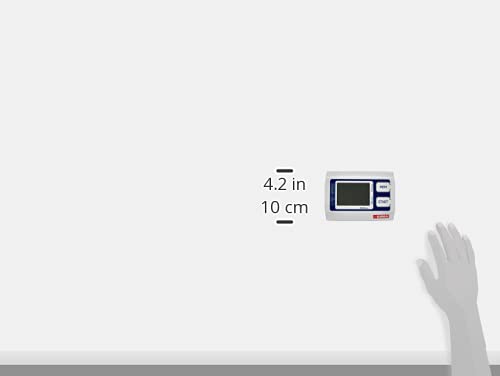
This image provides a size comparison of the GIMA 32921 Blood Pressure Monitor against an average adult hand, demonstrating its compact and portable dimensions.
10. Warranty and Support
For warranty information or technical support, please refer to the documentation provided with your purchase or contact your local GIMA distributor. Keep your proof of purchase for warranty claims.


