
Sony ZS-RS70BT
Sony ZS-RS70BT Portable Compact Disc Player User Manual
Model: ZS-RS70BT
Introduction
Thank you for purchasing the Sony ZS-RS70BT Portable Compact Disc Player. This manual provides essential information for the safe and efficient operation of your device. Please read it thoroughly before use and retain it for future reference.
Safety Information
- Do not expose the unit to rain or moisture to reduce the risk of fire or electric shock.
- Do not open the cabinet. Refer servicing to qualified personnel only.
- Avoid placing the unit in direct sunlight, near heat sources, or in extremely dusty or humid environments.
- Ensure proper ventilation around the unit. Do not block ventilation openings.
- Use only the specified power adapter.
- Keep out of reach of children.
Parts and Controls
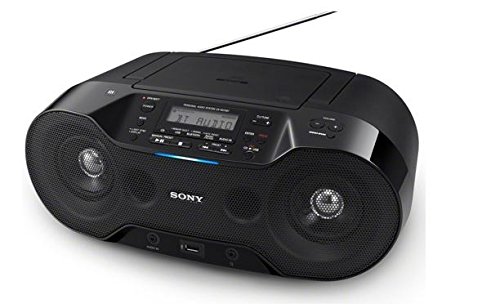
This image shows the front view of the Sony ZS-RS70BT Portable Compact Disc Player. A hand is placing a smartphone on the top-left area of the device, indicating NFC pairing or Bluetooth connection. The device features a central display, control buttons, and two large speaker grilles on either side. A USB port is visible at the bottom center.
Front Panel Controls:
- Power Button: Turns the unit on or off.
- Function/Source Button: Selects the audio source (CD, Bluetooth, USB, FM, Audio IN).
- Volume Control: Adjusts the sound level.
- Play/Pause Button: Starts or pauses playback.
- Stop Button: Stops playback.
- Skip/Search Buttons: Skips tracks or searches within a track.
- Display: Shows current status, track information, and radio frequency.
- USB Port: For connecting USB storage devices.
- NFC Touchpoint: For one-touch Bluetooth pairing with compatible devices.
Rear Panel:
- AC IN Jack: For connecting the power cord.
- Audio IN Jack: For connecting external audio devices.
- FM Antenna: For FM radio reception.
Setup
Power Supply
- Connect the supplied AC power cord to the AC IN jack on the rear of the unit.
- Plug the other end of the power cord into a wall outlet.
Battery Installation (Optional)
For portable use, the unit can operate on batteries (not supplied). Refer to the battery compartment cover on the bottom of the unit for correct battery type and polarity. Ensure batteries are inserted correctly.
Operating Instructions
Power On/Off
Press the Power button to turn the unit on or off.
CD Playback
- Open the CD compartment cover.
- Place a CD with the label side up.
- Close the CD compartment cover.
- Press the Function/Source button repeatedly until "CD" appears on the display.
- Press the Play/Pause button to start playback.
- Use the Skip/Search buttons to navigate tracks.
Bluetooth Connection (NFC One-touch Pairing)
- Press the Function/Source button repeatedly until "BT" (Bluetooth) appears on the display. The Bluetooth indicator will flash.
- For NFC-compatible devices: Touch your NFC-enabled smartphone or tablet to the NFC touchpoint on the unit. Follow the on-screen prompts on your device to complete pairing.
- For non-NFC devices: Enable Bluetooth on your device and search for "ZS-RS70BT". Select it to pair. If a passcode is required, enter "0000".
- Once connected, the Bluetooth indicator will stop flashing and remain lit. You can now stream audio from your device.
USB Playback
- Insert a USB storage device into the USB port.
- Press the Function/Source button repeatedly until "USB" appears on the display.
- The unit will automatically start playing MP3 files from the USB device.
- Use the Play/Pause and Skip/Search buttons to control playback.
FM Radio
- Extend the FM antenna for better reception.
- Press the Function/Source button repeatedly until "FM" appears on the display.
- Press and hold the Skip/Search buttons to automatically scan for the next available station.
- Press the Skip/Search buttons briefly to fine-tune the frequency.
- To preset a station, refer to the detailed instructions in the full manual (if available).
Audio IN
Connect an external audio device (e.g., MP3 player, smartphone) to the Audio IN jack using a stereo mini cable (not supplied). Press the Function/Source button until "AUDIO IN" appears on the display. Play audio from your connected device.
Volume Adjustment
Rotate the Volume Control knob to increase or decrease the sound level.
Maintenance
- Cleaning the Cabinet: Wipe the cabinet with a soft, dry cloth. Do not use abrasive pads, scouring powder, or solvents such as alcohol or benzine.
- Cleaning the Lens: If the CD lens gets dirty, it may cause skipping or playback errors. Use a commercially available CD lens cleaner.
- Disc Handling: Handle CDs by their edges to avoid fingerprints on the surface. Store discs in their cases when not in use.
Troubleshooting
| Problem | Solution |
|---|---|
| No power. | Ensure the AC power cord is securely connected. Check if batteries are correctly inserted or depleted. |
| No sound. | Adjust the volume. Check if the correct function/source is selected. Ensure headphones are not connected if you expect sound from speakers. |
| CD skips or does not play. | Clean the CD. Try another CD. Ensure the CD is inserted correctly. |
| Bluetooth pairing fails. | Ensure the unit is in Bluetooth pairing mode. Make sure your device's Bluetooth is on and within range. Delete previous pairings on your device and try again. |
| Poor FM reception. | Extend and adjust the position of the FM antenna. Try moving the unit to a different location. |
Specifications
| Feature | Detail |
|---|---|
| Brand | Sony |
| Model | ZS-RS70BT |
| Connectivity Technology | Bluetooth, NFC, USB |
| Speaker Type | Stereo |
| Compatible Devices | MP3 Player, Smartphone, Tablet |
| Supported Audio Format | MP3 |
| Audio Output Mode | Stereo |
| Tuner | FM Tuner |
Warranty and Support
This product is covered by a limited warranty. For detailed warranty information, please refer to the warranty card included with your purchase or visit the official Sony support website. For technical assistance or customer service, please contact Sony customer support in your region.
You can find more information and support resources on the official Sony website: www.sony.com
Related documentsZS-RS70BT


Ask a question about this manual
Ask about setup, troubleshooting, compatibility, parts, safety, or missing instructions. Manuals+ will review the question and use this page’s manual context to help answer it.