
Introduction
The Bose Bluetooth Audio Adapter allows you to wirelessly stream audio from your Bluetooth-enabled devices, such as smartphones and tablets, to your existing Bose audio systems or other compatible audio equipment. This adapter provides a convenient way to enjoy your digital music collection with the sound quality of your home audio setup.

Image: Top-down view of the Bose Bluetooth Audio Adapter, a compact black square device with the Bose logo and a Bluetooth symbol.
Package Contents
Please verify that all the following items are included in your package:
- Bose Bluetooth Audio Adapter
- Optical cable
- 3.5 mm audio cable
- 3.5 mm female-to-RCA cable
- USB-to-USB micro-B cable (for power)
- Wall adapter (for USB power cable)

Image: The Bose Bluetooth Audio Adapter displayed with all its included accessories: optical cable, 3.5mm audio cable, 3.5mm female-to-RCA cable, USB power cable, and wall adapter.
Setup
Follow these steps to connect your Bose Bluetooth Audio Adapter to your audio system:
- Connect to Power: Plug the micro-USB end of the USB cable into the "POWER 5V" port on the adapter. Connect the other end of the USB cable to the provided wall adapter, then plug the wall adapter into a power outlet. Alternatively, if your audio system has a powered USB port, you can connect the USB cable directly to it.
- Connect to Audio System: Choose one of the following audio connection methods based on your audio system's available inputs:
- Optical Connection: For optimal audio quality, connect one end of the optical cable to the "OPTICAL" port on the adapter and the other end to an optical input on your audio system.
- 3.5 mm Auxiliary Connection: Connect one end of the 3.5 mm audio cable to the "AUX OUT" port on the adapter and the other end to a 3.5 mm auxiliary input on your audio system.
- RCA Connection: If your audio system has RCA inputs, connect the 3.5 mm female-to-RCA cable to the "AUX OUT" port on the adapter, then connect standard RCA cables (not included) from the female-to-RCA cable to your audio system's RCA inputs.
- Power On: Once connected to power and your audio system, the adapter will automatically power on.
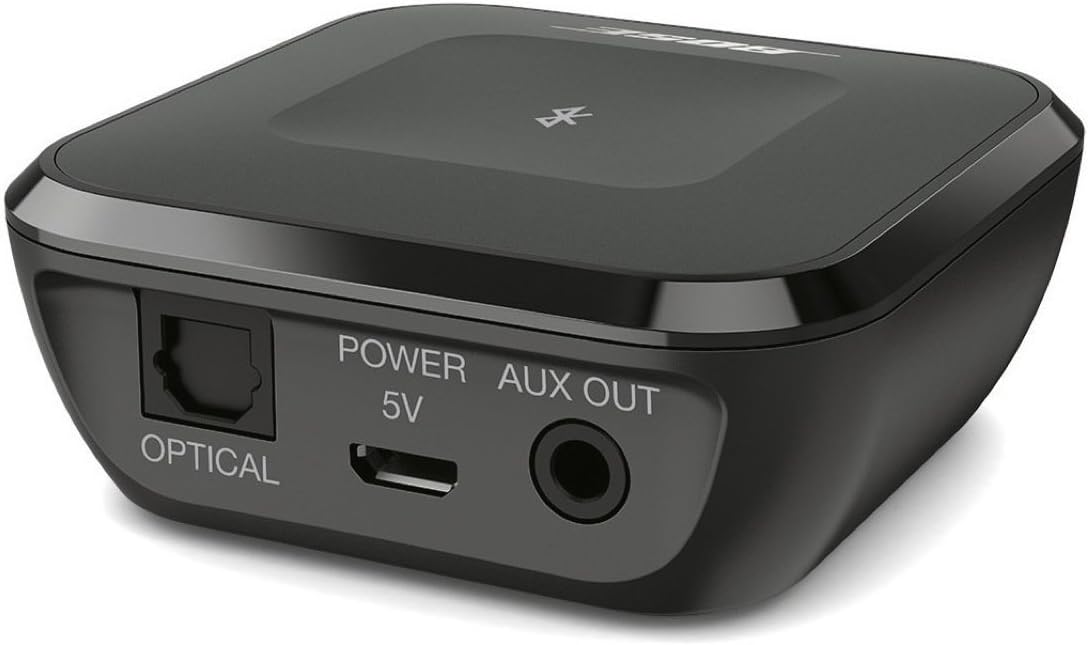
Image: Rear view of the Bose Bluetooth Audio Adapter, highlighting the "OPTICAL" port, "POWER 5V" micro-USB port, and "AUX OUT" 3.5mm port.
Operating Instructions
Pairing a Bluetooth Device
To stream audio wirelessly, you must first pair your Bluetooth device with the adapter.
- Ensure the Bose Bluetooth Audio Adapter is powered on and connected to your audio system.
- On your Bluetooth device (e.g., smartphone, tablet), enable Bluetooth and go to the Bluetooth settings menu.
- The adapter will appear in the list of available devices, typically named "Bose Bluetooth Audio Adapter". Select it to initiate pairing.
- Once paired, your device will show a "Connected" status, and you can begin streaming audio.
Note: The adapter can remember up to eight paired devices. If no device is currently connected, the adapter automatically enters pairing mode. If a device is connected, press the Bluetooth button on the adapter to enter pairing mode for a new device.
Connecting and Switching Between Devices
The Bose Bluetooth Audio Adapter allows up to three Bluetooth devices to be actively connected simultaneously.
- Connecting a Paired Device: If your device has been previously paired, simply select "Bose Bluetooth Audio Adapter" from your device's Bluetooth settings to connect.
- Switching Audio Source: To switch the audio source between actively connected devices, pause playback on the currently playing device and then start playback on another connected device. The adapter will automatically switch to the new audio source.
- Automatic Reconnection: If a connected device moves out of range and then returns within approximately 10 minutes, the adapter will attempt to automatically reconnect to it.
Troubleshooting
| Problem | Solution |
|---|---|
| No audio or poor audio quality |
|
| Cannot pair a device |
|
| Device disconnects frequently |
|
Specifications
| Model Number | 727012-1300 |
| Dimensions (L x W x H) | 2.4 x 2.4 x 1 inches (6.1 x 6.1 x 2.54 cm) |
| Item Weight | 12.2 ounces (0.35 kg) |
| Color | Black |
| Hardware Interface | Bluetooth, Micro USB Type B, USB |
| Compatible Devices | Smartphone, Tablet |
| Bluetooth Version | 4.0 (supports apt-X codec) |
| Wireless Range | Up to 30 feet (9 meters) |
| Paired Devices Memory | Up to 8 devices |
| Active Connections | Up to 3 devices simultaneously |
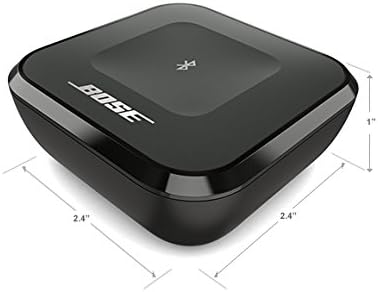
Image: The Bose Bluetooth Audio Adapter shown with its approximate dimensions: 2.4 inches by 2.4 inches by 1 inch.
Maintenance
To ensure the longevity and optimal performance of your Bose Bluetooth Audio Adapter, follow these simple maintenance guidelines:
- Cleaning: Use a soft, dry cloth to gently wipe the surface of the adapter. Avoid using liquid cleaners, solvents, or abrasive materials, as these can damage the finish or internal components.
- Storage: When not in use for extended periods, store the adapter in a cool, dry place away from direct sunlight and extreme temperatures.
- Handling: Handle the adapter with care. Avoid dropping it or subjecting it to strong impacts.
- Environment: Do not expose the adapter to water, moisture, or high humidity. Keep it away from heat sources.
Warranty and Support
For information regarding the product warranty, please refer to the warranty card included with your purchase or visit the official Bose website. For technical support, troubleshooting assistance beyond this manual, or service inquiries, please contact Bose customer support through their official channels.
Official Bose Website: www.bose.com